Shopify Dropshipping Automation Guide for 2026: How To Automate What Flow Can't?
Shopify dropshipping automation reaches past Flow: sync supplier stock, route orders to EDI or Magento 2 suppliers, and invoice on shipment. See how it works.
Shopify dropshipping automation already handles a big share of the work inside your admin. A Flow workflow tags each order the moment it lands, and a supplier on Shopify Collective pushes its tracking number straight into your store.
Now picture a busier cart. A customer buys a trail shoe from a brand that runs Magento 2 and a backpack from a distributor that trades EDI documents, both in one checkout.
Shopify has no record of either supplier's warehouse. So someone on your team splits the order and re-keys each half into the right supplier system, and weeks later builds an invoice from a shipping confirmation.
That gap holds most of the manual hours in a Shopify dropship program. The supplier half often still runs on email and a sync script nobody wants to own.
You can close that gap without touching your storefront. This guide starts with what Shopify automates natively in 2026 and where Shopify dropship automation stops.
Then it walks you through the six supplier workflows Carro runs on a Shopify store. You finish with an eight-step setup, from the first category decision to the first settled order.
It's written for Shopify retailers, marketplace operators and brands working with established brands and distributors. In those programs, each new supplier adds a connection to build and a price list to maintain.
Key Takeaways (TL;DR)
- What Shopify already automates: Flow reacts to events such as a new order or a change in a variant's inventory quantity, and Shopify groups each order's line items into fulfillment orders by the location that ships them.
- Shopify Collective: the native option for Shopify-to-Shopify pairs, as long as both stores sit in the same supported country, use the same currency and run Shopify Payments with active payouts.
- Where automation stops: at the supplier's system, meaning brands on Magento 2, distributors on EDI, suppliers who send CSV files over SFTP, and carts that mix several of them.
- Six Carro workflows close the gap: supplier stock sync, partner price lists into cost, multi-supplier order splits, tracking per supplier order, invoicing on shipment, and an exceptions view.
- Decisions stay with people: you approve each brand, the supplier accepts or rejects each return, and a failed charge reaches someone on your team with the detail needed to act.
- Setup: suppliers come onto the network in days, and eight steps take you from defining categories to a weekly exceptions review.
- Reported results: retailers on Carro report up to 3.5x revenue growth, up to 180% AOV growth and up to 3x catalog size, all without buying the stock first.
Shopify Dropshipping Automation: at a Glance
Here's every dropship workflow on a Shopify store: what Shopify covers natively, what Carro adds, and where your team still makes the call.
| Workflow | What Shopify covers natively | What Carro automates | Where a person still acts |
|---|---|---|---|
| Finding suppliers | Collective discovery of suppliers that run Shopify stores | Account Managers hand-match brands from a network of 1,500,000 products | You approve each brand before it lists |
| Supplier stock into Shopify | Flow reacts to quantities already in Shopify | Stock moves from each supplier's system on the cadence its connection supports | Pick the connection per supplier |
| Partner cost | Cost per item edited in the admin or by import | Partner price lists set the cost for each relationship | You set the retail price and margin |
| Multi-supplier orders | Fulfillment orders grouped by location | The order splits into supplier orders routed into each partner's own system | Nothing on a routine order |
| Tracking | Returned by fulfillment service apps and Collective suppliers | Each supplier order moves from confirmed to shipped with tracking | Follow up on stalled orders |
| Supplier invoicing | Collective automatic payments between Shopify stores | The shipment triggers the supplier invoice, with fees kept separate | Finance reviews failed charges |
| Exceptions | Flow alerts on conditions you define | Failed charges, SKU mapping errors and stalled orders in one view | A person decides each exception |
When suppliers sit outside Shopify, rows two through six hold the manual hours. Carro automates the supplier side of each of those rows.
What Shopify Already Automates for Dropshipping
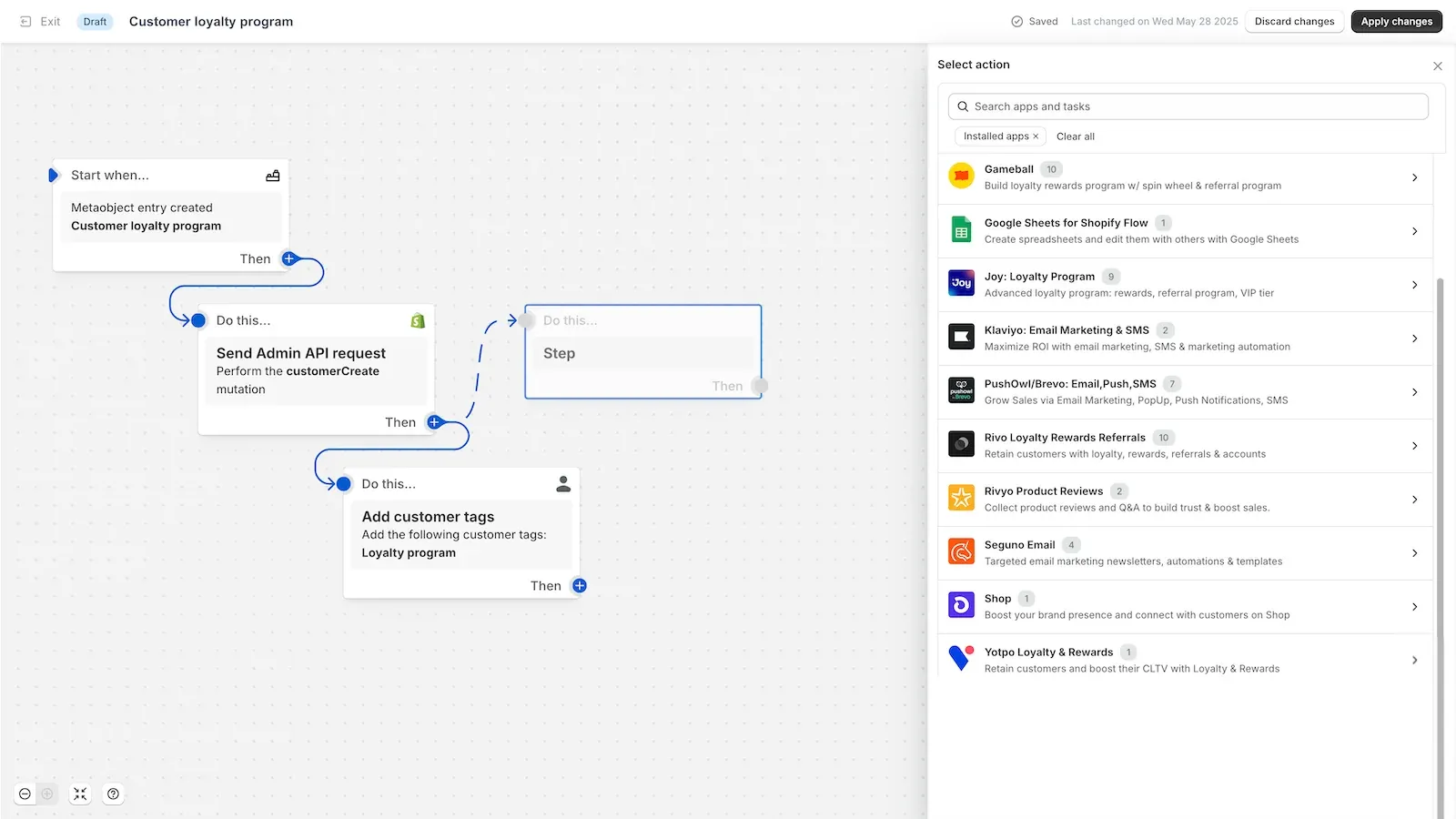
Start with what you already have. A program whose suppliers all run Shopify stores can cover a big share of its dropship work with three native Shopify features: Flow, fulfillment orders and Collective.
Each section below shows what the feature does for a dropship team and where it stops. If any of your suppliers run EDI, Magento 2, CSV files or an API, read the limits at the end of each one closely.
1. Shopify Flow
Shopify Flow is a free Shopify app that automates tasks inside your store and across your apps. Each workflow pairs a trigger with optional conditions and one or more actions.
Several Flow triggers fit a dropship team well: Order created, Product variant inventory quantity changed, Product variant out of stock, and Fulfillment order ready to fulfill.
Put them to work on day one. Tag every order that contains a partner product, or alert the right person the moment a partner variant sells out.
Flow acts on events that Shopify or an installed app reports. It has no view of a supplier's warehouse until something writes that stock into Shopify, and no connection to a distributor's EDI system.
Stores on the Grow, Advanced and Plus plans can call an outside system with Flow's Send HTTP request action. That opens a door, and your team owns everything behind it.
Your team then maintains the endpoint and the mapping to each supplier's format. It also handles the retries when a call fails and the updates every time a supplier changes its system.
2. Fulfillment Orders and Locations
When a customer places an order, Shopify groups its line items into fulfillment orders, one for each location assigned to ship them. Apps read these to see which location fulfills which lines, with no SKU matching by hand.
A third-party fulfillment service gets its own location in Shopify. It can accept or reject a fulfillment request and report status back into the Shopify admin.
For dropshipping, that model has the right shape. Make each supplier a location, and a three-brand order becomes three fulfillment orders automatically.
The gap is delivery: something still has to carry each fulfillment order into the supplier's own system and bring tracking back.
For a supplier with no fulfillment service app, that something is a person or a script. And custom order routing location rules, which change how Shopify picks the location, are open only to Shopify Plus stores.
3. Shopify Collective
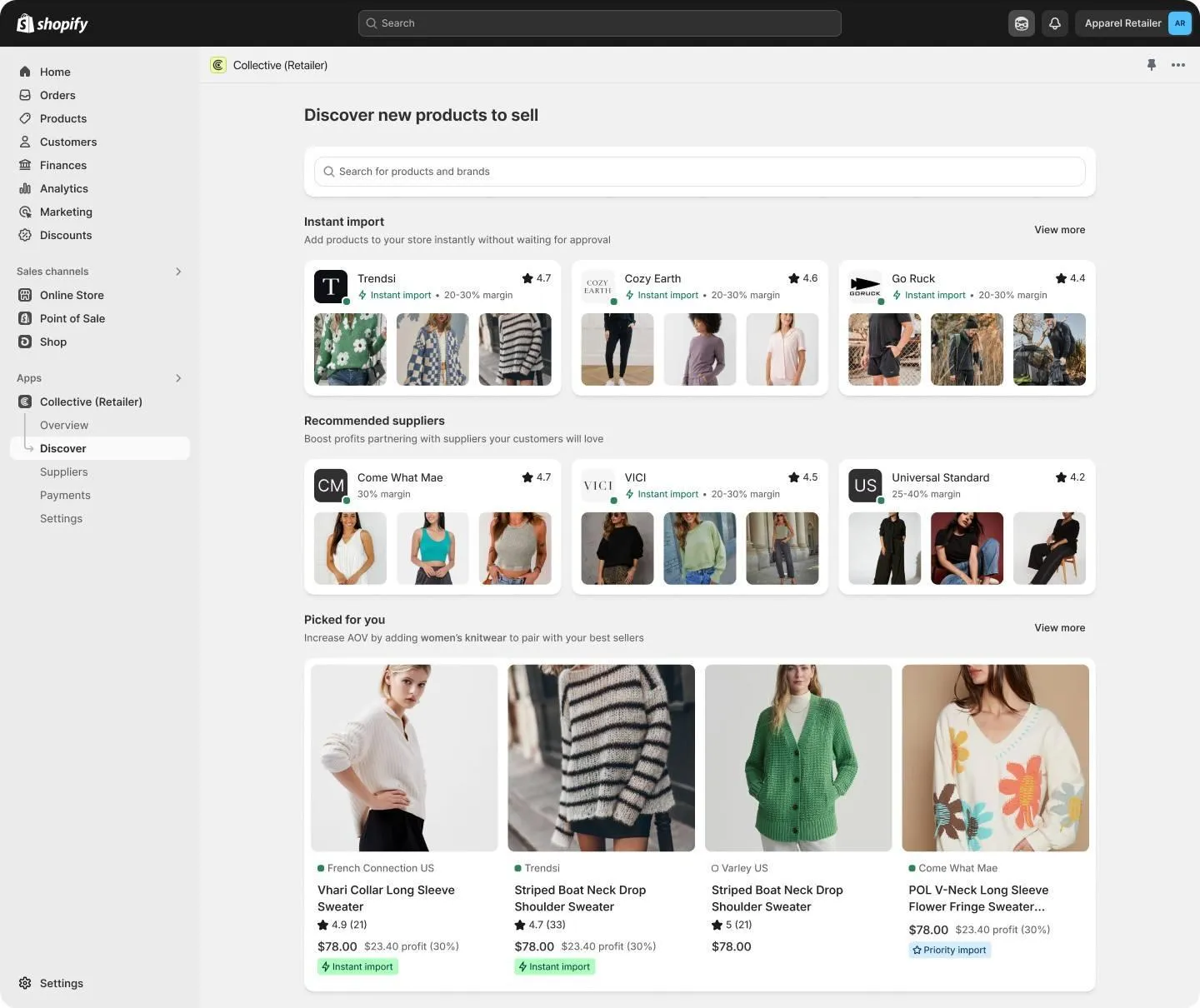
Shopify Collective lets Shopify stores sell each other's products. A retailer imports products from suppliers that use Shopify and starts selling them with no inventory commitment.
When a customer orders, the retailer and the supplier each receive an order in their own Shopify stores. The supplier fulfills, and the fulfillment details, including the tracking number, land on the retailer's order.
With automatic payments turned on, the product's cost price is debited from the retailer's Shopify Payments balance. It transfers to the supplier's Shopify Payments account when the supplier marks the order fulfilled.
As of September 2026, the Collective requirements include an active plan, a store in a supported country, and Shopify Payments with active payouts.
Supported countries include the US, Canada, the UK, Australia, Japan and most EU countries. The retailer and supplier must also sit in the same country and use the same currency.
A few things sit outside it. Collective does not support digital products or gift cards, and it cannot be used with Managed Markets, pickup in store or metafields.
If every brand you want already runs a Shopify store in your country, Collective takes a lot of supplier work off your plate. Most established programs have at least some suppliers where that condition fails.
Where Shopify Dropship Automation Stops
All three native tools share one assumption: the supplier's data already lives in Shopify, or the supplier runs Shopify itself. Established brands and distributors often do neither.
The gaps below are where a Shopify dropship program slides back into email and spreadsheets. Spot them early, and you have a ranked list of what to automate next.
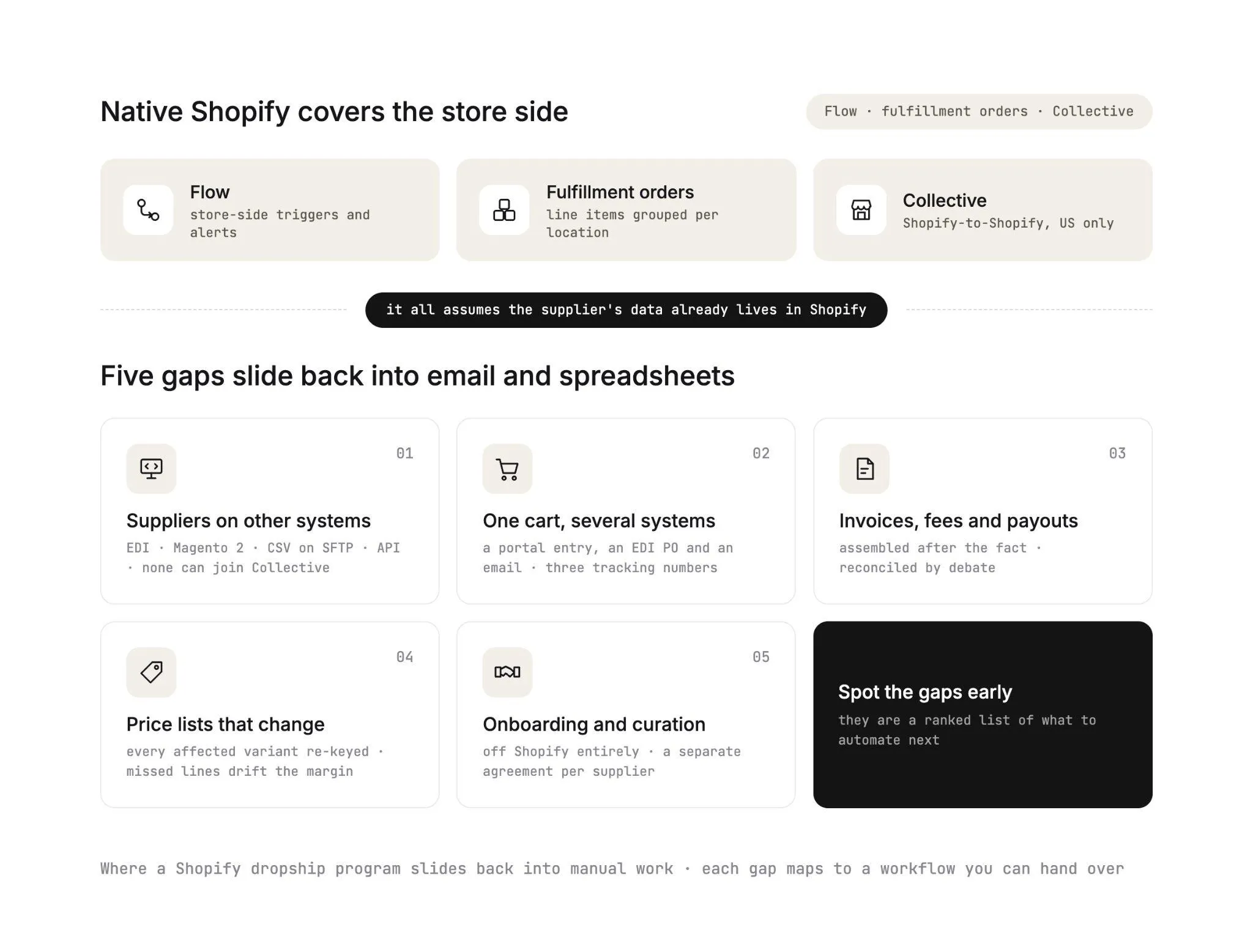
1. Suppliers That Run Something Other Than Shopify
A national distributor exchanges EDI documents with its retail partners. A brand runs Magento 2.
A small label updates a CSV file on an SFTP server every morning, and a larger one exposes an API its developers built.
None of these suppliers can join Collective, and Flow cannot see their stock. Each one ends up with a separate app or script to maintain, and each fails in its own way.
2. One Cart, Several Supplier Systems
Take an illustrative order. A customer buys a Trail Runner 2 from Northpeak, whose system is Magento 2.
The same cart holds a Summit Pack 28L from Ridgeline, supplied through a distributor on EDI. It also holds a Merino Base Layer from Loft Wool, which sends a CSV.
Shopify creates the fulfillment orders. Your team still enters the first order in a supplier portal, produces an EDI purchase order for the second and emails the third, then collects three tracking numbers from three places.
A coordinator can absorb this while volume is low. As orders grow, the hours climb with every order, and each re-keyed line is one more chance to send the wrong size to the wrong supplier.
3. Invoices, Fees and Payouts Across Partners
Collective's automatic payments cover the Shopify-to-Shopify case. For every other supplier, the invoice often gets assembled after the fact from a statement.
Commissions, shipping costs and return credits get rebuilt by hand. Then finance reconciles the supplier's figures against the store's figures, and any disagreement turns into an afternoon of working out whose spreadsheet is right.
4. Partner Price Lists That Change
A supplier sends a new price list in March. Someone has to re-key the cost of every affected variant in Shopify.
Miss one line, and the margin on that product drifts until a finance review catches it. With twenty suppliers each changing prices a few times a year, price maintenance becomes a standing task on someone's calendar.
5. Onboarding and Curation Outside Collective
Outside Collective, finding and signing brands happens off Shopify entirely. Each new supplier means a separate agreement.
After that comes a connection, product data, a price list and a test order, all before a single product can sell. Many brands worth carrying have no technical team to close that gap, and that's usually where a promising partnership stalls for months.
Six Shopify Dropshipping Automation Workflows to Run With Carro
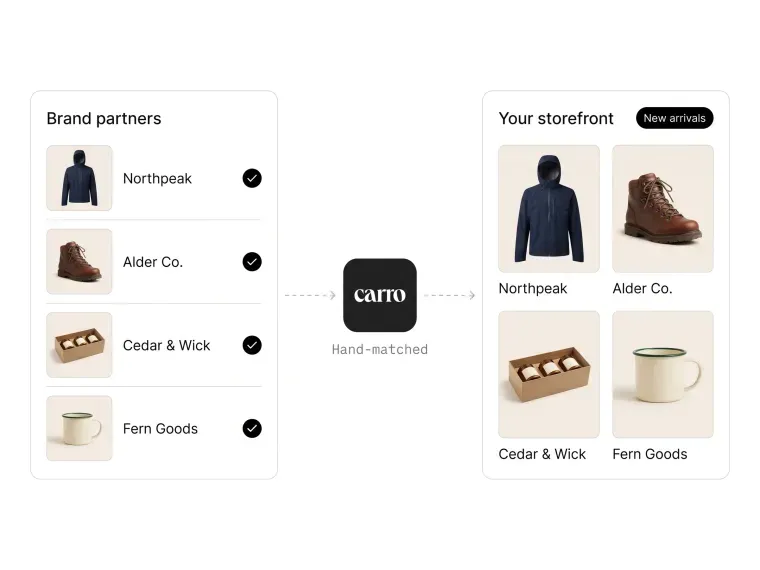
Each of those five gaps maps to a workflow you can hand over. Carro is a dropship platform that connects your Shopify store to vetted brands and distributors through product data, orders and settlement.
Every workflow below runs on a Shopify store connected to Carro. Your supplier can run Shopify, Magento 2, WooCommerce or BigCommerce, or connect through EDI, an API, SFTP or CSV files.
Carro runs beside your existing payments, shipping, ERP and accounting systems. None of these workflows needs a replatform or a custom build.
1. Supplier Stock Into Shopify Inventory
Your partner products follow the supplier's real quantities, and nobody on your team uploads a stock file. The trigger is a stock change in the supplier's system, such as a sale on the brand's own site or a delivery into its warehouse.
Stock moves from the supplier's system to your Shopify listing on the cadence that supplier's connection supports. A brand with a platform app or an API can update often.
A supplier sending a daily CSV updates daily. That's why the connection you choose for each supplier matters.
What your team sees: available quantities on partner products that follow the supplier's own numbers.
Keep your Flow workflows for the store-side jobs they already do well, such as tagging partner orders and alerting your team.
Accurate stock pays off at scale: every partner variant that shows the supplier's real quantity is one less oversold order to cancel and refund.
IHL Group's 2025 study, Fixing Inventory Distortion: Who's Winning, Who's Failing, What's Working, puts the worldwide cost of retail out-of-stocks at $1.2 trillion a year.
This is the job inventory management software should do for stock you do not hold. For the Shopify side, see how Carro works as Shopify inventory management software for partner assortment.
2. Partner Price Lists Into Cost
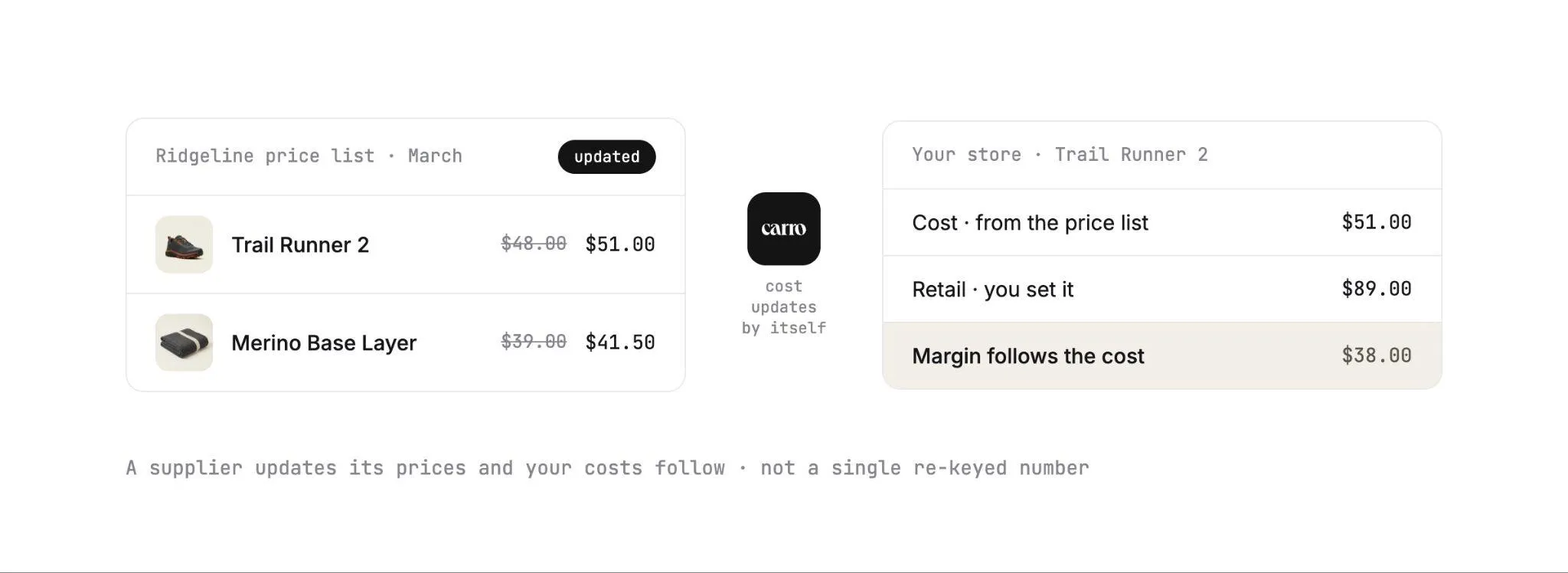
A supplier updates its prices, and your costs follow without a single re-keyed number. The trigger is that price change.
Partner price lists set the cost for each supplier relationship. You set the retail price and the merchandising on your store, and the margin follows the cost you agreed with that partner.
What your team sees: cost that updates from the price list, and a retail price that stays under your control.
Edits you make to titles or descriptions change your store's copy of the product only, leaving the supplier's original untouched.
3. Splitting Multi-Supplier Orders
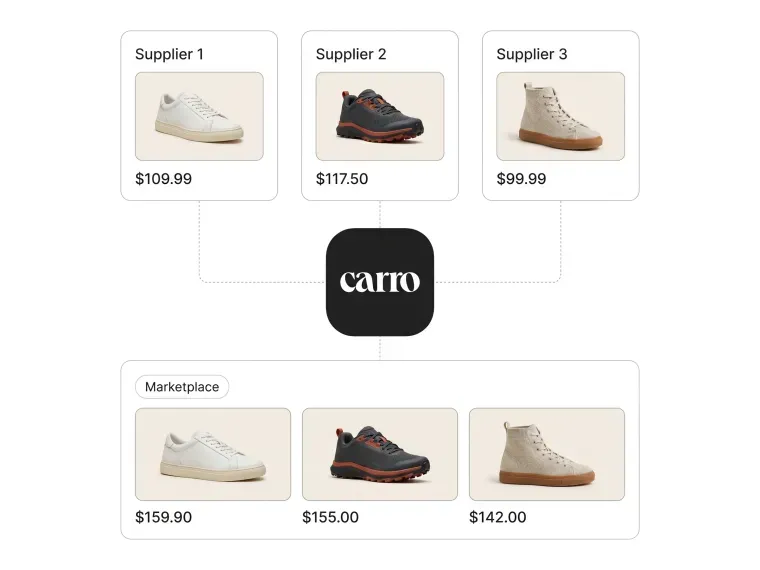
Sell three brands in one cart and ship each part from the right warehouse, with nothing re-keyed. The trigger is a Shopify order with lines from more than one supplier.
The customer order splits into separate supplier orders. Each one routes into the system that partner already works in, whether that's an EDI connection, an API, a platform app or a file.
What your team sees: one customer order and its supplier orders side by side. Each carries a documented state, from confirmed at the supplier through shipped with tracking.
This workflow makes multi-brand carts practical at volume. That matters, because a complementary product in the same cart is how average order value grows on Shopify.
The order execution module covers the routing detail.
4. Tracking Each Supplier Order to the Door
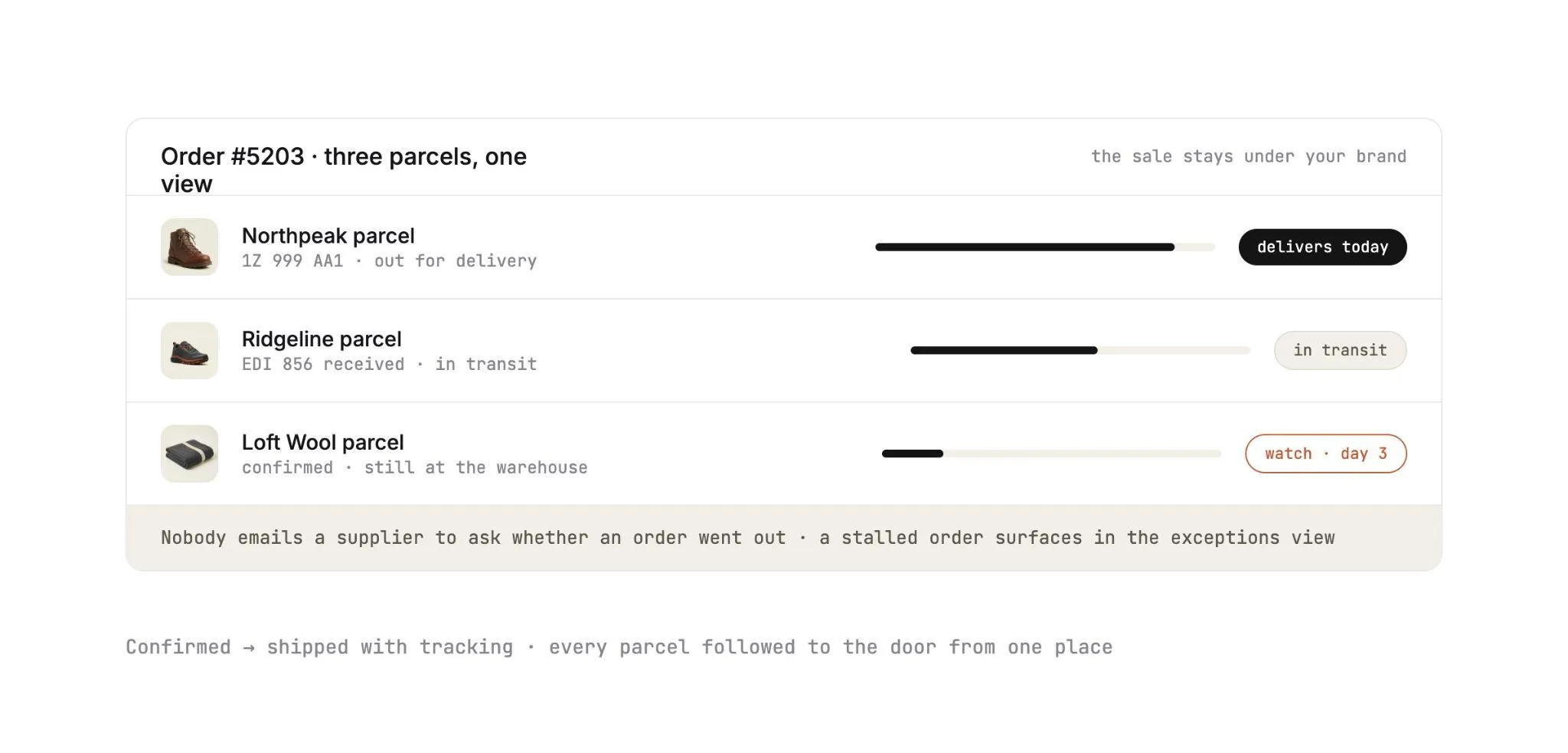
The sale stays under your brand while the supplier packs and ships behind the scenes. The trigger is the supplier shipping its part of the order.
Each supplier order carries a documented state, from confirmed at the supplier through shipped with tracking information. You follow every parcel to the door from one place.
What your team sees: shipment status per supplier. A three-parcel order shows which parcel is moving and which one is still at the warehouse.
Nobody emails a supplier to ask whether an order went out. A stalled supplier order shows up in the exceptions view.
5. Invoice on Shipment
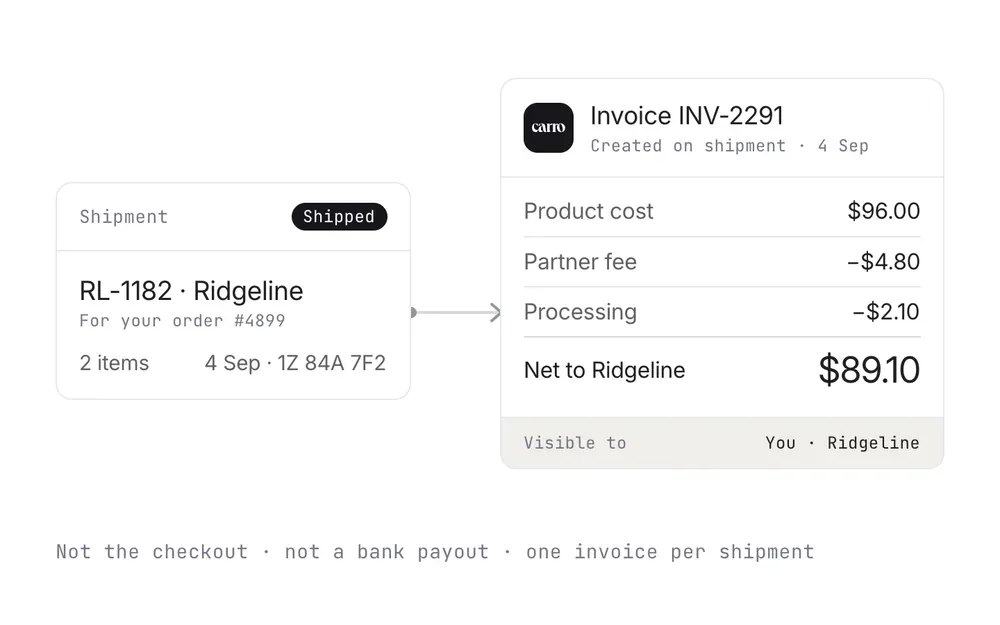
Settlement starts when the supplier ships. The shipment itself creates the supplier invoice, under the settings you agreed with that partner and with configured delays where a program needs them.
Automated billing and manual invoicing are both supported. Billing charges the retailer and credits the supplier through the connected payment account, available in Stripe-approved countries in USD.
Product cost, partner fees and processing charges stay separate within each partner relationship. A commission, a shipping cost and a return credit each land against the order they belong to.
What your team sees: invoice, batch invoice and payout records with the fee and net detail finance needs. The supplier reads the same order and the same figures.
Suppliers can be paid the day the order ships. The payment settlement module shows how one sale breaks down from customer price to net payout.
6. Exceptions
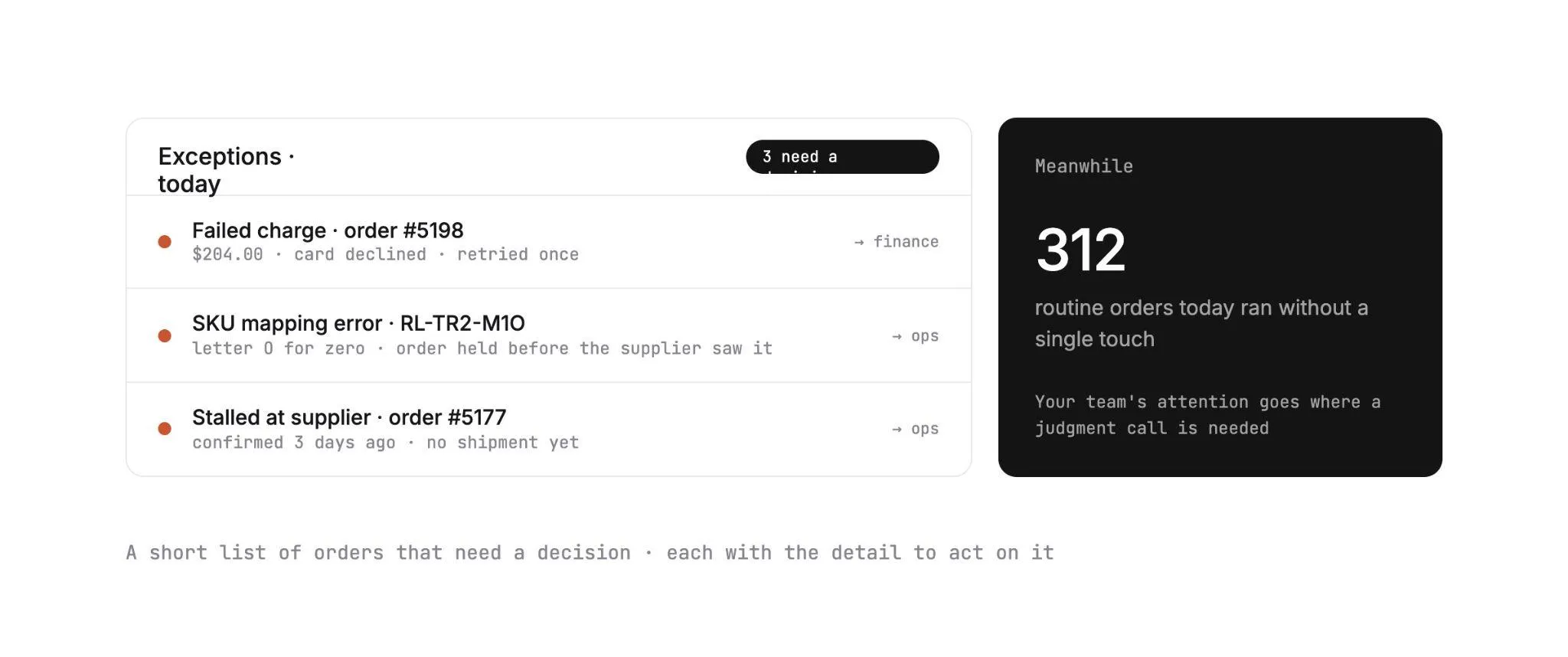
Routine orders run without a touch, so your team's attention goes where a judgment call is needed. The trigger is anything that leaves the expected path: a failed charge, a SKU mapping error, or an order that stalls at a supplier.
Each one appears in an exceptions view with the detail needed to act on it. A failed charge follows the configured process and is surfaced for a person to handle.
A return runs as a request the supplier accepts or rejects, under the terms and refund settings agreed with that supplier. Return acceptance and the refund stay separate steps.
What your team sees: a short list of orders that need a decision.
How to Start Shopify Dropshipping Automation With Carro (Step by Step)
Eight steps take your Shopify store from a category idea to a live, settled order. Suppliers come onto the network in days, and you can test network brands without placing a purchase order first.
The Carro team works through the setup with you, and with any supplier that has no technical team.
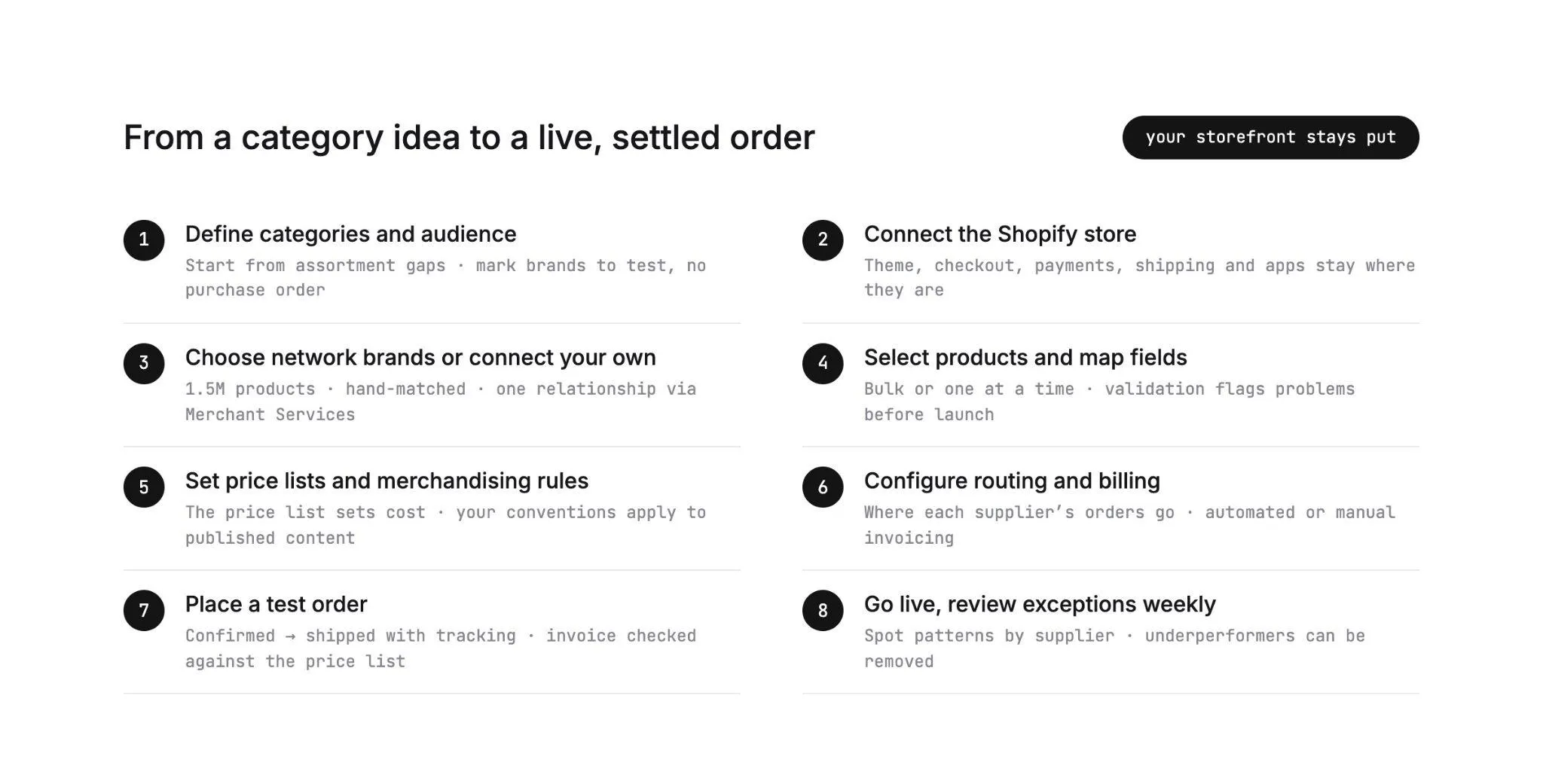
Step 1: Define Categories and Audience
Start from the gaps in your assortment. Look at what customers search for on your store and don't find, and at which products would sit naturally in the same cart as your best sellers.
Carro's Merchant Services start from audience and category criteria. A retailer filters by audience (outdoor, 25 to 44) and category (trail footwear), sees which brands fit, and marks two to test with no purchase order.
That test is the whole idea behind dropshipping expansion. Put products in front of real customer demand and keep the ones that sell.
Step 2: Connect the Shopify Store
Connect your Shopify store to Carro. Your theme, checkout, payment setup, shipping and existing apps stay where they are, and Carro runs beside your ERP and accounting systems.
If you're moving from another dropship tool, the move changes the connection under the storefront and leaves the storefront itself untouched. Carro used the same path to move the customer bases of Modern Dropship and Onport.
Step 3: Choose Network Brands or Connect Your Own Suppliers
Work from the Carro network, connect the partners you already have, or do both.
The network holds 1,500,000 products from established brands and distributors. Account Managers hand-match brands to your category and audience.
Through Merchant Services, you hold one commercial relationship with Carro for that inventory. That one relationship replaces a separate supply agreement with every supplier.
For your own suppliers, onboarding runs as a defined sequence with visible progress:
- Account details, including contacts, terms and returns
- Connection, matched to the supplier's actual setup
- Product data
- Partner price list
- Test order
- Go live
In practice, your team sees that one supplier has its Shopify app installed and 128 of 212 products mapped, with the price list and test order still to come.
Suppliers without technical teams are supported, and the Carro team works on the setup with them.
Step 4: Select Products and Map Fields
Filter by supplier or brand, then select products one at a time or in bulk. Partner products arrive through each supplier's connection with descriptions, images and variants mapped to the fields that connection supports.
Validation flags data problems before launch, so you fix them before a customer ever sees the product page.
If you also govern product data for your own SKUs, keep that work in its own place. Our guide to Shopify PIM covers the owned-catalog side.
Step 5: Set Partner Price Lists and Merchandising Rules
Attach each supplier's partner price list, which sets your cost for that relationship. Then set your retail prices.
Merchandising rules apply your store's conventions to published content, for example the title format and tags your collections depend on.
Step 6: Configure Routing and Billing
Confirm where each supplier's orders go: into their Shopify store, their Magento 2 store, their EDI system, their API or a file on a schedule. From this point on, a multi-supplier order splits and routes into each supplier's system with nothing re-keyed.
Then set billing per relationship. Choose automated billing or manual invoicing, add any configured delay the program needs, and connect the payment account that charges your store and credits the supplier.
Step 7: Place a Test Order
A test order checks fulfillment, tracking and invoicing before products go live. Build the test cart with products from at least two suppliers on different systems, so you exercise both the split and the routing.
Watch each supplier order move from confirmed to shipped with tracking. Then check the tracking on each supplier order and compare the invoice against the price list.
Step 8: Go Live and Review the Exceptions View Weekly
Publish the products and take your first partner orders! From here, stock, cost, routing, tracking and invoicing run without anyone re-keying them.
Your team's recurring task is a weekly pass through the exceptions view. Use it to spot patterns by supplier.
If two partners generate most of the stalled orders, those are the two conversations to book first. Underperforming partners can be removed.
For how the same stages work beyond Shopify, including stores on other platforms, see our dropshipping automation guide.
Shopify Native vs Shopify Apps vs Carro
Each option wins in a different situation, so the table sorts them by what your program looks like.
| Your situation | Shopify native (Flow, fulfillment orders, Collective) | Shopify apps | Carro |
|---|---|---|---|
| A few suppliers, all on Shopify, same country and currency | A good fit through Collective | Rarely needed | Useful if you want network brands too |
| Suppliers on EDI, Magento 2, CSV or a custom API | No direct connection | One app or connector per supplier type | One onboarding path for every supplier |
| Importing products from open supplier catalogs for a single store | Not covered | Import apps are built for this | Not the fit, since the network is curated brands |
| Carts with lines from several suppliers on different systems | Fulfillment orders split by location, delivery to suppliers is manual | Depends on the mix of apps | Order splits and routes into each partner's system |
| Supplier invoices with fees, commissions and return credits | Collective automatic payments for Shopify pairs | Accounting apps plus manual reconciliation | Invoice on shipment, fees kept separate per order |
| Testing new brands before buying stock | Possible with Collective suppliers | Possible with open catalogs | Hand-matched brands, no purchase order |
| Moving off a legacy dropship tool | Not covered | Rebuild each supplier connection | Migration changes the connection under the storefront |
Running two of these at once works well. Flow keeps handling store-side automation such as tagging and internal alerts, while Carro covers the supplier side, including partners Collective can't reach.
The combination to avoid is two tools writing the same field. Decide which system owns stock and cost for each supplier, and write it down.
If you're still weighing whether an extended assortment suits your store, our guide on how to sell on Shopify without inventory covers the model. For owned stock, the roundup of the best inventory management software for Shopify compares the tools.
What To Watch After Launch
Eight numbers tell you whether the automation is paying off.
Check them weekly for the first two months, then monthly, and break each one out by supplier.
| Metric | What it tells you | Warning sign |
|---|---|---|
| Oversell and cancellation rate on partner products | Whether stock from each supplier reaches Shopify often enough | Any rise, especially on one supplier |
| Time from order to supplier confirmation | Whether routing reaches each supplier's system | Orders sitting unconfirmed past a day |
| Time from order to tracking, per supplier | Fulfillment speed you can hold partners to | One supplier much slower than the rest |
| Share of orders reaching the exceptions view | How clean the setup is overall | Repeated SKU mapping errors from one partner |
| Invoice disputes per month | Whether price lists and billing settings match what was agreed | Any dispute over cost, which points to a stale price list |
| Time to list a new supplier's products | Whether onboarding keeps pace with your partner pipeline | Rising with each new supplier |
| AOV on orders containing partner products | Whether the added assortment fills the cart | Flat against orders without partner products |
| Sell-through of test brands | Which brands earn a permanent place | A test brand with no sales after a full season |
Say eighteen suppliers run cleanly and two do not. You have two supplier calls to make, and a blended average across suppliers would hide both.
Where AI agents shop for buyers, the first two rows carry extra weight. Adobe's 2025 holiday shopping report, published in January 2026, found that traffic to retail sites from generative AI tools grew 693.4% year over year.
Everything You Need to Know About Shopify Dropshipping Automation
The whole guide in one table, ready for anyone scoping a program or preparing for a demo.
| Topic | What you need to know |
|---|---|
| What it covers | Automating the supplier work behind a Shopify dropship program: stock, cost, order routing, tracking, invoicing and exceptions. |
| Shopify Flow | A free Shopify app that runs trigger, condition and action workflows on events inside your store and installed apps. |
| Fulfillment orders | Shopify groups each order's lines by the location that ships them, and fulfillment services can accept or reject requests. |
| Shopify Collective | Shopify-to-Shopify selling between two eligible stores in the same country and currency, with orders, tracking and automatic payments flowing between them. |
| Where native tools stop | Suppliers on EDI, Magento 2, CSV or APIs, mixed-system carts, invoices with fees, and changing price lists. |
| Stock workflow | Stock moves from each supplier's system into Shopify on the cadence its connection supports. |
| Cost workflow | Partner price lists set the cost per relationship, and you set the retail price. |
| Order workflow | One order splits into supplier orders routed into each partner's system, tracked from confirmed to shipped. |
| Settlement workflow | The shipment triggers the supplier invoice, with product cost, fees and processing kept separate. |
| Where a person acts | Approving brands, handling failed charges, and return decisions made under each supplier's terms. |
| Setup | Eight steps, from categories and audience to a weekly exceptions review, with suppliers onboarded in days. |
| Connections | Shopify, Magento 2, WooCommerce and BigCommerce, plus EDI, API, SFTP, CSV, platform apps and webhooks. |
| Reported results | Up to 3.5x revenue growth, up to 180% AOV growth and up to 3x catalog size. |
Take the rows on where native tools stop and on setup into a scoping call, since they show how much of your supplier list Shopify covers alone. Bring the suppliers that fall outside it to a demo, and the Carro team can show how each one connects.
Why Carro Is the Right Move
Three things set Carro apart on a Shopify store:
1. One workflow from supplier setup to settlement Onboarding, catalog and stock sync, order routing, tracking, invoicing and payouts run in one place. Every new supplier follows the same path as the last, so the work per supplier stops growing as you add more.
2. Connects on each supplier's terms, without a replatform Suppliers connect through Shopify, Magento 2, WooCommerce, BigCommerce, EDI, API, SFTP or CSV. Your storefront, payments, shipping and accounting stay where they are.
3. Curated brands through one relationship Account Managers hand-match brands from a network of 1,500,000 products. You approve each one, then test it on real demand with no purchase order.
As one customer, Eric Flores, Drop Ship Coordinator, put it: "Carro has improved the way we manage suppliers, orders, and catalog operations, allowing us to set new products live much faster than before."
Carro is built for Shopify retailers and marketplace operators whose suppliers sit on a mix of systems. It fits best where a dropship coordinator re-keys orders between those systems and finance rebuilds supplier invoices at month end.
It is a poor fit for a single store importing products from an open supplier catalog.
Bring one real order path to the demo, with the suppliers and systems it touches and the exception that costs your team the most time. Then watch it run end to end.
Frequently asked questions
What is Shopify dropshipping automation?
Shopify dropshipping automation is software that handles the supplier work behind a Shopify store, from syncing supplier stock to routing orders and invoicing suppliers. Shopify covers part of it natively through Flow, fulfillment orders and Shopify Collective. Suppliers on EDI, Magento 2 or CSV files need a separate layer, which Carro runs on a Shopify store from supplier connection to invoice.
Can Shopify Flow automate dropshipping on its own?
Shopify Flow can automate the store-side parts of dropshipping, such as tagging orders with partner products or alerting your team when a partner variant sells out. It runs on events inside Shopify, so it has no view of a supplier's stock or EDI system. Connecting those needs a layer like Carro, or custom code your team maintains behind Flow's Send HTTP request action.
Does Shopify Collective work with suppliers that are not on Shopify?
Shopify Collective does not work with suppliers that are not on Shopify, because it connects two Shopify stores. As of September 2026, both stores also need an active plan, the same supported country and currency, and Shopify Payments with active payouts. Carro connects brands and distributors on Magento 2, WooCommerce, BigCommerce, EDI, SFTP, CSV or an API to a Shopify store.
How do I automate orders with products from several suppliers on Shopify?
To automate orders with products from several suppliers on Shopify, you need a layer that splits each customer order by supplier and delivers each part into that supplier's own system. Shopify groups line items into fulfillment orders by location, but it does not send them into a supplier's EDI or Magento 2 system. Carro routes each supplier order into the system that partner already uses.
What is the best Shopify dropshipping automation platform in 2026?
The best Shopify dropshipping automation platform in 2026 for retailers and marketplaces working with established brands is Carro. It connects a Shopify store to suppliers on Magento 2, WooCommerce, BigCommerce, EDI, API, SFTP or CSV, with stock sync, order routing and invoicing in one workflow. Account Managers hand-match brands from a network of 1,500,000 products, and you approve each one before it lists.
How do I get started with Carro?
To get started with Carro, book a demo and bring one real order path, the suppliers it involves and the exception that costs your team the most time. Setup then follows eight steps, from defining categories and connecting the Shopify store to placing a test order and going live. Suppliers come onto the network in days.
Do I need developers to set up Shopify dropship automation with Carro?
You do not need developers to set up Shopify dropship automation with Carro, and many clients launch without internal developer resources. The Carro team works on technical integration directly, including with suppliers that have no technical team. The FairGround, a marketplace run by a small, part-time team, onboarded brands of all sizes this way.
Does dropshipping put my Shopify store's product quality at risk?
Dropshipping puts product quality at risk when suppliers come from open, unvetted catalogs, which is why the Carro network is limited to vetted, established brands and distributors. You approve every brand before its products list and keep the sale under your own brand. Every supplier order carries a documented state from confirmed to shipped with tracking, and underperforming partners can be removed.