Dropshipping Automation 2026 Guide: How To Automate the Work After Checkout
Put dropshipping automation to work across real brands: eight stages from supplier connection to payout, plus the calls your team still owns. See how it works.
Dropshipping automation for a retailer or marketplace selling products from established brands does most of its work after the customer pays. Import tools cover the listing and the forwarded order.
After checkout, the order has to reach the supplier holding the stock. Then the shipment has to turn into an invoice both sides agree on.
Add a tenth brand to your dropship program and your storefront gains a few hundred product pages. Behind those pages, your team picks up one more stock feed, partner price list, order channel and supplier invoice to check at month end.
That hidden work is where a dropship program's cost lives. A team that handled five suppliers comfortably can start losing whole afternoons to it long before the program feels large.
Each of those tasks repeats, so software can take it on. This guide follows one supplier through the eight stages of a dropship order in Carro, from connection to reconciled payout.
For each stage, you'll see what starts it and what runs on its own. You'll also see what lands in front of your team, and which calls stay with people.
Carro is a dropship platform for retailers, marketplaces, brands and shopping platforms that sell products from vetted brands and distributors. If you run a single store importing from open supplier catalogs, the import tools in the first section may already cover you.
Key Takeaways (TL;DR)
- Program-level vs single-store automation: single-store import tools copy listings and forward orders, while program-level dropship automation runs supplier onboarding, catalog sync, order routing and settlement across many brands.
- Eight stages: Connect, Prepare, Sync, Route, Fulfill, Track, Invoice and Reconcile run the same way for supplier twenty as they did for supplier two.
- The shipment is the key event: it triggers the supplier invoice under the terms you agreed, so a supplier can be paid the day an order ships.
- People keep the judgment calls: approving partners, acting on a failed charge, accepting or rejecting a return and curating the assortment stay with people.
- No technical team required: a supplier can connect through a commerce app, an API, EDI, SFTP or scheduled CSV files, and the Carro team works on the setup with them.
- First move: count the manual touches per supplier, because that list becomes your connection plan and shows which exceptions to watch.
- Reported results: Carro retailers report up to 3.5x revenue growth, up to 180% AOV growth and up to 3x catalog size.
Dropshipping Automation in 2026: at a Glance
The eight stages of a dropship order, what kicks off each one and where your team steps in.
| # | Stage | What starts it | What runs automatically | Where a person acts |
|---|---|---|---|---|
| 1 | Connect | A new supplier joins the program | Connection through a commerce app, API, EDI, SFTP or CSV files | Choosing which suppliers to bring on |
| 2 | Prepare | Supplier products arrive | Field mapping, partner price list, validation checks | Selecting products, setting price and merchandising rules |
| 3 | Sync | Stock or price changes at the supplier | Stock and cost update on the cadence the connection supports | Reviewing validation flags |
| 4 | Route | A customer places an order | Order split by supplier and sent into each supplier's own system | Fixing a SKU mapping error if one appears |
| 5 | Fulfill | The supplier receives its order | Order state moves from confirmed to shipped | Following up on stalled orders |
| 6 | Track | The supplier ships | Tracking information attached to the supplier order | Answering customer questions on late parcels |
| 7 | Invoice | The shipment | Supplier invoice under agreed settings, retailer charged, supplier credited | Acting on failed charges |
| 8 | Reconcile | Invoices and payouts are issued | Invoice, batch invoice and payout records with fee and net detail | Finance review and exports |
Stages one and two happen once per supplier. Stages three through eight repeat with every stock change and every order, which is where your team wins back its hours.
What Dropship Automation Covers When You Work With Real Brands
Two different jobs travel under the same search term. The right one for you depends on who your suppliers are and how many you work with.
The first covers one store copying listings from open catalogs. The second covers a program of vetted brands, each with its own system, price list and invoice, and it is the one the rest of this guide follows.
1. Single-Store Import Tools
Tools such as AutoDS serve stores that source from large open catalogs. They import products from supplier sites like AliExpress, Amazon and Walmart, then monitor price and stock on those listings.
They also pass orders to the supplier for fulfillment and send tracking numbers back to the store. For one store testing products from open marketplaces, that covers most of the daily work.
The supplier relationship usually lives in an account on the supplier's website. That leaves little partner administration to automate.
2. Program-Level Automation
Picture a retailer adding outdoor brands to its catalog, or a marketplace bringing on sixty sellers. Both work with companies that hold their own inventory and run their own systems.
Each of those suppliers has agreed a price with you and expects payment for every unit it ships under your brand.
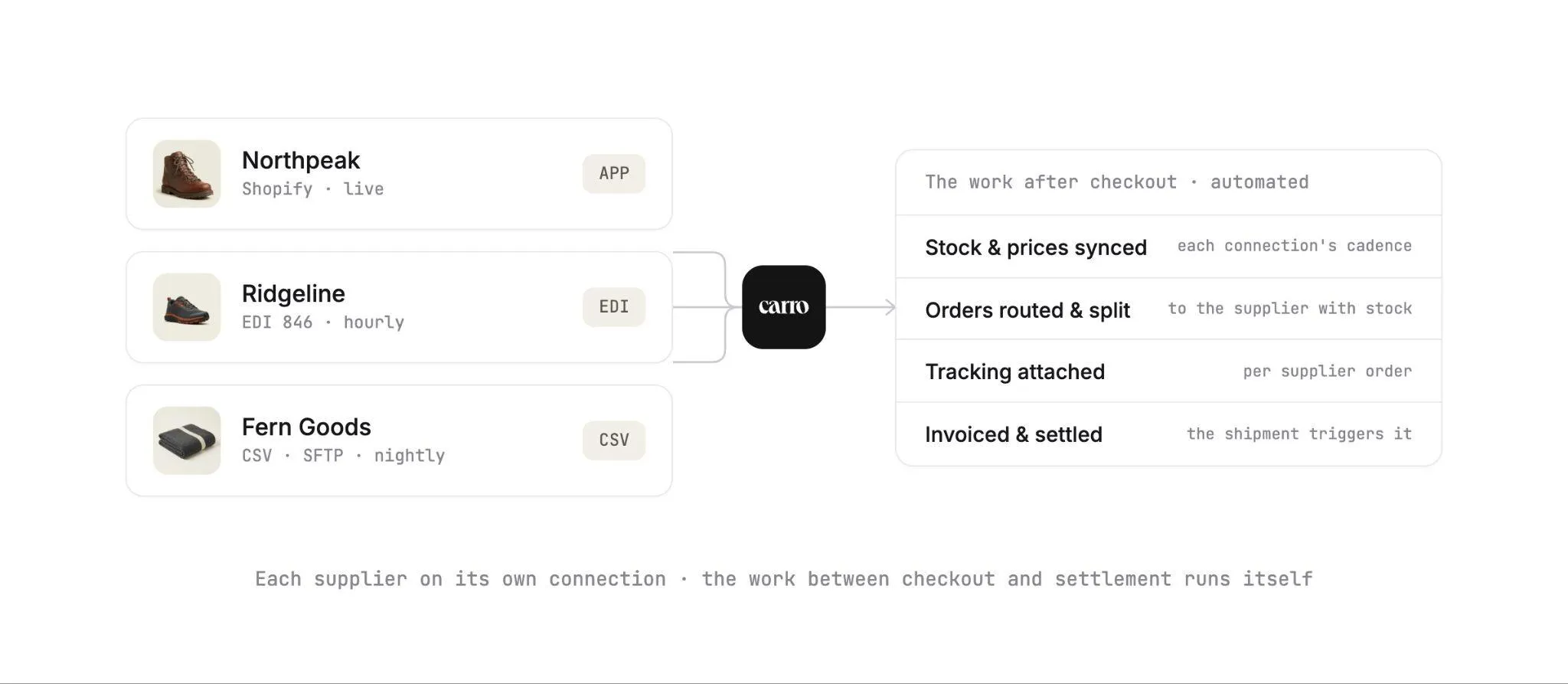
Dropship automation at this level connects the supplier's system and keeps its stock and prices current in your catalog. From there, it sends each order into the system the supplier already uses and settles each shipment against the terms you agreed.
That full scope is what Carro covers. Retailers pick from a network of 1,500,000 products from established brands, or connect the partners they already work with.
Account Managers hand-match complementary brands to each retailer's audience and categories, so introductions start from brands that fit your store.
| Single-store import tools | Program-level dropship automation | |
|---|---|---|
| Typical user | One store testing products | Retailers, marketplaces, shopping platforms and brands |
| Suppliers | Open catalogs such as AliExpress, Amazon and Walmart | Vetted brands and distributors, from a network or your own partners |
| How products arrive | Imported listing by listing | Through each supplier's connection, with variants mapped to fields |
| How orders reach suppliers | Passed to the supplier for fulfillment | Routed into the supplier's own system |
| Supplier cost | The supplier's listed price | A partner price list per relationship |
| Paying the supplier | Paid at purchase on the supplier's site | Invoice triggered by the shipment under agreed terms |
If you are weighing tools from the first column against Carro, the comparison of AutoDS, CJdropshipping and Carro sets them side by side. The rest of this guide focuses on the second column.
The Eight Stages You Can Automate, From Connection to Reconciliation
Carro runs one workflow for every supplier, so each new partner reuses a setup your team already knows. Follow a single supplier from the day it connects to the day its first payout reconciles.
Each stage below opens with the event that starts it and closes with what your team sees on screen. Operations leads will work from the views in stages three through six, while finance teams should read stages seven and eight closely.
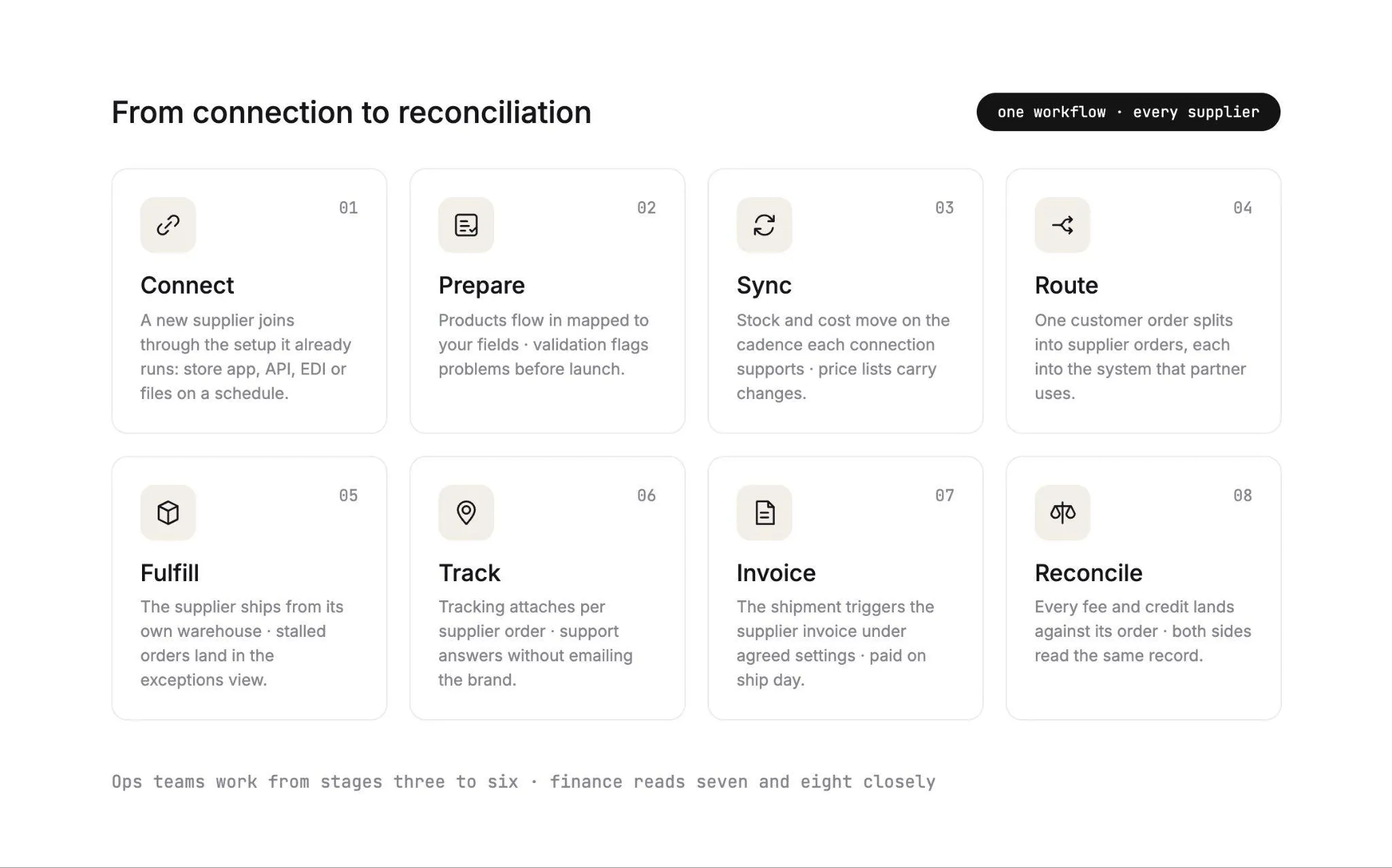
1. Connect
The trigger is a new supplier: a brand you picked from the network, or a partner you already buy from. Carro matches the connection to that supplier's actual setup.
That might be a Shopify, Magento 2, WooCommerce or BigCommerce store. It might also be an API, EDI, or CSV files sent on a schedule over SFTP.
Onboarding runs as a defined sequence with visible progress: account details (contacts, terms and returns), connection, product data, partner price list, test order and go live.
Suppliers without technical teams are welcome, and the Carro team works on the setup with them directly. The supplier onboarding module holds that sequence for every partner.
What your team sees: a checklist per supplier. One might show its Shopify app installed and 128 of 212 products mapped, with the price list and test order still to come.
For the full onboarding playbook, see our guide to marketplace vendor onboarding.
2. Prepare
Once the connection is live, partner products flow in with descriptions, images and variants mapped to the fields that connection supports. Filter by supplier or brand, then select products one at a time or in bulk.
Validation flags data problems before launch. Merchandising rules apply your conventions to published content.
Your edits change your copy of a product, and the supplier's original stays as it was. Before anything goes live, a test order checks fulfillment, tracking and invoicing end to end.
What your team sees: a partner product list with a count of what is selected, such as 24 of 212 products selected to add.
3. Sync
The trigger here is any change at the supplier: a unit sold on the brand's own site, or a new price list. Stock moves from the supplier system on the cadence the connection supports.
The partner price list sets your cost for that relationship. When a supplier changes its prices, the price list carries the new cost, so nobody re-types a number.
This is the part of the program that behaves like inventory management software, with the stock sitting in someone else's warehouse.
IHL Group's 2026 Inventory Distortion Study puts the global cost of out-of-stocks and overstocks at $1.7 trillion a year, or 6.2% of retail sales. In a dropship catalog, each stale stock count risks an order your supplier cannot fill.
AI shopping agents raise the bar for catalog data. Adobe's April 2026 report on AI traffic to U.S. retail sites found that traffic from AI sources grew 393% year over year in the first quarter of 2026.
An agent buys from what it can read: accurate stock, accurate prices and product data it can trust. Our guide to Shopify agentic commerce covers what that means for your catalog.
What your team sees: current stock and cost on every partner product. To go further on the inventory side, our guide on how to automate inventory management covers sync cadence and SKU mapping in detail.
4. Route
A customer checks out with a trail runner from one brand and a 28-liter pack from another. Carro splits that single order into two supplier orders.
Each one routes into the system that partner already works in, with nothing re-keyed. A brand on Shopify receives its order through its store.
A distributor on EDI receives its order through the same pipe its other retail orders use. In EDI, retail purchase orders typically travel as the 850, one of the standard X12 transaction sets.
That is why programs with EDI partners care about EDI for dropshipping long before they reach supplier fifty.
What your team sees: one customer order with two supplier orders under it, each with its own state. The order execution module keeps those states in one view.
5. Fulfill
The supplier packs and ships the order from its own warehouse, and the sale stays under your brand. Each supplier order carries a documented state, from confirmed at the supplier through shipped with tracking information.
A stalled order shows up in the exceptions view with the detail needed to act on it. Whoever follows up sees which supplier and which order are involved right away.
What your team sees: an order board sorted into confirmed, shipped, delivered and stalled.
6. Track
The shipment kicks off this stage. Tracking information attaches to the supplier order, and Carro follows the shipment status to the door.
A two-brand order means two parcels and two tracking numbers. Both sit against the order, so your support team can tell a customer where the pack is without emailing the brand.
What your team sees: shipment status per supplier order, with no inbox of update requests.
7. Invoice
Finance gets its trigger from the same shipment. It creates the supplier invoice under the settings you agreed, with configured delays where a program needs them.
Automated billing and manual invoicing are both supported. A supplier with unusual terms can still sit in the same workflow.
Billing charges the retailer and credits the supplier through the connected payment account, in USD, in Stripe-approved countries. Set up that way, a supplier can be paid the day the order ships!
Compare that with the average accounts payable desk. Ardent Partners' The State of ePayables 2025: AP's Unfinished Journey puts the average cost of processing one invoice at $9.84, with an average cycle time of 8.2 days.
A failed charge follows the configured process and lands in front of a person to act on. The payment settlement module holds the billing timeline for each order.
8. Reconcile
Product cost, partner fees and processing charges stay separate within each partner relationship. Each commission, shipping cost and return credit lands against the order it belongs to.
Invoice, batch invoice and payout records carry the fee and net detail a finance team needs. Retailer and supplier read the same order with the same figures. At month end, finance reviews those records and exports them.
What your team sees: one sale broken into customer price, product cost, partner fee, processing and net payout.
Benefits of Dropship Automation
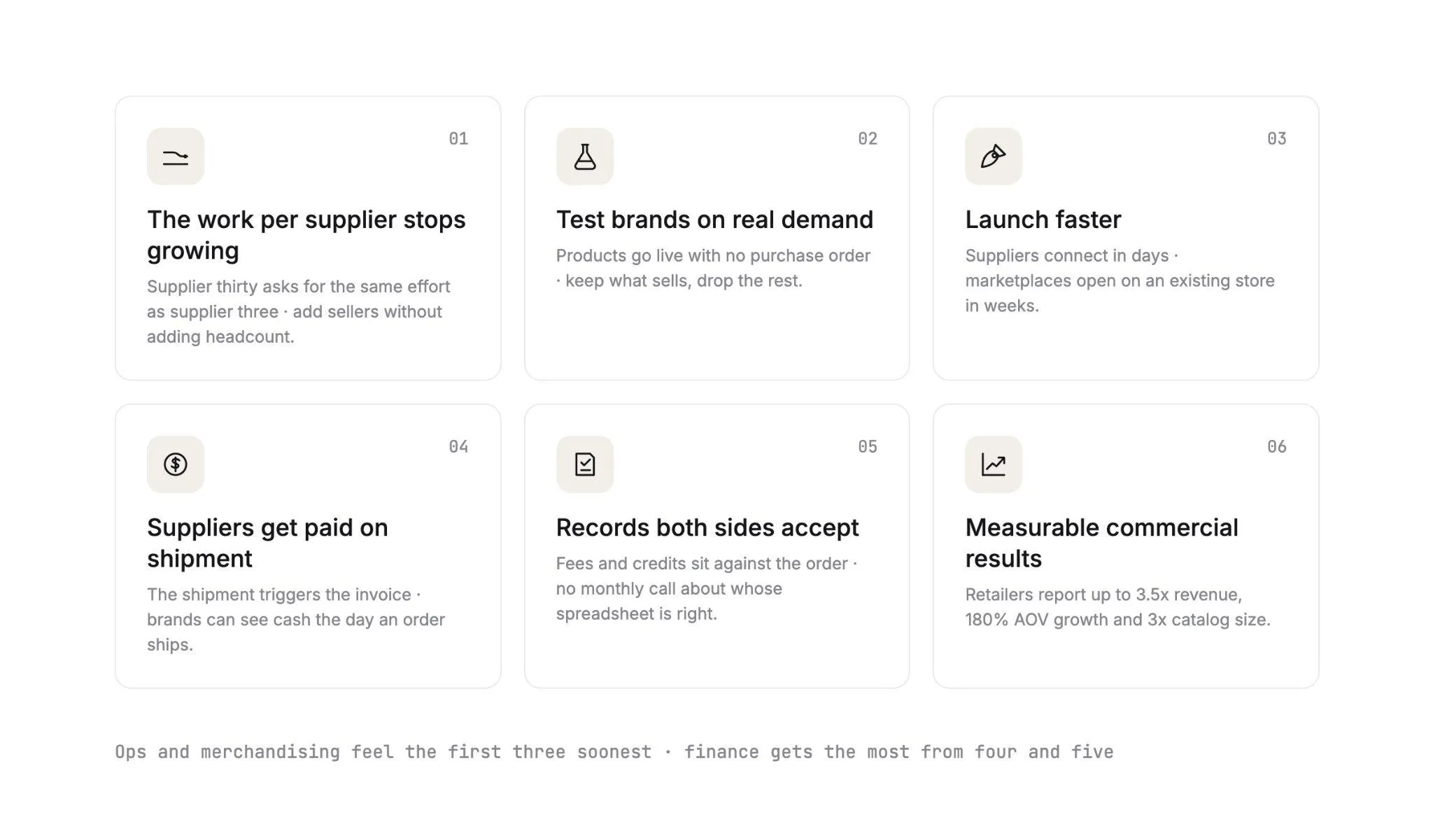
Automating the eight stages changes what a dropship program costs to run. Six gains stand out for your team.
Operations and merchandising teams feel the first three soonest, since they set how fast a new brand reaches your store. Finance gets the most from the fourth and fifth, which change when each brand is paid and how the month-end close runs.
1. The Work Per Supplier Stops Growing
Every new partner follows the same onboarding sequence and the same order path. Supplier thirty asks for the same effort as supplier three, so you can add sellers and products without adding headcount.
In practice, your coordinator checks one onboarding checklist per supplier: connection, products mapped, price list and test order. The hours that used to go into wiring each brand in now go into choosing which brands to add next.
2. Test Brands on Real Demand Before Buying Stock
Filter the network by audience and category, then mark the brands you want to test. Their products go live in your store with no purchase order.
Keep the products that sell and drop the rest, with no warehouse full of unsold units left behind.
3. Launch Faster
Suppliers come onto the network in days, and marketplaces can open on an existing store in weeks.
Eric Flores, a Drop Ship Coordinator, put it this way: "Carro has improved the way we manage suppliers, orders, and catalog operations, allowing us to set new products live much faster than before."
4. Suppliers Get Paid on Shipment
Because the shipment triggers the invoice, brands can see cash the day an order ships where the program is set up that way.
That makes you an easier retailer to supply, and it gives you a strong opening line when you pitch the next brand.
5. Finance Gets Records Both Sides Accept
Fees, commissions, shipping costs and return credits sit against the order they belong to. Retailer and supplier work from those same figures, which replaces the monthly call about whose spreadsheet is right.
Each record breaks one sale into customer price, product cost, partner fee, processing and net payout. When a supplier questions a payout, your finance team opens the order and both sides look at the same line items.
6. Measurable Commercial Results
Carro retailers report up to 3.5x revenue growth, up to 180% AOV growth and up to 3x catalog size.
Retailers add that assortment with no stock bought up front, because each supplier ships its own orders from its own warehouse.
Challenges of Dropship Automation and How to Handle Them
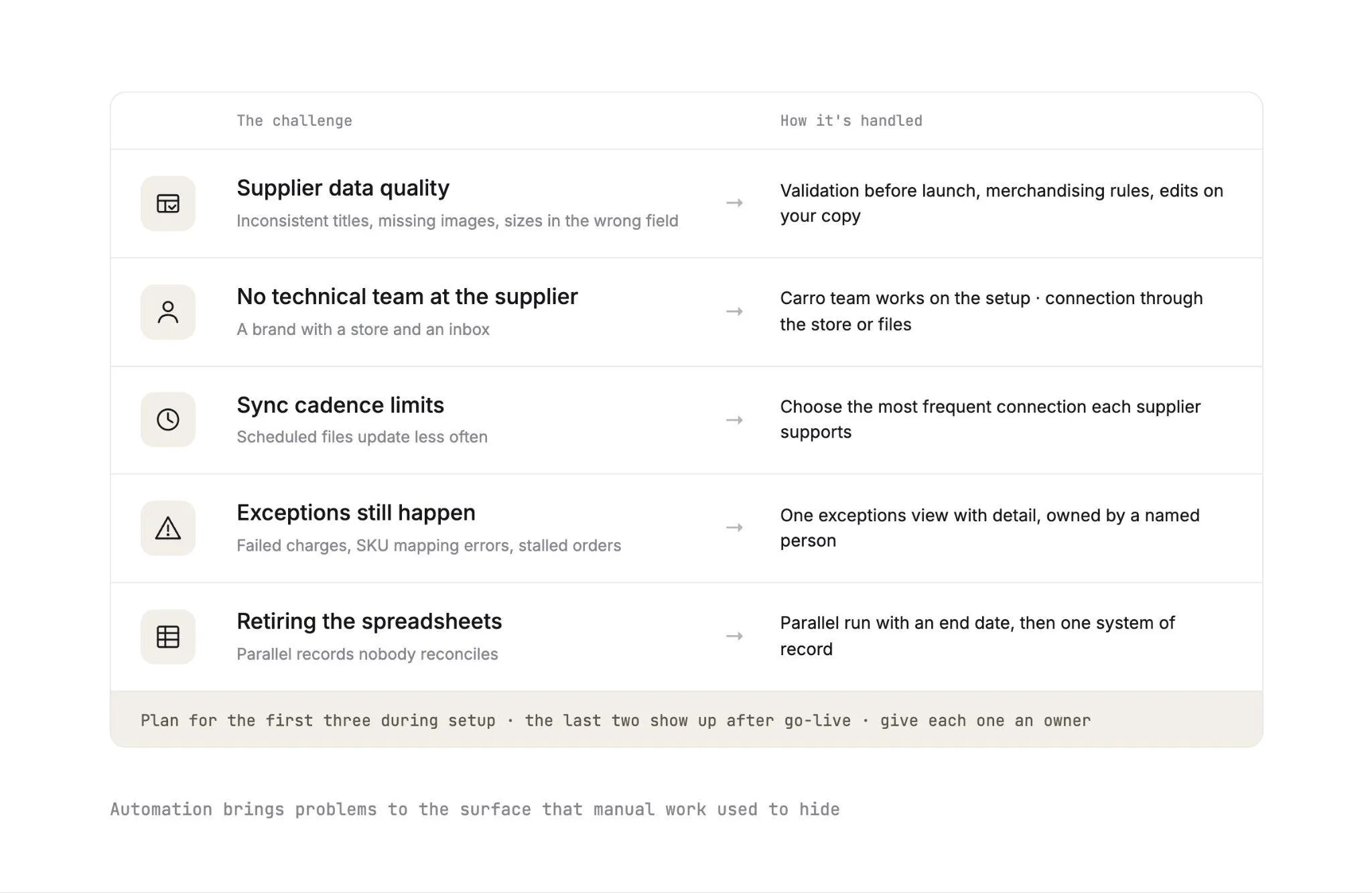
Automation also brings problems to the surface that manual work used to hide. Plan for these five before launch, and give each one an owner.
The first three shape your setup plan, so work through them while suppliers are still connecting. The last two show up after go-live, and the table at the end of this section gives a one-line answer for each.
1. Supplier Data Quality
One brand writes titles in capitals. Another puts the size in the title and sends two images per product.
Validation flags problems like these before launch. Merchandising rules then apply your conventions to what gets published, while your edits stay on your copy of the product.
2. Suppliers Without Technical Teams
A four-person brand may run a Shopify store and an inbox, with no developer on staff. The Carro team works on the setup with suppliers like this directly.
That is how The FairGround onboarded brands of all sizes after moving from Onport.
The FairGround described the result: "Automating inventory and product tagging makes it easier to scale. It allows us to manage a curated selection of products effectively, keeping control over what goes live while growing the business."
3. Sync Cadence Limits
Stock moves on the cadence each connection supports. A supplier sending a scheduled file usually updates less often than one connected through its store or an API.
Pick the most frequent connection each supplier can run. Keep scheduled files for suppliers with no other option.
4. Exceptions Still Happen
Failed charges, SKU mapping errors and stalled orders appear in the exceptions view with the detail needed to act on them. Automation makes them visible, and someone on your team has to own the queue.
Sort that queue by supplier during a weekly review. A SKU mapping error that keeps repeating points to one product mapping to fix at the source, and a supplier with a run of stalled orders is a conversation to book.
5. Retiring the Spreadsheets
A coordinator who has run the program from a workbook for three years will trust the workbook. Move the columns that matter into price lists and product fields, then run the old sheet in parallel until a named end date.
Set that date with finance, ideally after one full month-end close in Carro. If the invoice, batch invoice and payout records match the workbook for that month, the workbook can retire.
| Challenge | What it looks like | How it's handled |
|---|---|---|
| Supplier data quality | Inconsistent titles, missing images, sizes in the wrong field | Validation before launch, merchandising rules, edits on your copy |
| No technical team at the supplier | A brand with a store and an inbox | Carro team works on the setup, connection through the store or files |
| Sync cadence | Scheduled files update less often | Choose the most frequent connection each supplier supports |
| Exceptions | Failed charges, SKU mapping errors, stalled orders | Exceptions view with detail, owned by a named person |
| Spreadsheet habits | Parallel records nobody reconciles | Parallel run with an end date, then one system of record |
Where a Person Still Acts
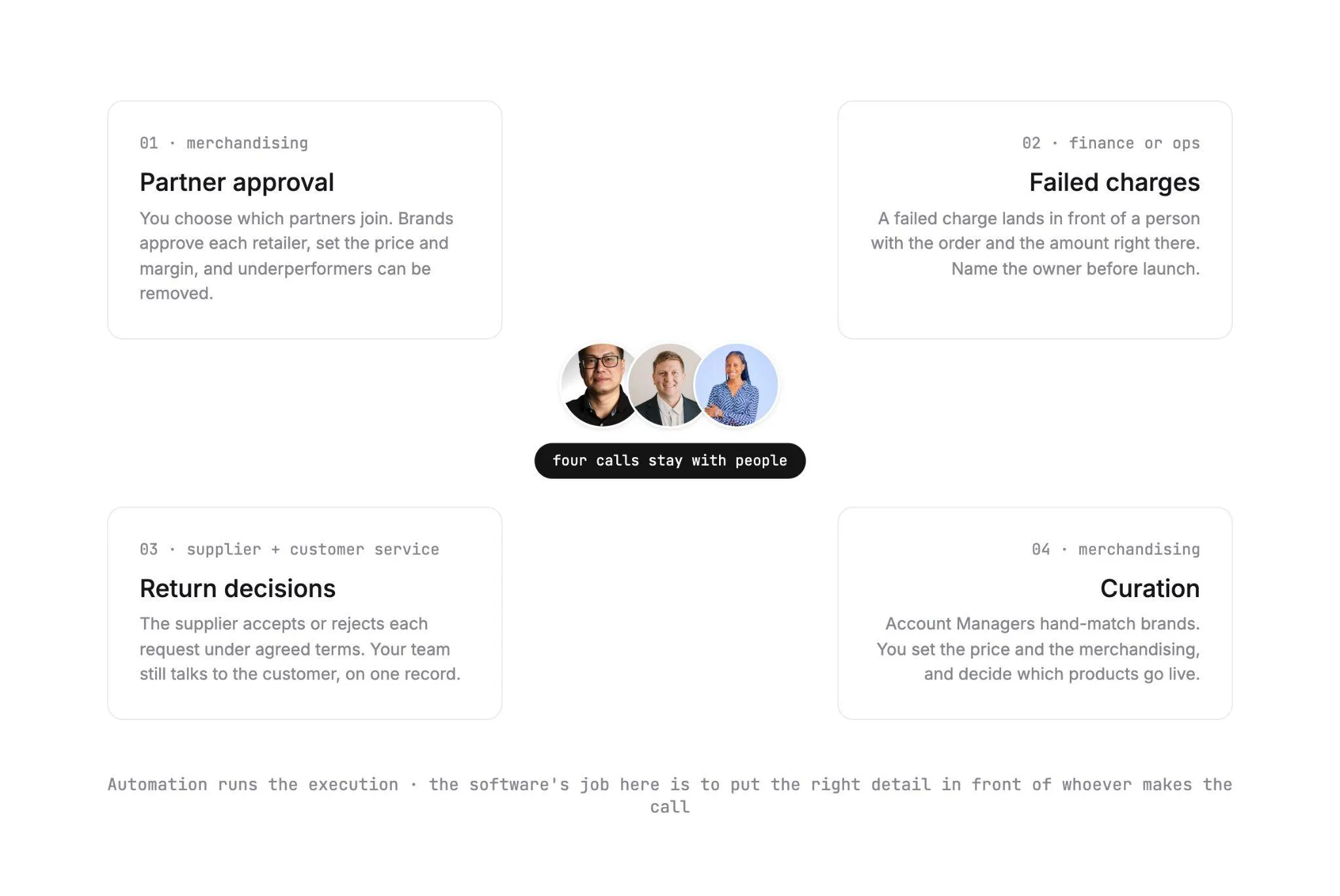
Carro automates the execution steps above. Four kinds of decision stay with people on purpose, and the software's job there is to put the right detail in front of whoever makes the call.
Each call below belongs to a specific team: partner approval and curation to merchandising, failed charges to finance or operations, and return decisions to the supplier and your customer service team. Use the list to name an owner for each before launch.
1. Partner Approval
You choose which partners join your program, from the Carro network or from your own supplier list. On the other side, brands approve each retailer before it lists their products, and set a price and margin for each partner.
Underperforming partners can be removed. A person makes that call, using the order states and exceptions the system already shows.
2. Failed Charges
A failed charge follows the process configured for your program and lands in front of a person. Someone on your finance or operations team decides the next move, with the order and the amount right there.
Name that owner before launch and agree how fast they pick up a new failure. A failed charge with no clear owner is how a supplier ends up asking where its payout went, which is the call automation should remove.
3. Return Decisions
A return runs as a request the supplier accepts or rejects, under the terms and refund settings agreed with that supplier. Return acceptance and refunds stay separate steps.
Your customer service team still talks to the customer. The supplier's decision and the return credit both sit against the original order, so everyone works from one record.
4. Curation
Account Managers hand-match retailers with complementary brands based on category and audience fit. You set the price and the merchandising, and you decide which products go live.
In The FairGround's own words, "I focus on curating products," while automation handles inventory, product descriptions, imagery and tagging. That lets a small, part-time team spend its hours on selection.
How To Automate Dropshipping in Five Steps
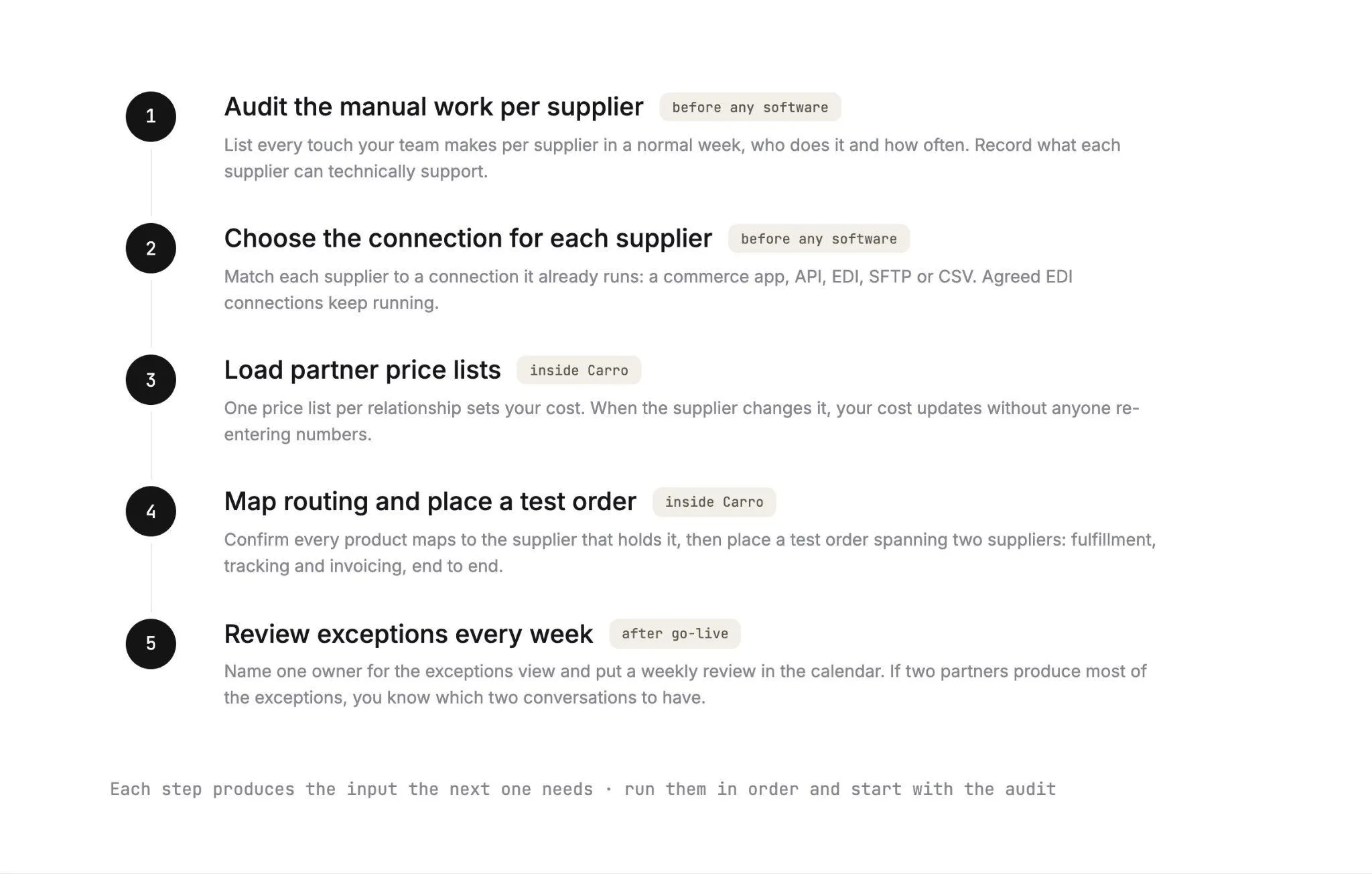
Each step produces the input the next one needs, so run them in order and start with the audit.
Steps one and two need only your supplier list and a record of today's manual tasks, so you can start them before any software is in place. Steps three to five run inside Carro, with the Carro team working on supplier connections alongside you.
Step 1: Audit the Manual Work Per Supplier
List every touch your team makes per supplier in a normal week: downloading stock files, updating prices, re-keying orders, chasing tracking and assembling invoices from statements. Note who does each task and how often.
Then record what each supplier can technically support. A brand with a Shopify store and a small maker with a spreadsheet will connect differently, and the audit tells you how many suppliers fall into each group.
Step 2: Choose the Connection for Each Supplier
Match each supplier to a connection it already runs: a commerce app on Shopify, Magento 2, WooCommerce or BigCommerce, an API, EDI, SFTP or CSV. Agreed EDI connections keep running while you add new suppliers around them.
Your own storefront connects the same way. Shopify retailers can follow our guide to Shopify dropshipping automation, and WooCommerce stores can work through the steps to dropship on WooCommerce.
Step 3: Load Partner Price Lists
Give each partner relationship its own price list, which sets your cost for that supplier's products. When the supplier changes it, your cost updates without anyone re-entering numbers.
You set the retail price and the merchandising rules on top. Keep the rules short at first (title format and category mapping, for example), then add to them once you see what the first suppliers send.
Step 4: Map Routing and Place a Test Order
Confirm that every selected product maps to the supplier that holds it, so a mixed order splits by line without anyone deciding who ships what. Check the billing setup for each partner at the same time.
Then place a test order that spans two suppliers. It should confirm fulfillment, tracking and invoicing for both before any product goes live.
Step 5: Review Exceptions Every Week
Name one owner for the exceptions view and put a weekly review in the calendar. Failed charges, SKU mapping errors and stalled orders all land in that one queue.
Look at the pattern by supplier, too. If two partners produce most of the exceptions, you know which two conversations to have, and possibly which two partners to replace.
Manual vs Automated: What One Order Costs Your Team
Take one customer order with a trail runner from one brand and a pack from another. Follow it through every step, done by hand and done in Carro.
| Step | Manual version | With Carro | Person involved? |
|---|---|---|---|
| Stock check | Someone opens each supplier's latest file | Stock already current on the cadence the connection supports | No |
| Order entry | Order re-keyed into two supplier portals or emails | Order split and routed into each supplier's system | No |
| Supplier confirmation | Waiting for two email replies | Each supplier order moves to confirmed | Only if an order stalls |
| Tracking | Two tracking numbers copied into the store | Tracking attaches to each supplier order | No |
| Customer update | Support emails the customer | Order shows shipment status per parcel | Only for questions |
| Supplier invoice | Built from the supplier's statement at month end | Triggered by each shipment under agreed settings | No |
| Paying the supplier | Batch payment after invoice checks | Retailer charged and supplier credited through the connected payment account | Only on a failed charge |
| Return | Emails between customer, retailer and supplier | Request the supplier accepts or rejects under agreed terms | Yes, the decision |
| Reconciliation | Fees and credits rebuilt in a spreadsheet | Fees, commission, shipping and return credit sit against the order | Finance review |
Count the manual touches in the second column, then multiply by your weekly order count. That number is the hand work your dropship program carries every week.
People still appear in the last column, at the steps where judgment matters: a stalled order, a failed charge, a return decision and the finance review.
Signs Your Dropship Stack Needs Replacing
Some programs outgrow their setup quietly. Watch for these signals that your tooling now costs more attention than your suppliers do:
- A spreadsheet per vendor, and one person who understands all of them.
- Hand-built EDI mappings that need a developer every time a supplier changes a field.
- Sync scripts nobody wants to own.
- New suppliers taking months to reach their first order after the agreement is signed.
- Supplier invoices assembled from statements after the fact, with fees and returns rebuilt by hand.
- A legacy dropship platform that lacks the integrations you need, or is no longer a viable home for the program.
If three or more sound familiar, see how Carro helps teams modernize a legacy dropship stack without a rebuild.
Carro connects through an API, EDI, SFTP or a platform app, so your payments, shipping, ERP and accounting systems stay right where they are.
For teams leaving another dropship platform, a migration with orders intact changes the connection under your storefront and leaves the storefront itself in place.
Carro has already moved the customer bases of Modern Dropship and Onport onto its platform, and sellers can follow the retailer across.
Everything You Need to Know About Dropshipping Automation
The whole guide in one table, ready for anyone scoping a dropship program or prepping for a vendor call.
| Topic | What you need to know |
|---|---|
| What dropshipping automation means | Software that runs the repeat work of a dropship program: supplier connection, catalog sync, order routing, tracking, invoicing and reconciliation. |
| Import tools vs program-level automation | Import tools copy listings from open catalogs into one store. Program-level automation runs relationships with vetted brands across many suppliers. |
| The eight stages | Connect, Prepare, Sync, Route, Fulfill, Track, Invoice and Reconcile, the same path for every supplier. |
| Connections | Shopify, Magento 2, WooCommerce and BigCommerce, plus EDI, API, SFTP, CSV, platform apps and webhooks. |
| Supplier onboarding | Account details, connection, product data, partner price list, test order and go live, in days per supplier. |
| Catalog and cost | Stock moves on the cadence each connection supports, and partner price lists set the cost for each relationship. |
| Order routing | One customer order splits into supplier orders, each routed into the system that partner already uses. |
| Settlement | The shipment triggers the supplier invoice, the retailer is charged and the supplier is credited through the connected payment account. |
| Reconciliation | Product cost, partner fees, processing, commissions, shipping and return credits land against the order they belong to. |
| Where a person acts | Partner approval, failed charges, return decisions and curation. |
| How to start | Audit manual touches, choose a connection per supplier, load price lists, test a two-supplier order, review exceptions weekly. |
| Signs to replace your stack | Per-vendor spreadsheets, hand-built EDI mappings, unowned scripts, months-long onboarding. |
| Migration | Carro has moved the Modern Dropship and Onport customer bases; the storefront stays in place. |
| Reported results | Up to 3.5x revenue growth, up to 180% AOV growth and up to 3x catalog size. |
The connection, onboarding and settlement rows are the ones to take into a scoping call, since they decide how fast your suppliers go live. For a demo, bring your supplier list and your manual-touch audit, and the Carro team can map each supplier to a connection.
Why Carro Is the Right Move
Three things set Carro apart for a dropship program built on real brands:
1. One workflow from supplier setup to settlement. Onboarding, catalog and inventory sync, order routing, fulfillment tracking, invoicing and payouts run in a single system. Every new supplier follows the same path as the last one, so the work per seller stops growing with the number of sellers.
2. Connects on each supplier's terms, with no replatform. Carro works with Shopify, Magento 2, WooCommerce and BigCommerce, plus EDI, API, SFTP, CSV and platform apps. It runs beside your existing payments, shipping, ERP and accounting systems, and suppliers without technical teams get hands-on help from the Carro team.
3. Settlement that follows the shipment. The shipment triggers the supplier invoice, the retailer is charged and the supplier is credited. Fees and returns tie to the order, and both sides read the same record.
Carro is built for retailers running dropship programs with vetted brands, marketplaces adding sellers without adding headcount and shopping platforms giving their merchants a supplier network.
It fits US teams on Shopify, Magento 2, WooCommerce or BigCommerce, or connected through EDI, API or SFTP, that transact in USD in Stripe-approved countries.
Bring your supplier list and your costliest exception to a demo. We'll show you where each one sits in the eight stages, and how quickly your next supplier can go live!
Frequently asked questions
What is dropshipping automation?
Dropshipping automation is software that runs the repeat work of a dropship program without anyone re-keying it, from syncing supplier stock and prices to routing orders and invoicing each shipment. For a single store, that usually means importing listings and passing orders to the supplier. For a retailer or marketplace working with vetted brands, Carro runs it across eight stages, from Connect to Reconcile.
What parts of dropshipping can you automate?
The parts of dropshipping you can automate are the ones that repeat on every order or supplier change: stock and price sync, order routing, tracking, supplier invoicing and reconciliation. Judgment stays with a person, such as approving partners or deciding a return. In Carro, failed charges, SKU mapping errors and stalled orders land in one exceptions view with the detail needed to act.
How do you automate dropshipping with suppliers that have no technical team?
You automate dropshipping with suppliers that have no technical team by connecting them through what they already run, such as a Shopify or WooCommerce store, or CSV files sent over SFTP. The Carro team works on each connection with the supplier directly. The FairGround, a marketplace run by a small, part-time team, onboarded brands of all sizes this way after migrating from Onport.
Does dropship automation work with EDI suppliers?
Dropship automation works with EDI suppliers, and retailers can add new suppliers through Carro while their agreed EDI connections keep running. A distributor on EDI receives orders through the system it already uses, while a smaller brand connects through its store. Most dropship relationships exchange the X12 850 purchase order, 856 advance ship notice and 810 invoice, with nobody re-keying them.
How long does dropship automation take to set up?
Dropship automation with Carro takes days to set up per supplier and weeks for a marketplace opening on an existing store. Each supplier moves through account details, connection, product data, partner price list, test order and go live. The test order checks fulfillment, tracking and invoicing before products go live.
Do I need to replatform to automate dropshipping?
You do not need to replatform to automate dropshipping with Carro, because it connects to the Shopify, Magento 2, WooCommerce or BigCommerce store you already run. It works beside your existing payments, shipping, ERP and accounting systems. Teams leaving a legacy dropship platform keep the storefront and change the connection under it, as the customer bases of Modern Dropship and Onport have.
What is the best dropshipping automation software in 2026?
The best dropshipping automation software in 2026 for retailers and marketplaces working with vetted brands is Carro, because it runs the whole workflow from supplier connection to reconciled payout in one system. Account Managers hand-match brands from a network of 1,500,000 products, and each shipment triggers the supplier invoice. Carro retailers report up to 3.5x revenue growth and up to 3x catalog size.
How do I get started with Carro?
You get started with Carro by booking a demo and bringing your supplier mix and the order path that causes the most exceptions today. Your store then connects through its Shopify, Magento 2, WooCommerce or BigCommerce integration, and you choose network brands, connect your own partners, or both. Suppliers come onto the network in days, and marketplaces can open on an existing store in weeks.
Will dropshipping automation hurt product quality or our brand?
Dropshipping automation will not hurt product quality or your brand when it runs on vetted brands and distributors you choose, which is how Carro works. Account Managers hand-match brands to your audience, and you approve each partner and set the price. Every order carries a documented state from confirmed through shipped with tracking, and underperforming partners can be removed.