Marketplace Vendor Onboarding in 2026: What It Is and How to Do It at Scale?
What is vendor onboarding for a marketplace? Take a signed brand through six stages to its first shipped order and keep each stage moving. Read the full guide.
The answer to what is vendor onboarding depends on who is asking. In procurement, it covers the paperwork that lets accounts payable pay a new supplier.
On a marketplace, it covers everything between a brand signing and its first order reaching your customer. That version is the one that grows your assortment, and it is the one this guide is about.
Picture the day a brand signs. It lands in your partner list with zero products a customer can buy, and every week it stays that way is assortment you signed for and cannot sell.
The road from signature to first sale is a fixed sequence you can run the same way for every supplier. Collect the terms, connect the system, map the products, load the price list, run a test order and launch.
Marketplace volume gives that sequence plenty to feed. Digital Commerce 360's top online marketplaces data projected that the top 100 online marketplaces would reach $3.832 trillion in GMV in 2024, up 10% on 2023.
This guide walks you through the six stages Carro runs for every supplier and the spots where each one tends to stall.
You will also see what vendor onboarding automation takes off your team's plate, and how to keep supplier fifty as easy to launch as supplier five.
We close with the numbers that show whether your process is working. If you run a marketplace or a dropship program with brand partners, this is the stretch of the operation that sets how fast new assortment reaches your customers.
Key Takeaways (TL;DR)
- Two meanings: procurement uses vendor onboarding for getting a supplier approved and payable, and this guide covers the marketplace meaning, which runs from signed agreement to first shipped order.
- Six stages, in order: account details and terms, connection, product data, partner price list, test order, go live.
- Where delays sit: usually on the supplier side of the handoff, such as a return policy nobody wrote down or a request for an API the supplier has no developer to build.
- Vendor onboarding automation: product import, field mapping, validation, stock and price updates, order routing and invoicing run once a supplier is connected, while people choose suppliers, agree terms, fix flagged data and approve go-live.
- One path for every supplier: supplier fifty follows the same sequence as supplier five, which keeps onboarding work flat as the network grows.
- No developer needed: brands can launch through a platform app or files on a schedule, with the Carro team working on the setup alongside them.
- Metric to track first: time to first order, followed by the share of selected products that are live and the test order pass rate.
- Timelines on Carro: a supplier comes onto the network in days, and a marketplace can open on the store it already runs in weeks.
What Is Vendor Onboarding? At a Glance
Here are the six stages a supplier moves through on Carro before its products can sell, plus a common reason each one slows down.
| # | Stage | What gets done | Who acts | What usually slows it |
|---|---|---|---|---|
| 1 | Account details and terms | Contacts, commercial terms, return rules, billing and shipping setup | You and the supplier, with the Carro team | Return terms left for later |
| 2 | Connection | Supplier linked by platform app, API, EDI, or CSV files over SFTP | The supplier, with hands-on help from the Carro team | A connection the supplier cannot maintain |
| 3 | Product data | Products selected and fields mapped until validation flags clear | Your merchandising team | Unmapped variants and missing images |
| 4 | Partner price list | Cost per relationship loaded so it updates when the supplier changes it | The supplier, with your review | A price list agreed by email and never loaded |
| 5 | Test order | One real order checked from routing through to the supplier invoice | The supplier ships an order you place | Testing a product that does not represent the catalog |
| 6 | Go live | Products published and orders routing to the supplier | You approve the launch | Nobody owns the go-live decision |
The first two stages are mostly conversations with the supplier, and every later stage builds on what those conversations settled. Agree the return window and refund settings in the first conversation, and the first return request already has terms to run under.
What Is Vendor Onboarding?
Vendor onboarding is the process of bringing a new supplier from a signed agreement to a working relationship. Once it is done, you can sell what the supplier makes and pay them for it.
The exact steps depend on which side of the business owns the relationship. For a marketplace team, the practical answer to what is vendor onboarding is a fixed list of stages every supplier passes through before its first sale.
Procurement teams use the same term for a different list, covered first below.
1. Vendor Onboarding in Procurement
In procurement and accounts payable, onboarding a vendor means collecting what finance needs before the first invoice arrives. For a US supplier, that usually starts with IRS Form W-9.
The W-9 gives the payer the vendor's taxpayer identification number for information returns. Bank details come next, followed by whatever approvals your purchasing policy requires.
In that model, the goods usually arrive at your own dock. The supplier's product data rarely touches your storefront.
2. Vendor Onboarding in a Marketplace or Dropship Program
On a marketplace or in a dropship program, the supplier ships straight to your customer. Its products sit on your storefront, under your brand.
So onboarding covers everything that has to work before the first sale. That means a connection to the supplier's system, product data mapped to your catalog, agreed costs and a test order that comes back with tracking and an invoice.
Teams use vendor, seller, supplier and brand partner for the same party, and this guide does too.
| Aspect | Procurement vendor onboarding | Marketplace vendor onboarding |
|---|---|---|
| Goal | Approve a supplier and pay it | Get a supplier's products selling and shipping |
| Who ships the goods | Supplier to your warehouse | Supplier to your customer |
| What gets collected | Tax form and bank details, plus any compliance documents policy requires | Contacts, return terms, connection, product data, price list |
| Usual owner | Procurement and accounts payable | Marketplace operations or the dropship coordinator |
| Done when | The supplier record is approved for payment | A test order has shipped with tracking and products are live |
Finding and choosing suppliers happens before either version starts, and our supplier acquisition guide covers that sourcing work. Everything below picks up at the signature.
What Is the Vendor Onboarding Process? Six Stages
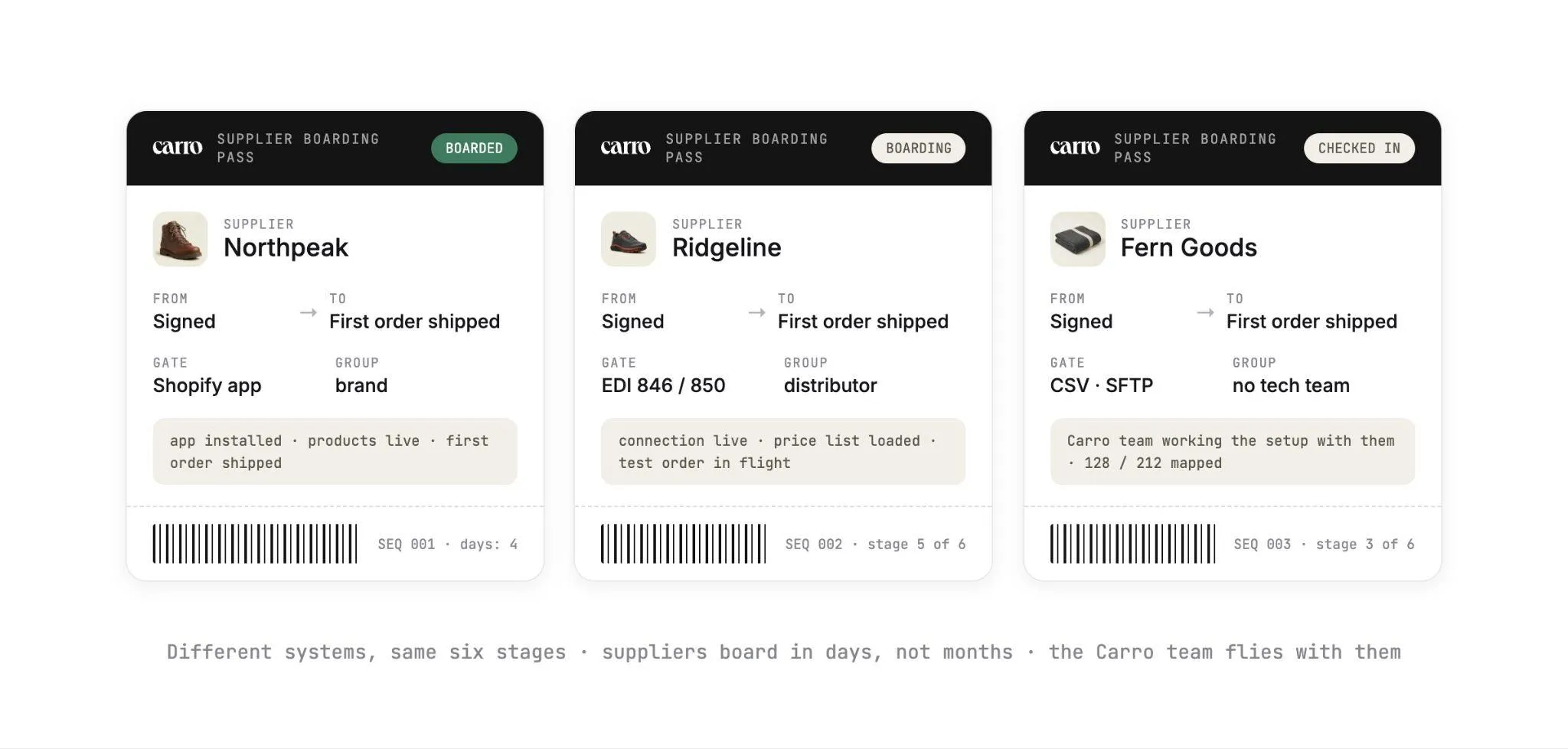
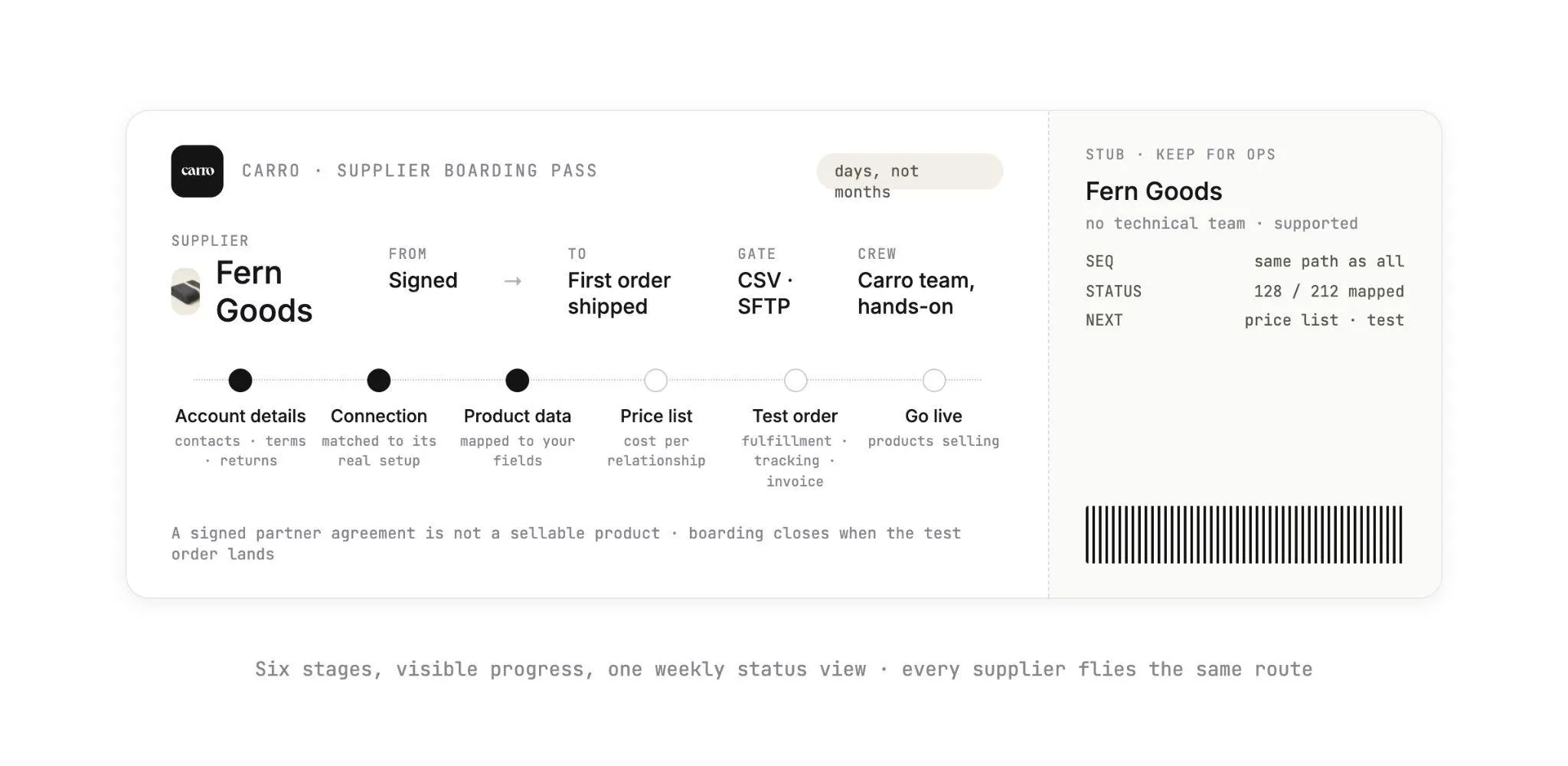
Carro runs partner setup as one defined sequence, the same for every supplier: account details, connection, product data, partner price list, test order, go live.
Supplier onboarding on Carro shows exactly where each supplier sits in that sequence. A stuck launch points straight to the stage that is holding it.
The stages run in order because each one needs something from the last. You cannot map product data before the connection exists, and a test order tells you little until the price list is loaded.
Stage 1: Account Details and Terms
Stage one collects who to call and what was agreed. Start with an operations contact for stalled orders and a finance contact for invoices.
Then lock in the return window and refund settings, the shipping setup and the billing details settlement will use.
Give returns the most attention here. On Carro, a return runs as a request the supplier accepts or rejects under the terms and refund settings agreed with that supplier.
An undefined policy at this stage turns into a customer waiting on a refund later. Returns volume makes the effort worth it: the NRF's 2025 retail returns report projects $849.9 billion in total retail returns for 2025.
That same report estimates that 19.3% of online sales would be returned in 2025. Clear terms at stage one decide how smoothly each of those requests runs on a dropship order.
For brands and distributors in the Carro network, the commercial side gets lighter. Carro holds the authorization to represent their products in agreed selling channels.
One relationship with Carro covers that inventory, so you skip negotiating a separate supply agreement with every brand. You confirm channel rights and terms for each opportunity.
Approval runs in both directions. A brand approves each retailer before it lists the brand's products, and it sets a price and margin per partner.
Brands can see how that works from their side on Carro's page for brands and suppliers.
Stage 2: Connection
This is where the supplier's system meets yours, and Carro meets each supplier where it already works. The connection is evaluated against the supplier's actual setup.
A brand running its own Shopify store can install the platform app. A distributor with a development team can use the API.
An established wholesaler may already run EDI, and a small brand can send CSV files over SFTP on a schedule.
A distributor on EDI usually exchanges standard X12 transaction sets with its retail partners. Expect the 846 inventory advice, the 850 purchase order, the 856 ship notice and the 810 invoice.
The connection stage confirms which of those documents the supplier sends, and how often.
Pick the connection with stock in mind. Stock moves from the supplier's system on the cadence its connection supports, so a nightly file and a platform app can give your storefront different freshness. Know which one you have before you choose products to list.
Suppliers without technical teams are supported at this stage, and the Carro team works on the setup with them. Your side stays right where it is.
Carro connects to Shopify, Magento 2, WooCommerce and BigCommerce storefronts. It runs beside your existing payments, shipping, ERP and accounting systems.
Stage 3: Product Data
Stage three brings the supplier's catalog into yours. Partner products arrive through the connection with their descriptions and images, and variants map to the fields that connection supports.
Your team filters by supplier or brand, then selects products one at a time or in bulk.
Validation flags data problems before launch, such as a variant with no size value or a product with no image. Merchandising rules then apply your conventions to published content.
The result is products from forty brands following one house style on your storefront. Edits change your copy of a product and leave the supplier's original untouched, so your conventions never rewrite the brand's own catalog.
Clean data pays off at checkout. In Salsify's 2025 Consumer Research Report, 54% of shoppers have abandoned a sale because product content wasn't consistent from one channel to the next.
The same research found that 71% have made a return because the product didn't match the online listing. Stage three is where you catch those mismatches, well before a customer does.
In practice: your team opens the supplier's progress and sees the Shopify app installed and 128 of 212 products mapped, with the price list and test order still to come.
Those 84 unmapped products are this week's work. The status tells you so without a single call to the brand.
This is the stage where supplier-held stock starts behaving like inventory you manage. If you are comparing how tools handle stock you do not own, our overview of inventory management software for multi-supplier catalogs sets out what to look for.
The Catalog & Inventory module shows how Carro keeps partner products in sync.
Stage 4: Partner Price List
Finance works from one loaded cost per supplier from this stage on. The partner price list sets your cost for each supplier relationship, and it lives in the system.
When a supplier changes a price, your cost updates with it. Nobody re-keys numbers from a spreadsheet the brand emailed.
You still set the retail price and the merchandising. On the brand side, each retail partner gets its own price list, so two retailers carrying the same product can hold different agreed costs.
Confirm billing details and shipping setup alongside the price list, since the first invoice depends on them.
The common stall here is a price list agreed in an email thread and never loaded. The test order then invoices at the wrong cost, and the first reconciliation turns into an argument about whose number is right.
Stage 5: Test Order
A test order proves the whole path before any product goes live. Place a real order for one of the supplier's products, ideally in a cart with a product from a second supplier, so you can watch the order split.
On Carro, a single customer order can split into separate supplier orders. Each one routes into the system that partner already works in, with nothing re-keyed.
Each supplier order carries a documented state, from confirmed at the supplier through shipped with tracking. The shipment then triggers the supplier invoice under the agreed settings.
When the test completes, check four things:
- The order reached the supplier's system in the form they expected.
- The supplier confirmed and shipped within the fulfillment standard you set.
- The order reached shipped with tracking information.
- The invoice carried the cost from the partner price list.
The usual mistake is testing an unrepresentative product. If most of the supplier's catalog has size and color variants, test a product with size and color variants.
Stage 6: Go Live
Go live is your call, and it is the best moment in the whole sequence! Once you approve it, the selected products publish to your storefront and orders route to the supplier as they come in.
Stock and prices keep updating on the connection's cadence from that day on. The first weeks after launch are also when problems from earlier stages surface.
Stalled orders and SKU mapping errors appear in an exceptions view with the detail needed to act on them, and a person on your team works each one. Failed charges land there too and follow the configured process until someone resolves them.
Settlement starts with the first shipment. Billing charges you and credits the supplier through the connected payment account, with product cost, partner fees, processing charges and returns kept separate.
With the Payment Settlement module, suppliers can be paid the day an order ships.
Where Vendor Onboarding Stalls
Most onboarding delays happen at a handoff between your team and the supplier's, where each side believes the other has the next step.
Each stall has a specific fix, and most fixes are a rule you set once, such as a required field or a gate between stages.
Here are the stalls that come up most often, with what moves each one.
| Where it stalls | What you see | What moves it |
|---|---|---|
| Return terms left undefined | Account details complete except the return window and refund settings | Make return terms a required item before the connection starts |
| The wrong connection | Supplier agreed to an API integration and has no developer | Switch to the platform app or scheduled CSV files, with the Carro team on the setup call |
| Unmapped variants | A large share of selected products held by validation flags | Map variant options per supplier in one pass and fix the source file once |
| Weak images | Products pass mapping but look off next to your house style | Agree image requirements in stage one |
| Price list not loaded | Test order invoices at a cost nobody recognizes | Load the price list before anyone places the test order |
| Test order skipped | The first real order becomes the test, in front of a customer | Treat the test order as a gate to go live |
| No owner for go-live | Supplier ready for days, products still unpublished | Name one person who approves every launch |
| Status lives in email | Nobody can say which stage a supplier is in | One status view per supplier, reviewed weekly |
Most rows in that table wait on a person. That's why the fix in almost every row is a named owner or a gate between stages.
What Is Vendor Onboarding Automation?
Vendor onboarding automation is software handling the repeatable parts of onboarding: the steps that look the same for every supplier once the connection exists.
Your team keeps the commercial calls, and the two lists below split the work task by task.
On a dropship platform like Carro, the automated parts run in one workflow from connection to settlement. Your coordinators spend their hours on the decisions that need them.
1. What Runs Automatically
Once a supplier's connection is live, these steps repeat for every product and every order with nobody re-keying data between systems.
- Product import. Partner products arrive through the supplier's connection with their copy and images, and variants land in the fields that connection supports.
- Validation flags data problems before launch, so a missing size value shows up in review before a customer sees the product page.
- Merchandising rules apply your conventions to published content from every supplier.
- Stock and price updates: stock moves from each supplier's system on the cadence its connection supports, and partner price lists update your cost when the supplier changes them.
- Order routing splits a multi-supplier order into supplier orders and sends each one into the system that partner uses.
- Tracking and invoicing. Each order carries its state through shipped with tracking, and the shipment triggers the supplier invoice under the agreed settings.
Your coordinators stop copying products between systems and chasing suppliers for tracking numbers. Their week moves to the decisions in the next list, which no import or sync can make for them.
2. What Still Needs a Person
Each item below is a commercial or quality call. Carro puts the supporting detail in front of whoever makes it, such as the flagged field on a product or the failed charge in the exceptions view.
- Choosing which suppliers fit. Account Managers hand-match brands on category and audience fit, and you approve each one.
- Agreeing commercial terms, including the return window and refund settings.
- Choosing the connection with the supplier, a conversation the Carro team has directly with suppliers that lack technical staff.
- Deciding which products to list from each supplier.
- Fixing flagged data at the source so the same flag does not return next week.
- Approving go-live.
- Acting on failed charges, which follow the configured process and are surfaced for someone to resolve, and on return requests, which the supplier accepts or rejects.
Keeping stock current after launch is its own automation project. Our guide on how to automate inventory management covers it for dropship and marketplace catalogs.
How to Streamline Vendor Onboarding Process at Scale
A shared spreadsheet and a careful coordinator can carry onboarding for your first handful of suppliers. As the list grows, each supplier adds its own mapping and its own email thread.
Soon the team that onboards suppliers sets the speed limit on your assortment. Four practices raise that limit.
Carro's approach to scaling a marketplace rests on sourcing and assessing partners in bulk, then onboarding every one through the same workflow. The work each new seller costs stops growing with the number of sellers.
1. Source and Assess Suppliers in Bulk
Assessment starts before the signature. With Carro's Merchant Services, you filter the network by audience and category and mark the brands you want to test, with no purchase order.
In practice: a retailer filters for an outdoor audience aged 25 to 44 in trail footwear and marks two fitting brands to test.
Account Managers hand-match brands from a network of 1,500,000 products on category and audience fit, alongside the partners you already work with.
Assess a batch together and the whole group enters stage one in the same week, with the same checklist.
2. Put Every Supplier on the Same Path
A process full of special cases turns into a process nobody can describe. Run every supplier through account details, connection, product data, price list, test order and go live, in that order.
Then any coordinator can pick up any supplier's onboarding and know what comes next, which lets a small team cover a large network. Only the connection method changes from one supplier to the next.
3. Template the Parts That Repeat
Most onboarding work repeats with small variations. Turn the repeated parts into templates your team reuses with every supplier:
- An account details checklist with contacts, return window and refund settings as required items
- Field mapping notes per connection type, so the second supplier on the Shopify app maps faster than the first
- A price list format suppliers fill in once
- A test order script covering which products to order, which second supplier to pair them with, and what to check
- A go-live checklist signed off by one named person
Update a template the first time a supplier exposes a gap, such as a return rule nobody asked about. The mapping notes pay back fastest, because every later supplier on the same connection type starts from fields your team has already solved.
4. Review One Status View Every Week
Visible progress per supplier turns your weekly onboarding meeting into a short list of specific blockers. Sort the suppliers in progress by stage and by how long each has sat there.
The ones that need a call rise straight to the top. Match the fix to the stage: a mapping session for a supplier with dozens of unmapped variants, or a commercial call with someone senior for a supplier stuck on return terms for three weeks.
What Bulk Onboarding Looks Like in Practice: VYSN
VYSN runs a curated commerce platform and used to source brands by hand. It replaced that manual sourcing with one system for onboarding and distributing partners.
VYSN now onboards partners and distributes them in bulk. As VYSN puts it: "We can now grow our product assortment across multiple platforms from one centralized place."
VYSN's growth story has the details.
Onboarding Suppliers Without Technical Teams
Plenty of the brands worth carrying are small, and your process should welcome them. A four-person brand with a good product and a Shopify store usually has no developer.
An onboarding process that assumes a developer filters that brand right out of your catalog. Four habits keep those suppliers in your pipeline:
- Offer the lowest-effort connection the supplier can keep running: that is the platform app for a brand on Shopify, or CSV files over SFTP on a schedule for a brand that manages products in a spreadsheet.
- Put someone on a call with the brand: a person walking the brand through its connection replaces a thread of emailed instructions, and on Carro that person can come from the Carro team.
- Ask only for the product data that connection supports, then close gaps in review so the supplier is never blocked at the start.
- Run the test order with the brand on the call, so they see the order arrive and know what a shipped order with tracking looks like from their side.
How The FairGround Onboarded Brands With No IT Staff
The FairGround runs a vetted-brand marketplace with a small, part-time team, and many of its brands have no technical resources. When it migrated from Onport to Carro, the Carro support team met brands directly to get them connected.
Brands of all sizes came on board, including those with no technical background. Automation now handles inventory, product descriptions, imagery and tagging, so the team spends its time on curation.
The FairGround put it this way: "Their proactive approach made it much easier for our small brands to onboard, especially because many of them don't have dedicated IT resources."
The full story is in The FairGround's journey with Carro.
If you are planning the marketplace itself, our guide on how to create a multi-vendor marketplace covers the model decisions that come before the first supplier signs.
Vendor Onboarding Metrics That Matter
Good onboarding metrics show you exactly where the process slows, per supplier and per stage. Program averages hide the one supplier holding up a category launch.
| Metric | How to measure it | What it tells you | Warning sign |
|---|---|---|---|
| Time to first order | Days from signed agreement to first shipped customer order | How long assortment waits after a deal closes | Rising as the supplier count rises |
| Time in each stage | Days each supplier spends in each of the six stages | Which stage is your bottleneck | One stage holding most suppliers |
| Share of catalog sellable | Live products divided by products selected | How much of what you chose reaches the storefront | Selected products stuck behind validation flags |
| Test order pass rate | Test orders completed end to end, with tracking and a correct invoice, on the first attempt | Whether stages one to four were done properly | Repeat tests for the same supplier |
| Exceptions in the first 30 days | Exceptions logged per new supplier, such as SKU mapping errors or stalled orders | Whether onboarding quality holds after launch | New suppliers generating more exceptions than established ones |
| Onboarding load per coordinator | Suppliers in progress per person running onboarding | Whether the team or the process sets the limit | Each coordinator able to carry fewer suppliers as the network grows |
Break every metric out by connection type. If suppliers on scheduled files take far longer than suppliers on the platform app, a better file template is your next quick win.
Eric Flores, Drop Ship Coordinator, described the result: "Carro has improved the way we manage suppliers, orders, and catalog operations, allowing us to set new products live much faster than before."
Everything You Need to Know About Vendor Onboarding
This table condenses the stages, stalls, metrics and Carro timing from this guide for a quick scan before your next planning meeting.
| Topic | What you need to know |
|---|---|
| Definition | Vendor onboarding takes a new supplier from a signed agreement to products that sell and orders that ship. |
| Two meanings | Procurement onboarding gets a supplier approved and payable; marketplace onboarding gets its products live on your storefront. |
| The six stages | Account details and terms, connection, product data, partner price list, test order, go live. |
| Connection options | Platform apps, API, EDI, SFTP and CSV, matched to what each supplier already runs. |
| Product data | Products arrive mapped to the fields each connection supports, and validation flags problems before launch. Edits change only your copy. |
| Price lists | A partner price list sets cost per relationship and updates when the supplier changes it. |
| Test order | One real order checked from routing through shipment, tracking and the supplier invoice. |
| Where it stalls | Undefined return terms, a connection the supplier cannot maintain, unmapped variants and an unloaded price list. |
| What automates | Import, mapping, validation, stock and price updates, order routing and shipment-triggered invoicing. |
| What needs a person | Choosing suppliers, agreeing terms, fixing flagged data, approving go-live, failed charges and return decisions. |
| Onboarding at scale | Bulk sourcing and assessment, one path for every supplier, templates and a weekly status view. |
| Suppliers without tech teams | Platform apps or scheduled files, with the Carro team working on the setup. |
| Metrics | Time to first order, time per stage, share of catalog sellable and test order pass rate. |
| Timing on Carro | Suppliers come onto the network in days, and a marketplace opens on an existing store in weeks. |
The stall and metrics rows belong in your next planning meeting, since they show where your current process loses days. To test the timing row, bring one real supplier to a demo and see the setup it needs to reach its first order.
Why Carro Is the Right Move
Three things set Carro apart for teams onboarding suppliers at volume.
1. One path from signature to settlement Onboarding, catalog and inventory sync, order routing, fulfillment tracking, invoicing and payouts run in a single workflow. Every supplier follows the same six stages as the last one, so onboarding work stays flat as your network grows.
2. Connections on each supplier's terms Platform apps, API, EDI, SFTP and CSV are all supported, with hands-on help from the Carro team for suppliers that have no technical staff. Your storefront stays on Shopify, Magento 2, WooCommerce or BigCommerce. Carro runs beside your payments, shipping, ERP and accounting systems.
3. A curated network behind one relationship Account Managers hand-match brands from a network of 1,500,000 products, and you approve each one. One commercial relationship with Carro covers network inventory, so you skip a separate agreement per brand.
Carro is built for marketplace operators and dropship coordinators whose supplier list is growing faster than the team that onboards it. It also fits retailers opening a marketplace on the store they already run.
It fits teams moving off a legacy dropship platform as well, since Carro has already migrated the customer bases of Modern Dropship and Onport.
Bring your next batch of suppliers, and the systems they run, to a demo. The Carro team will walk through the setup each one needs to reach its first order, so your next seller goes live on a clear plan!
Frequently asked questions
What is vendor onboarding?
Vendor onboarding is the process of taking a new supplier from a signed agreement to a working relationship in which you can sell its products and pay it. In procurement, it centers on tax and banking details, starting with IRS Form W-9. In a marketplace or dropship program, it runs through six stages and ends when a test order has shipped with tracking and an invoice.
What is vendor onboarding process management, and who owns it?
Vendor onboarding process management is the work of moving every supplier through the same stages in order and knowing which stage each one is in. It usually sits with the marketplace operations lead or dropship coordinator, with finance joining at the price list and billing stage. On Carro, the owner sees each supplier's progress, such as a Shopify app installed and 128 of 212 products mapped.
What is vendor onboarding automation?
Vendor onboarding automation is software that handles the repeatable steps of onboarding once a supplier is connected, from importing products and mapping variants to syncing stock and prices and triggering the supplier invoice when an order ships. Decisions stay with people, such as which suppliers to add and when each one goes live. Failed charges surface for a person to act on.
How long does vendor onboarding take?
Vendor onboarding takes days per supplier on Carro, and a marketplace can open on a store it already runs in weeks. The biggest variable is the connection, since a supplier that installs a platform app moves faster than one building an API integration. Tracking days spent in each of the six stages shows where your own process loses time.
What does a supplier need to provide during vendor onboarding?
During vendor onboarding, a supplier needs to provide contacts, commercial and return terms, a way to connect its system, product data and a partner price list. Contacts should cover operations for stalled orders and finance for invoices. The connection can be a platform app, an API, EDI, or CSV files over SFTP, depending on what the supplier already runs.
What is the best vendor onboarding software for marketplaces in 2026?
The best vendor onboarding software for marketplaces in 2026 is Carro, for operators who want onboarding connected to everything that happens after it. Carro runs every supplier through the same six stages, connects through platform apps, API, EDI, SFTP and CSV, and gives suppliers with no technical team hands-on setup. The same workflow then handles catalog sync, order routing, invoicing and payouts.
How do I get started with Carro?
To get started with Carro, book a demo and bring your supplier list along with the systems those suppliers run. You then connect your Shopify, Magento 2, WooCommerce or BigCommerce store, and each supplier moves through account details, connection, product data, partner price list, test order and go live. Suppliers come onto the network in days.
Can suppliers without a technical team be onboarded?
Suppliers without a technical team can be onboarded, and the Carro team works on the setup directly with them. A brand on Shopify can install the platform app, and a brand that manages products in a spreadsheet can send CSV files over SFTP on a schedule. The FairGround onboarded brands with no IT staff this way after moving from Onport.
Does onboarding suppliers through Carro mean replacing our marketplace platform?
Onboarding suppliers through Carro does not mean replacing your marketplace platform, and it needs no custom build. Carro connects to Shopify, Magento 2, WooCommerce and BigCommerce, or to an existing commerce stack through an API, EDI, SFTP or CSV files. It has already moved the customer bases of Modern Dropship and Onport, changing only the connection under the storefront.