Vendor Management in 2026: A Guide for Retailers Whose Vendors Hold the Stock
Vendor management for dropship and marketplace programs: seven stages from sourcing to settlement, an eight-step order flow and eight habits. Read the guide.
Vendor management usually means the companies you buy from: purchase orders, contracts and invoices from suppliers whose goods land in your warehouse. Retailers with dropship programs and marketplace operators run a second kind of vendor.
These vendors' products sit on your store while the stock stays in their own warehouse, and they ship each order straight to your customer. Your customer never sees the vendor, and every vendor mistake arrives under your brand.
That changes what vendor management has to cover. A stale stock count becomes a cancelled order, and an unagreed return policy becomes a refund your support team has to explain.
This guide is for the teams running that model: retailers with dropship programs, marketplace operators and the brands that sell through them. It walks the seven stages of the vendor management process, from sourcing to settlement.
You'll also get the eight-step vendor management workflow every vendor and order follows, eight vendor management best practices and the signs your spreadsheets have stopped keeping up. The closing sections show how Carro runs each stage for dropship and marketplace programs.
Key Takeaways (TL;DR)
- Two meanings: procurement vendor management covers suppliers you buy stock from, while this guide covers vendors who hold the stock and ship to your customers.
- Seven process stages: sourcing and fit, terms and agreement, onboarding, catalog and price list upkeep, order routing and fulfillment, returns, and invoicing and settlement.
- Eight workflow steps: Connect, Prepare, Sync, Route, Fulfill, Track, Invoice and Reconcile run for every vendor and every order.
- Where people decide: your team chooses which vendors join, the vendor accepts or rejects each return, and a person acts on every failed charge.
- Best practices that pay off first: one path for every vendor, costs kept on partner price lists, return terms agreed before go-live and a test order before any product sells.
- When spreadsheets stop working: a file per vendor, hand-built EDI mappings and sync scripts nobody owns are the signs to move to one system.
- Where Carro fits: one workflow from vendor setup to settlement, a network of 1,500,000 products from established brands, and connections by EDI, API, SFTP, CSV or commerce apps.
Vendor Management: at a Glance
| # | Stage | What happens | Who acts | Carro module |
|---|---|---|---|---|
| 1 | Sourcing and fit | Vendors chosen by audience and category, from a network or your own contacts | Your team, with Carro Account Managers | Merchant Services |
| 2 | Terms and agreement | Contacts, commercial terms, return rules, billing and shipping setup agreed | Your team and the vendor | Merchant Services, Supplier Onboarding |
| 3 | Onboarding | Connection, product data, partner price list, test order, go live | The vendor, with hands-on help from the Carro team | Supplier Onboarding |
| 4 | Catalog and price list upkeep | Stock, product data and costs kept current from the vendor's system | Carro, with your merchandising team | Catalog & Inventory |
| 5 | Order routing and fulfillment | Each order split and sent into the vendor's own system, then tracked | Carro routes each order to the vendor that ships it | Order Execution |
| 6 | Returns | Return requests handled under the terms agreed with each vendor | The vendor accepts or rejects | Order Execution |
| 7 | Invoicing and settlement | Shipment triggers the vendor invoice, fees kept separate per order | Carro, then your finance team for reconciliation | Payment Settlement |
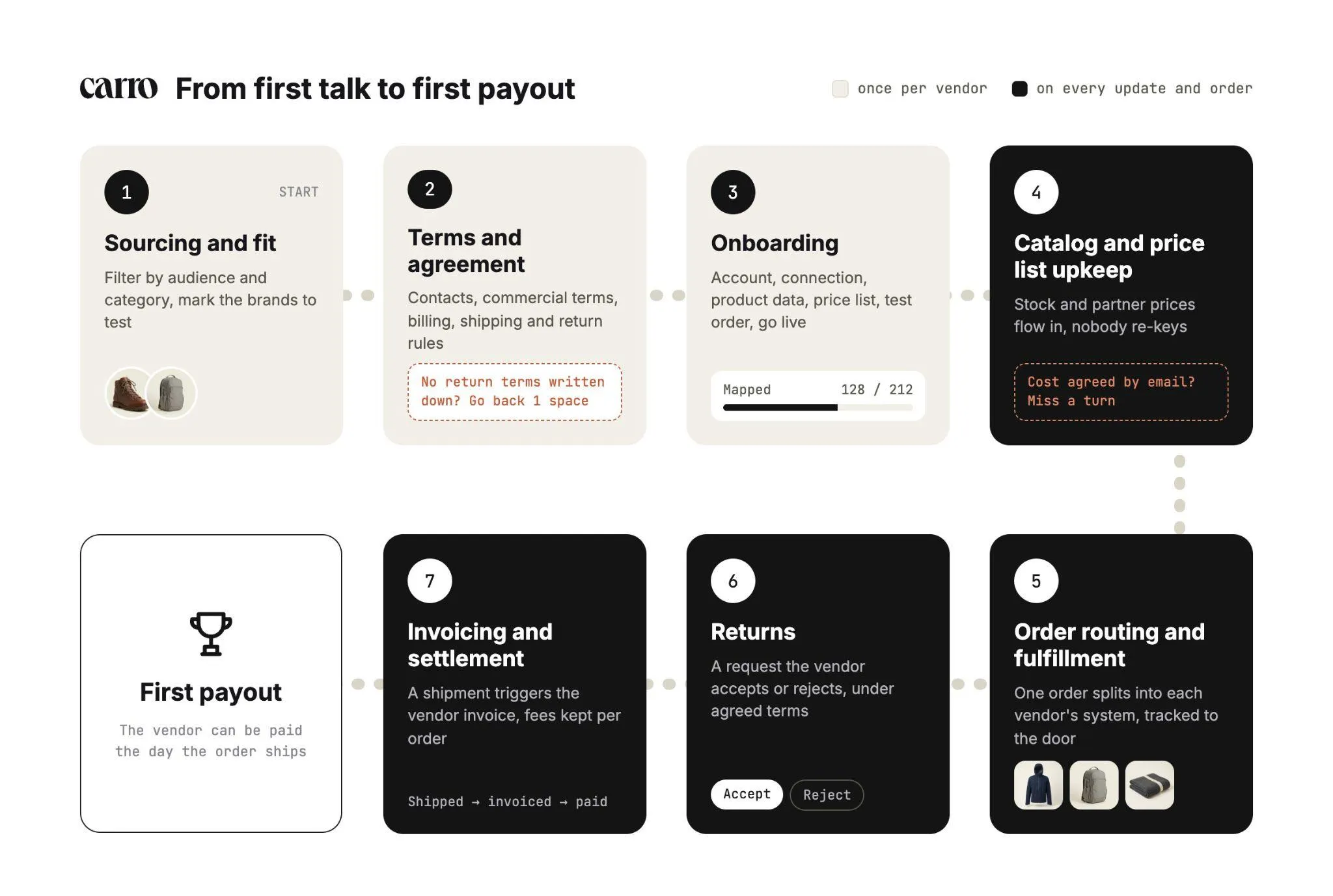
Stages one to three happen once per vendor. Stages four to seven repeat on every product update and every order.
What Is Vendor Management?
Vendor management is the work of choosing the companies that supply your products and running each relationship, from the agreed terms to the last invoice.
The term covers two different jobs, and the difference decides which tools and habits you need.
Procurement is the familiar version. This guide covers the other one: vendors who sell through your store.
1. Vendor Management in Procurement
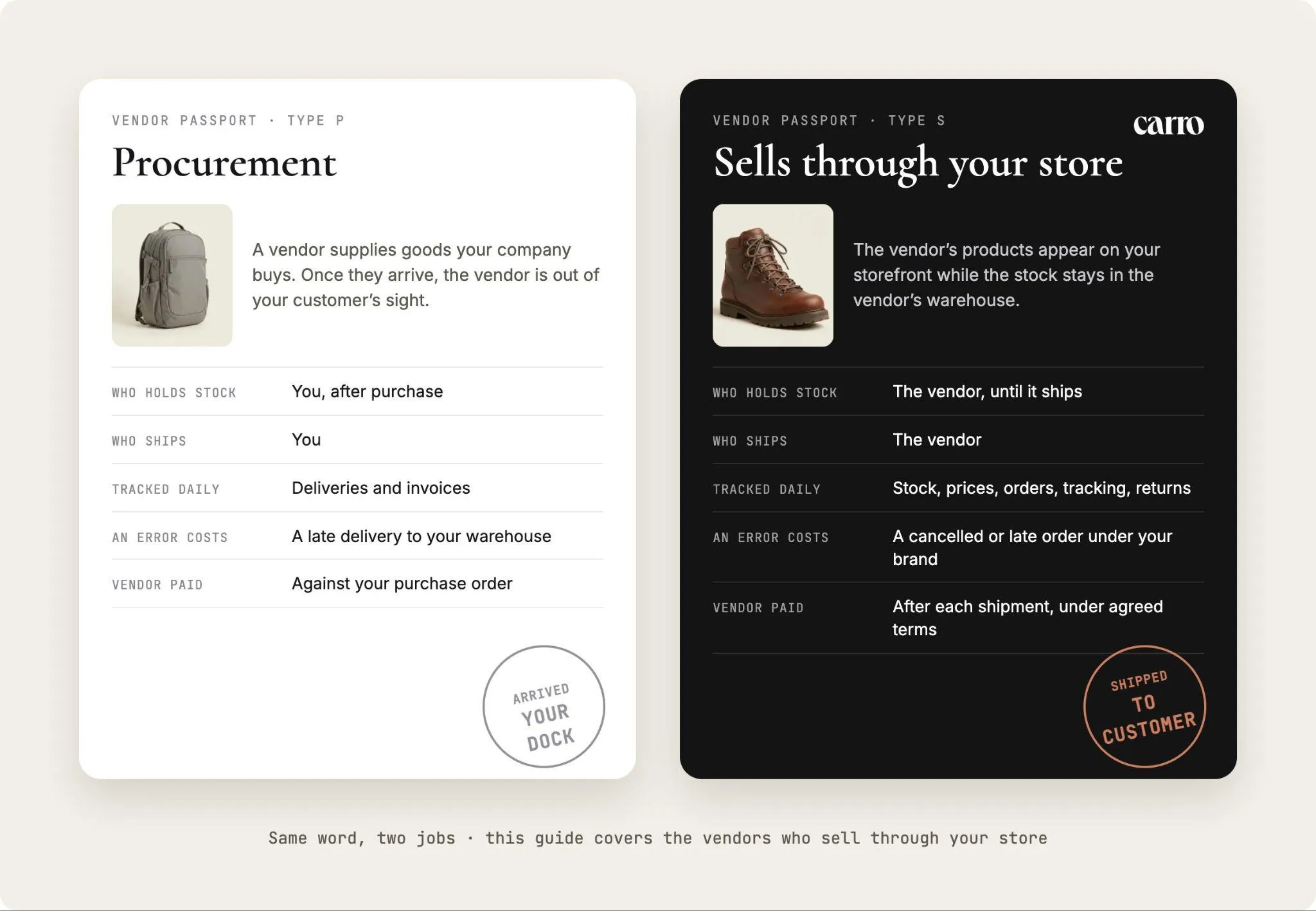
In procurement, a vendor supplies goods or services your company buys. You raise a purchase order, the goods arrive at your warehouse or office, and accounts payable pays the invoice.
The work centers on contracts, spend, supplier risk and payment terms. Once the goods arrive, the vendor is out of your customer's sight.
2. Vendor Management When Vendors Sell Through Your Store
In a dropship program or a marketplace, the vendor's products appear on your storefront while the stock stays in the vendor's warehouse. When a customer buys, the vendor ships the order directly.
You own the storefront, the price and the customer relationship, but the stock stays with the vendor until it ships. So every part of the vendor relationship shows up in your customer's order.
| Procurement vendor management | Vendors who sell through your store | |
|---|---|---|
| Who holds the stock | You, after purchase | The vendor, until it ships |
| Who ships to the customer | You | The vendor |
| What you track daily | Deliveries and invoices | Stock, prices, orders, tracking and returns |
| What a vendor error costs | A late delivery to your warehouse | A cancelled or late order under your brand |
| How the vendor gets paid | Against your purchase order | After each shipment, under agreed terms |
What Changes When Your Vendors Hold the Stock
When a vendor holds the stock, your storefront shows numbers you don't control. The quantity on a product page comes from the vendor's system, and so does the cost behind your margin.
If those numbers go stale, your store sells units the vendor no longer has. A stale catalog sells what cannot be shipped, and the cancellation email goes out under your name.
The order itself also leaves your hands at checkout. Each order has to reach the right vendor in a format their system accepts, and tracking has to come back so your team can answer a customer who asks where their parcel is.
Money moves differently too. Each sale splits between your retail price, the vendor's cost, partner fees and processing charges, and both sides need the same figures to settle without a reconciliation call.
AI shopping agents read the same data. An agent buys from what it can read: accurate stock, accurate prices and product data it can trust.
That's why vendor management for this model is mostly operational. The contract matters, and so do the stock feed, the price list, the order path and the invoice that follows each shipment.
The Vendor Management Process (Stage by Stage)
The vendor management process below runs from the first conversation with a vendor to the payout on its first shipped order. Each stage has an owner and a clear output, so you can see where any vendor stands at a glance.
Stages two and three take a vendor from a signed agreement to a sellable product. Connections, product data, partner prices, billing details and shipping setup all need coordinating before the first order.
1. Sourcing and Fit
Start from your customers, then find vendors that fit them. Filter by audience and category, for example outdoor shoppers aged 25 to 44 and trail footwear, then review which brands match.
On Carro, Account Managers hand-match retailers with complementary brands from a network of 1,500,000 products. You can also connect the vendors you already work with, so curated introductions sit alongside your existing relationships.
Mark the vendors you want to test and move them to terms. Testing a new brand on real demand needs no purchase order, so you can try two brands in a category before committing to either.
For a structured way to judge new partners, our supplier acquisition guide covers outreach and fit, and our guide on how to evaluate supplier product quality covers the checks to run before you list.
2. Terms and Agreement
Agree the commercial basics before any connection work starts. That means contacts on both sides, commercial terms, return rules, billing details and shipping setup.
Return terms deserve the most attention at this stage. A vendor whose return policy nobody wrote down becomes a stuck refund the first time a customer sends something back.
With Carro's Merchant Services, you can skip a separate supply agreement per vendor for the inventory Carro represents. Carro holds the authorization to represent products from brands and distributors in agreed selling channels, so one commercial relationship with Carro covers that inventory.
3. Onboarding
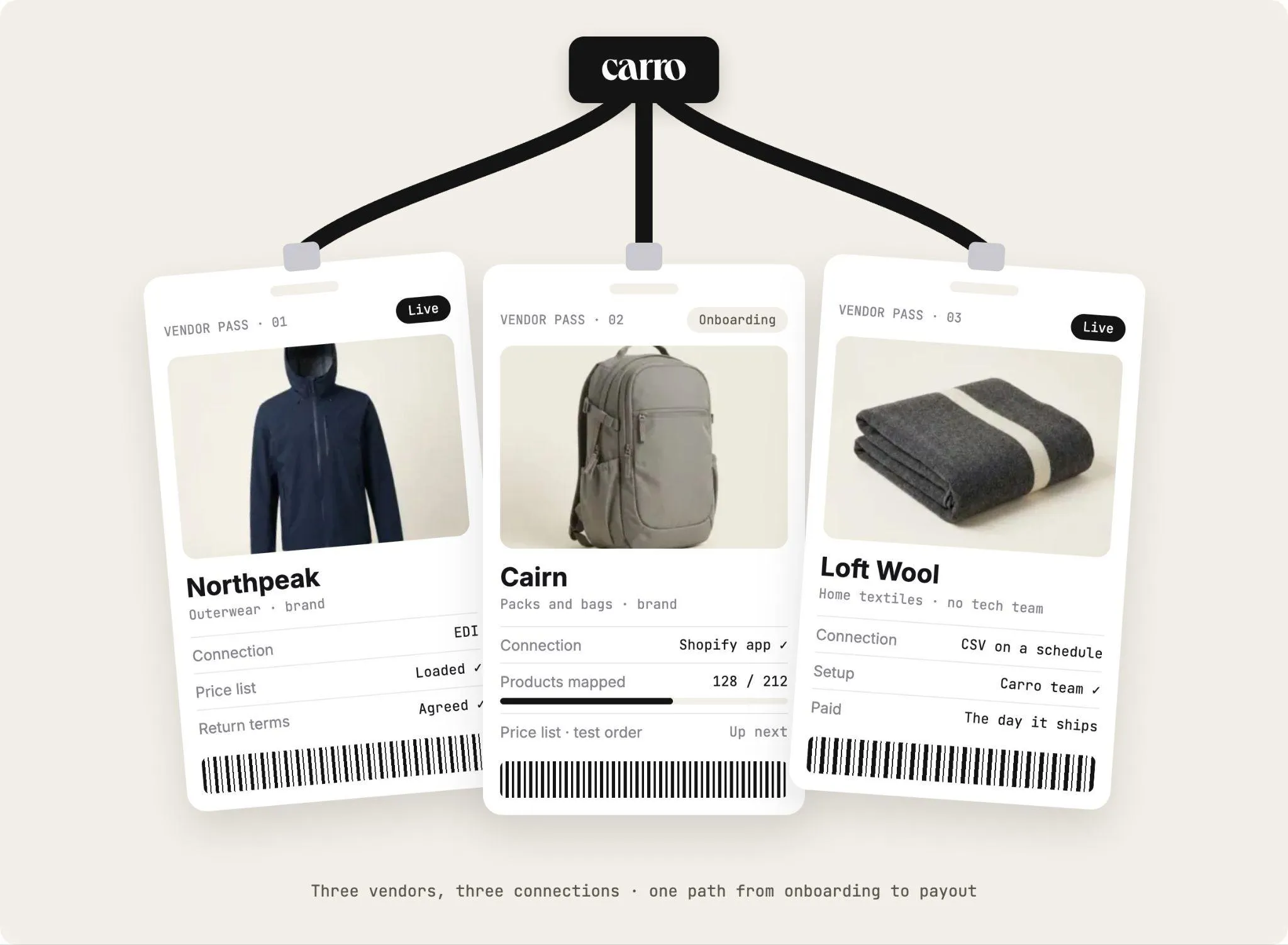
Onboarding takes a vendor from signed terms to products your customers can buy. On Carro, it runs as a defined sequence with visible progress: account details, connection, product data, partner price list, test order and go live.
The connection is chosen to fit each vendor's actual setup: a commerce app, an API, EDI or files on a schedule. Vendors without technical teams are supported, and the Carro team works on the setup with them.
Progress stays visible for every vendor. A team might see that one vendor has its Shopify app installed and 128 of 212 products mapped, with the price list and test order still to come.
Our marketplace vendor onboarding guide walks each of those steps in detail, including where vendors tend to stall.
4. Catalog and Price List Upkeep
Once a vendor is live, its catalog needs to stay current without anyone re-entering data. Partner products arrive through the connection each vendor uses, with descriptions, images and variants mapped to the fields that connection supports.
Stock moves from the vendor's system on the cadence the connection supports. Partner price lists set the cost for each relationship, so your team stops re-keying numbers whenever a vendor changes them.
Your edits change your copy of a product, and the vendor's original stays as the vendor wrote it. Validation flags data problems before launch, and merchandising rules apply your conventions to published content.
5. Order Routing and Fulfillment
A customer order with products from three vendors needs to reach three different systems. On Carro, a single order can split into separate vendor orders, each routed into the system that vendor already works in, with nothing re-keyed.
Each order carries a documented state, from confirmed at the vendor through shipped with tracking information. Failed charges, SKU mapping errors and stalled orders appear in an exceptions view with the detail needed to act on them.
The sale stays under your brand while the vendor packs and ships behind the scenes. Our guide on how to automate inventory management covers how stock and order flows connect across vendors.
6. Returns
Returns are where unclear terms cost the most. On Carro, a return runs as a request the vendor accepts or rejects, under the terms and refund settings agreed with that vendor.
Return acceptance and refunds stay separate steps. A return credit lands against the order it belongs to.
7. Invoicing and Settlement
Settlement closes the loop on every order. On Carro, a shipment triggers the vendor invoice under the agreed settings, with configured delays where a program needs them.
Billing charges the retailer and credits the vendor through the connected payment account, available in Stripe-approved countries. Vendors can be paid the day the order ships, and automated billing and manual invoicing are both supported.
Product cost, partner fees and processing charges stay separate within each vendor relationship. A commission and a shipping cost each land against the order they belong to, and a failed charge follows the configured process until a person acts on it.
The Vendor Management Workflow: Eight Steps From Connection to Reconciliation
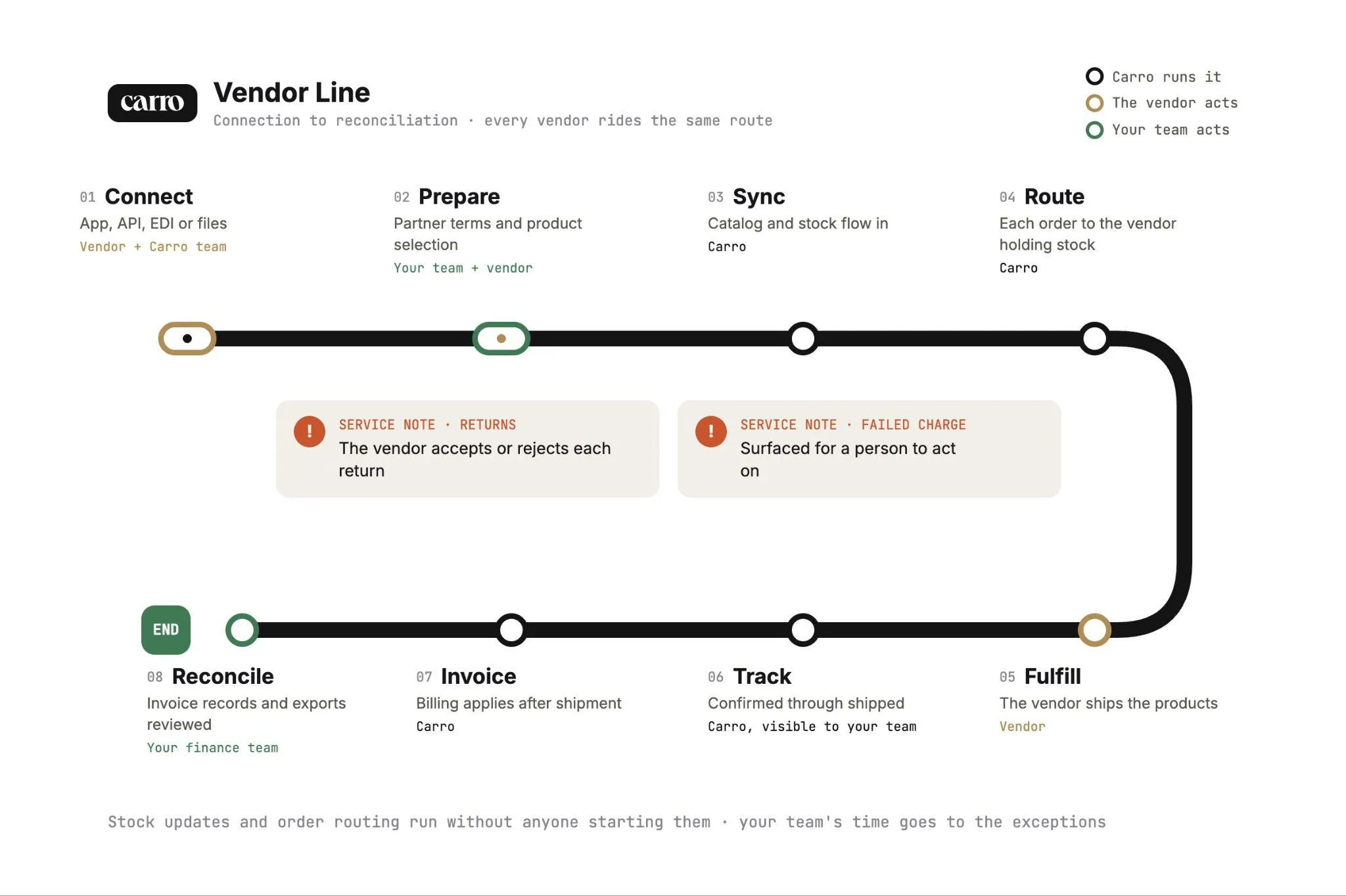
The vendor management workflow sits inside the process: it's the repeatable path every vendor, product update and order follows once the relationship is set up.
On Carro, that workflow has eight steps, and the table shows who acts at each one.
| Step | What happens | Who acts |
|---|---|---|
| Connect | The vendor links through a commerce app, API, EDI or files | The vendor, with the Carro team |
| Prepare | Partner terms and product selection are set | Your team and the vendor |
| Sync | Catalog and inventory updates flow from the vendor's system | Carro |
| Route | Each order is sent to the vendor that holds the stock | Carro |
| Fulfill | The vendor ships the products | The vendor |
| Track | Shipment status is followed from confirmed to shipped | Carro, visible to your team |
| Invoice | The configured billing setup applies after shipment | Carro |
| Reconcile | Invoice records and exports are reviewed | Your finance team |
Returns and failed charges always need a decision from someone. The vendor accepts or rejects each return, and a failed charge is surfaced for a person to act on.
Stock updates and order routing run without anyone starting them, and a shipment triggers the vendor invoice under the agreed settings. Your team's time goes to the exceptions that need a decision.
Vendor Management Best Practices
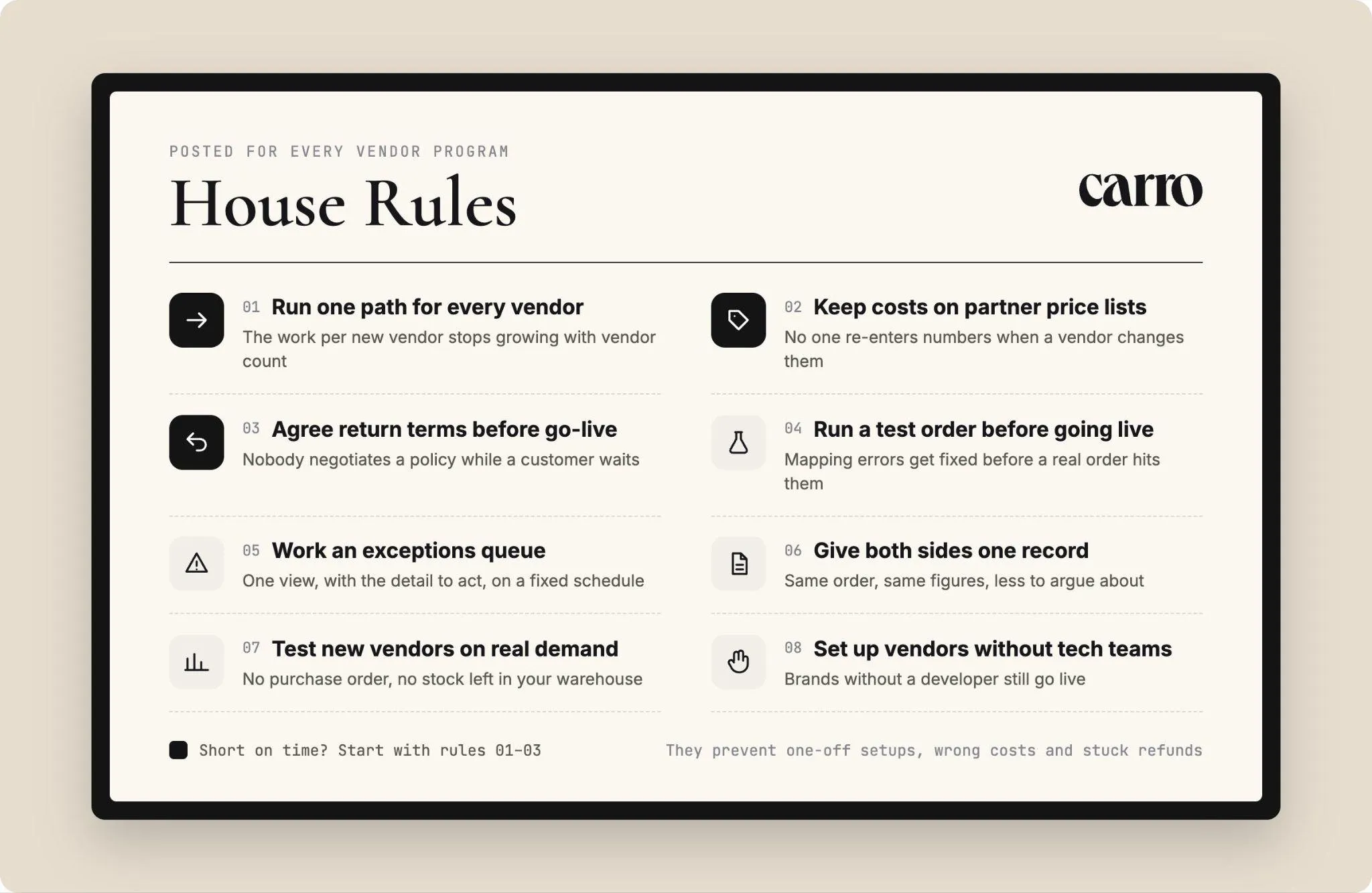
These eight vendor management best practices come straight from how the stages above fail when they're skipped. Each one is something your team can put in place for the next vendor you onboard.
Start with the first three if you're short on time. They prevent the problems that cost the most to fix later: one-off setups, wrong costs and stuck refunds.
1. Run One Path for Every Vendor
Give every vendor the same onboarding sequence and the same order path. When each vendor gets its own spreadsheet, mapping or script, the work grows with every vendor you add.
With one path, the work each new vendor costs stops growing with the number of vendors.
2. Keep Costs on Partner Price Lists
A cost agreed by email lives in someone's inbox. When the vendor changes it, someone has to notice, find every affected product and re-enter the number.
Load each vendor's costs as a partner price list from day one. Each vendor relationship gets its own price list, so your team stops re-entering numbers when a vendor changes them.
3. Agree Return Terms Before Go-Live
Collect return terms with the contacts and commercial terms in stage two. Cover who accepts returns, where they ship back to and how refunds are settled.
When the first return arrives, the request runs under terms both sides already agreed. Nobody has to negotiate a policy while a customer waits.
4. Run a Test Order Before Any Product Goes Live
Place a test order before a vendor's products go live. It checks fulfillment, tracking and invoicing end to end, on the vendor's real connection.
Any mapping error the test order finds gets fixed before a real customer's order hits it.
5. Work an Exceptions Queue With the Detail to Act
Every vendor program sees failed charges, SKUs that don't map and orders that stall at the vendor. How quickly your team sees them decides how many customers notice.
Keep exceptions in one view with the detail needed to act, and review it on a fixed schedule. A repeating SKU mapping error points to one mapping to fix at the source.
6. Give Both Sides One Record
Reconciliation calls happen when the retailer and the vendor each keep their own figures. Every disagreement becomes a hunt for whose spreadsheet is right.
When retailer and vendor read the same order and the same figures, invoice disputes have less to argue about. On Carro, invoice, batch invoice and payout records carry the fee and net detail finance needs.
7. Test New Vendors on Real Demand
Add a new vendor's products, sell them to real customers and keep what sells. There's no purchase order and no category forecast to make before demand is proven.
What doesn't sell can come off the store without leaving stock in your warehouse. That keeps your assortment curated and your balance sheet free of slow sellers.
8. Give Vendors Without Technical Teams Hands-On Setup
Many of the brands worth carrying have no developer. If your vendor management process assumes an API, those brands never go live.
Offer connections that fit each vendor, from a commerce app to files on a schedule, with hands-on help for the setup. On Carro, the Carro team works on the setup directly with vendors that have no technical team.
When Spreadsheets Stop Working for Vendor Management
Most vendor programs start on spreadsheets, and that works while the vendor list is short. The signs below show the point where the files start costing more time than they save.
If these signs describe your program, it's time to move vendor management into one system. Our article on inventory management in Excel covers how to migrate without losing data.
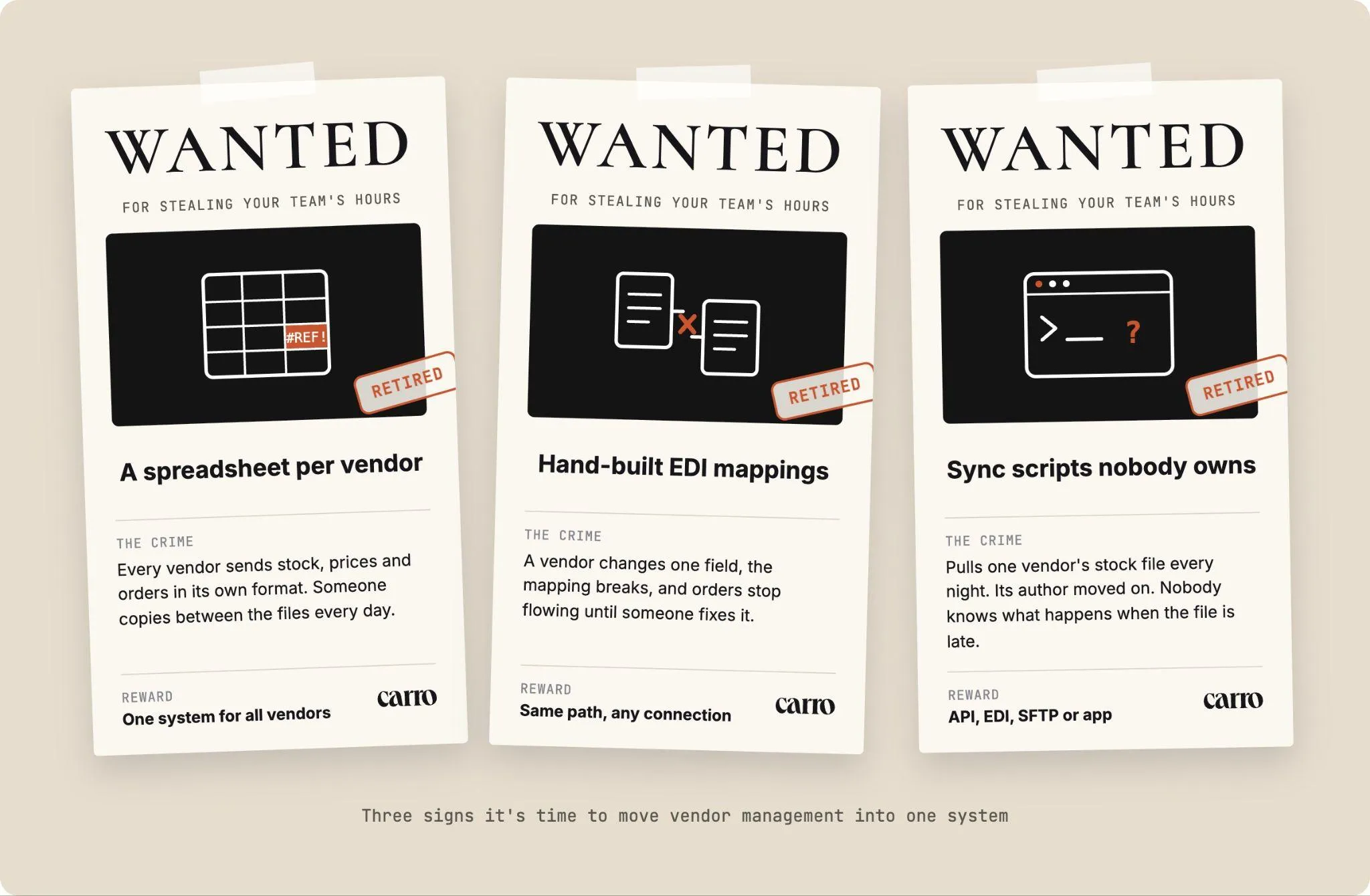
1. A Spreadsheet Per Vendor
Each vendor sends stock, prices and orders in its own format, and each one gets its own file. Someone on your team spends part of every day copying between them.
On Carro, onboarding, product data, orders and payouts run in one system, so nobody copies between vendor files.
2. Hand-Built EDI Mappings
Your larger vendors exchange EDI documents, and each connection was mapped by hand. When a vendor changes a field, the mapping breaks and orders stop flowing until someone fixes it.
Retailers can add vendors on Carro while their agreed EDI connections keep running. New vendors follow the same path as the last one, whichever connection they use.
3. Sync Scripts Nobody Wants to Own
A developer wrote a script to pull one vendor's stock file every night. That developer has moved on, and nobody knows what happens when the file arrives late.
Replacing scripts like these is what Carro's Modernize use case covers. Carro connects through an API, EDI, SFTP or a commerce app, so your surrounding systems stay where they are.
How Carro Runs Vendor Management for Dropship and Marketplace Programs
Carro is a dropship platform that connects brands, retailers and marketplaces through product data, orders and settlement. Vendor setup, catalog updates, order routing and billing run in one workflow, from the products a retailer chooses to the vendors who ship them.
Carro runs beside your existing payments, shipping, ERP and accounting systems. There's no replatform or custom build, and implementation stays short.
For Retailers and Marketplaces
Each of Carro's five modules runs one or more stages of the vendor management process.
| Carro module | Process stages it runs | What your team gets |
|---|---|---|
| Merchant Services | Sourcing and fit, terms | One commercial relationship for network inventory, filtered by audience and category |
| Supplier Onboarding | Terms, onboarding | A defined sequence with visible progress, and hands-on setup for vendors without technical teams |
| Catalog & Inventory | Catalog and price list upkeep | One catalog, with stock and prices kept in sync |
| Order Execution | Order routing, fulfillment, returns | Orders split and routed into each vendor's system, tracked to the door |
| Payment Settlement | Invoicing and settlement | Invoices triggered by shipment, with fees and payouts kept per order |
If you're weighing inventory management software for a program where vendors hold the stock, this is the layer to look at. It covers the stock you list but don't own, from the vendor's system to your storefront.
For Brands and Distributors
Vendor management runs both ways. A brand selling through retailers needs control over who carries its products and on what terms.
On Carro, brands approve each retailer before it lists them, set a price and margin per partner, and see which partners move which products.
Billing follows each shipment, so a brand can be paid the day an order ships. Brands can see the full setup on the Carro for suppliers page.
Proof From Teams Running It
PacSun's Dropship Coordinator describes faster product launches, testing brands without owning inventory and the vendors the Carro support team helped onboard. Read the PacSun dropship program story for the details.
The FairGround migrated from Onport to Carro and runs a vetted-brand marketplace with a small, part-time team. The Carro support team met brands directly to get them connected, including brands with no technical resources, as covered in the FairGround success story.
Eric Flores, a Drop Ship Coordinator, put it this way: "Carro has improved the way we manage suppliers, orders, and catalog operations, allowing us to set new products live much faster than before."
Across Carro retailers, reported results reach up to 3.5x revenue growth, up to 180% AOV growth and up to 3x catalog size.
Everything You Need to Know About Vendor Management
The table below condenses this guide for anyone scoping a vendor program or preparing for a vendor review.
| Topic | What you need to know |
|---|---|
| Definition | Vendor management covers choosing, onboarding, operating and paying the vendors that supply your products. |
| Two meanings | Procurement vendors sell to you; dropship and marketplace vendors sell through you and ship to your customers. |
| Process stages | Sourcing and fit, terms and agreement, onboarding, catalog and price list upkeep, order routing and fulfillment, returns, invoicing and settlement. |
| Workflow steps | Connect, Prepare, Sync, Route, Fulfill, Track, Invoice, Reconcile. |
| Where people decide | Which vendors join, return acceptance (by the vendor) and failed charges. |
| Stock timing | Stock moves on the cadence each vendor's connection supports. |
| Costs | Partner price lists set the cost for each relationship. |
| Returns | Requests the vendor accepts or rejects under agreed terms, with refunds as a separate step. |
| Settlement | Shipment triggers the vendor invoice, with cost, fees and processing kept separate per order. |
| Best practices to start with | One path for every vendor, partner price lists and return terms agreed before go-live. |
| Spreadsheet warning signs | A file per vendor, hand-built EDI mappings and scripts nobody owns. |
| Where Carro fits | One workflow from vendor setup to settlement, across 1,500,000 products and connections by EDI, API, SFTP, CSV or commerce apps. |
| Reported results | Carro retailers report up to 3.5x revenue growth, up to 180% AOV growth and up to 3x catalog size. |
Take the workflow and settlement rows into your next finance conversation, since those decide how much reconciliation falls to the team. Bring your current vendor list and systems to a demo to see each stage run on your own program.
Why Carro Is the Right Move
Three things set Carro apart for teams managing vendors who hold the stock:
1. One workflow from setup to settlement: Vendor onboarding, catalog and inventory sync, order routing, fulfillment tracking, invoicing and payouts run in a single workflow. Every new vendor follows the same path as the last one.
2. Connections on each vendor's terms: Shopify, Magento 2, WooCommerce and BigCommerce, plus EDI, API, SFTP, CSV and commerce apps, all connect without a replatform. Vendors without technical teams get hands-on help from the Carro team.
3. Settlement that follows the shipment: A shipment triggers the vendor invoice, the retailer is charged and the vendor is credited, with cost, fees and returns tied to the order. Both sides read the same record.
Carro is built for retailers running dropship programs and marketplace operators adding sellers faster than they can add staff. It also fits brands that want control over who sells their products.
For teams moving off a legacy dropship platform, Carro has already moved the customer bases of Modern Dropship and Onport.
Bring your vendor list, your current systems and the work that slows your team down to a demo. You'll see how Carro connects your program from vendor setup to settlement.
FAQs About Vendor Management
What is vendor management?
Vendor management is the work of choosing, onboarding, operating and paying the companies that supply the products you sell. For retailers and marketplaces whose vendors hold the stock, it runs across seven stages, from sourcing and terms to returns and settlement. Carro runs vendor setup, catalog updates, order routing and billing for dropship and marketplace programs in one workflow.
What are the steps in the vendor management process?
The steps in the vendor management process are sourcing and fit, terms and agreement, onboarding, catalog and price list upkeep, order routing and fulfillment, returns, and invoicing and settlement. The first three happen once per vendor. The last four repeat on every product update and every order.
What is the difference between a vendor management process and a vendor management workflow?
The difference between a vendor management process and a vendor management workflow is scope. The process covers the whole vendor relationship, from sourcing to settlement. The workflow is the repeatable path each vendor, product update and order follows, which on Carro runs in eight steps: Connect, Prepare, Sync, Route, Fulfill, Track, Invoice and Reconcile.
What are vendor management best practices?
Vendor management best practices for dropship and marketplace programs start with one onboarding path for every vendor and costs kept on partner price lists. Agree return terms before go-live and run a test order before any product sells. Work exceptions from one queue, and give retailer and vendor the same record of every order.
Can I bring the vendors I already work with?
You can bring the vendors you already work with to Carro and add brands from the Carro network alongside them. Each vendor connects through a commerce app, API, EDI, SFTP or CSV files, with hands-on help for vendors without technical teams. Retailers can keep their agreed EDI connections running while new vendors are added.
What is the best vendor management software for dropship and marketplace programs in 2026?
The best vendor management software for dropship and marketplace programs in 2026 is Carro, because it runs vendor onboarding, catalog sync, order routing and settlement in one workflow. It connects Shopify, Magento 2, WooCommerce and BigCommerce stores to a curated network of 1,500,000 products. Carro retailers report up to 3.5x revenue growth.
How do I get started with Carro?
You get started with Carro by booking a demo through the Carro website. Bring your vendor mix, your current systems and the work that slows your team down. The Carro team will walk through how your program connects from vendor setup to settlement, and vendors come onto the network in days.
We already manage vendors in our ERP. Why add Carro?
Managing vendors in your ERP covers the accounting side, and Carro runs beside it with no replacement project. Carro adds the operational layer for vendors who hold the stock: catalog and stock sync, order routing into each vendor's system, tracking and settlement per order. Your ERP, payments, shipping and accounting systems stay where they are.