How to Automate Inventory Management for Your Dropship or Marketplace in 2026
Win back the hours your team spends on supplier files and oversell refunds. Here is how to automate inventory management in seven steps. Read the 2026 guide.
Ask a dropship coordinator where Monday morning goes, and the answer is often a folder of supplier stock files waiting to be matched against storefront SKUs.
That folder is the best place to start if you want to know how to automate inventory management for a retailer or marketplace. Most of the stock in your catalog sits in someone else's warehouse.
Warehouse guides, and most inventory management software built for warehouse teams, cover barcode scanners, reorder points and cycle counts. Those tools act on units you own, while your program lists thousands of units it never receives or counts.
What you automate is the information moving between you and each supplier. That means the quantity they report, the cost on their price list, the product data, the order you pass them, the tracking number and the invoice.
Each new supplier adds another copy of that work. A spreadsheet and a shared inbox can carry a handful of suppliers. By a few dozen, the same routine can fill most of someone's week.
You can win most of those hours back! This guide starts with a one-week audit, then walks you through a seven-step plan, a process table, the returns flow and four numbers that prove the automation is paying off.
If your open question is which SKUs to own at all, our guide on how to improve inventory management covers that decision. This one assumes partners supply part of your assortment and shows you how to run it day to day.
Key Takeaways (TL;DR)
- What you're automating: information about stock you don't hold, as quantities, costs, product data, orders, tracking and invoices move between your store and each supplier.
- One-week audit first: before you pick any tool, measure six tasks (supplier files, price re-entry, oversell corrections, order re-keying, tracking chases and invoice assembly).
- SKU mapping goes first: stock sync, cost updates and order routing all match on it, so one clean mapping pays off in every later step.
- Connection per supplier: a platform app, an API, EDI or a CSV file on SFTP can all feed one catalog, and suppliers with no technical team can connect too.
- Reserves on slow feeds: a supplier whose stock file lands once a day needs an agreed reserve on fast sellers, so your storefront stops selling units that are already gone.
- Human decisions: approving a partner, choosing what goes live, accepting a return and acting on a failed charge stay with a person.
- Four numbers to track: oversell rate, days to list a new supplier's products, hours per supplier per week and invoice disputes per month.
- Where Carro fits: one workflow from supplier onboarding to settlement, across a curated network of 1,500,000 products plus the partners you already work with.
How to Automate Inventory Management: at a Glance
The seven steps, what each one automates, and the manual work it takes off your team.
| Step | What gets automated | Manual work it removes | What stays with a person |
|---|---|---|---|
| Each supplier SKU and variant matched to one catalog record | Looking up supplier codes against your SKUs | Resolving codes that match nothing |
| Data arriving by platform app, API, EDI or scheduled file | Downloading, cleaning and uploading supplier files | Agreeing the method with each supplier |
| Stock updates on the cadence each connection supports | Pasting quantities and cancelling oversold orders | Setting reserves for slower feeds |
| Cost per supplier relationship, updated from the price list | Re-entering changed costs | Setting your retail price and margin |
| Data problems flagged before launch, your conventions applied | Hand-editing titles and tags | Writing the rules, choosing what goes live |
| Orders split and sent to the supplier holding each line | Re-keying orders into portals and emails | Handling a supplier who cannot ship |
| Failed charges, mapping errors and stalled orders in one view | Hunting for problems across inboxes | Acting on each exception |
Steps one and two are setup you do once per supplier. Steps three through seven keep running on every stock update, price list change and order, and that is where your weekly hours come back.
What You Can Automate, and What Stays a Decision
Hand automation every step where data moves from one system to another and nobody needs to judge it. A stock quantity and a tracking number both fit that description.
Judgment calls stay with people. On Carro, Account Managers hand-match retailers with complementary brands, and you choose which partners join before a single product reaches your store.
| Area | Runs on its own once set up | Stays a decision |
|---|---|---|
| Stock | Supplier quantities flowing into your catalog on the connection's cadence | Reserve levels agreed with suppliers whose files land once a day |
| Cost | Partner price list changes landing as product cost | Your retail price and the margin you accept |
| Product data | Descriptions, images and variants mapped to your fields, with validation flags | Which products go live, and your merchandising conventions |
| Orders | Splitting a multi-supplier cart and routing each supplier order | What to do when a supplier cannot fill a line |
| Returns | The return request reaching the supplier under agreed terms | The supplier accepting or rejecting the return, and the refund as its own step |
| Billing | Invoice on shipment, retailer charged, supplier credited | Acting on a failed charge |
| Partners | Onboarding sequence with visible progress per supplier | Approving a partner, or removing one that underperforms |
Return acceptance and the refund are separate steps, each under the terms and refund settings agreed with that supplier. A failed charge follows the configured process and lands in front of a person to act on.
The FairGround, a vetted-brand marketplace that moved to Carro from Onport, runs with a small, part-time team. Automation handles inventory, product descriptions, imagery and tagging, so the team can spend its time on curation.
As The FairGround puts it:
"Automating inventory and product tagging makes it easier to scale. It allows us to manage a curated selection of products effectively, keeping control over what goes live while growing the business."
Where the Manual Hours Go Today
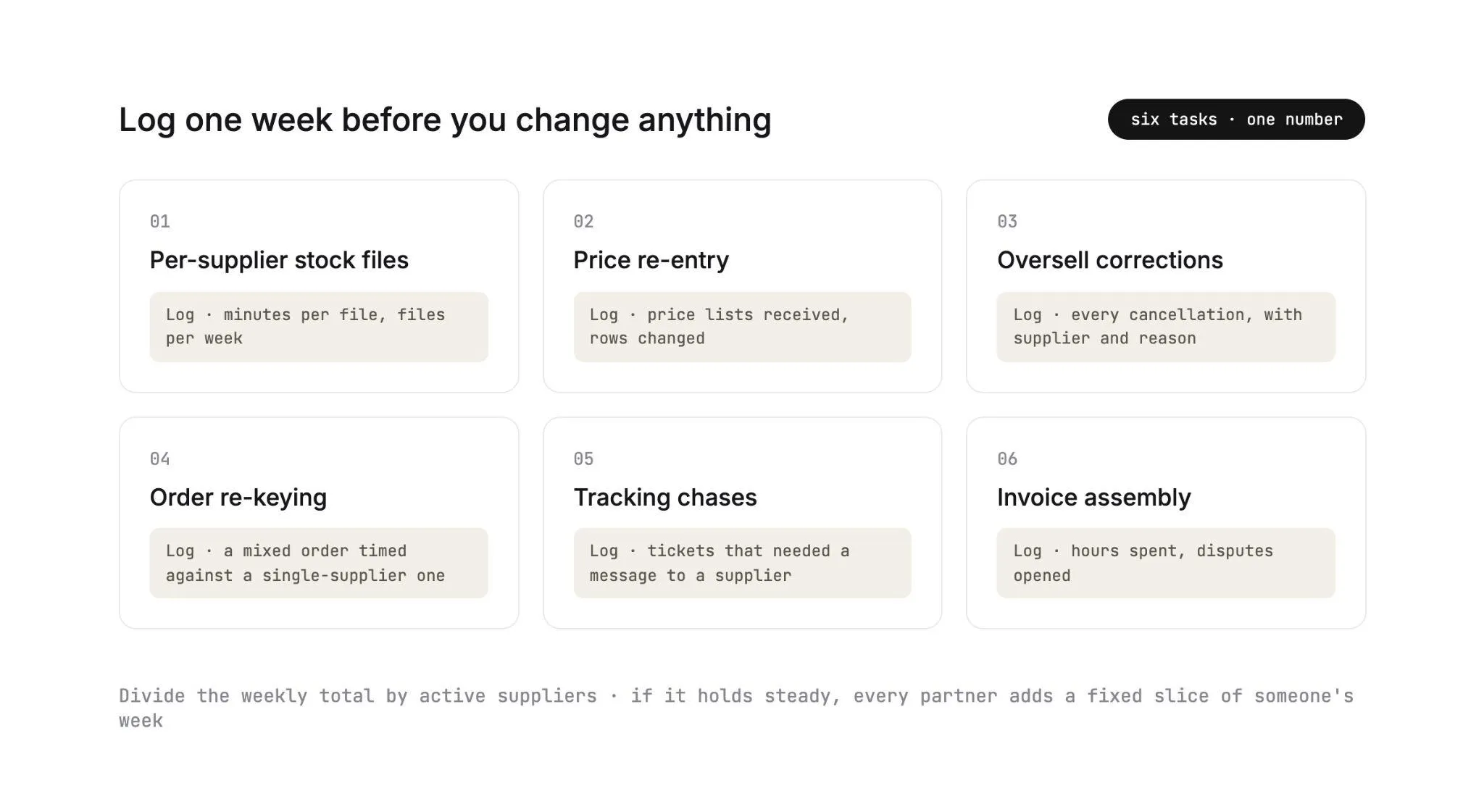
Spend one week logging time before you change anything. You will come out with a named, ranked list of what to automate first.
In most multi-supplier programs the hours fall into six tasks. Each one leaves a trail in the calendar and the inbox, so it is easy to measure.
1. Per-Supplier Stock Files
Every supplier sends stock in its own shape. One exports a CSV keyed on its own SKU codes, and another emails a spreadsheet with each size in a separate column.
Someone opens each file, matches the codes to your catalog and pastes the quantities in. Log the minutes per file and the number of files per week.
2. Price Re-Entry
Suppliers change wholesale costs every season, sometimes with little notice. When a new price list arrives, someone copies each changed cost into a spreadsheet and then into the store.
A missed row sells at the old margin until the monthly report catches it. Count the price lists received and the rows changed.
3. Oversell Corrections
An oversell happens when your storefront shows stock the supplier already sold, often through its own site or another retailer. Each one costs you a cancelled order and a refund, plus the hunt for whichever supplier file was stale.
IHL Group's 2026 Inventory Distortion Study puts the combined cost of out-of-stocks and overstocks at $1.7 trillion a year, or 6.2% of global retail sales.
Log every cancellation with the supplier name and the reason. By the end of the week, the stale feeds have names attached.
4. Order Re-Keying
A customer who buys from three brands in one cart creates three pieces of work. Someone splits the order by line and passes each part to the right supplier through a portal or an email.
Time a mixed order against a single-supplier one. The gap is your re-keying cost, and it grows with every brand you add.
5. Tracking Chases
Suppliers ship on their own schedules and send tracking numbers in their own formats. When a customer asks where a parcel is, someone messages the supplier and copies the number into the order once the reply arrives.
Count the order-status tickets that needed a message to a supplier before anyone could answer.
6. Invoice Assembly
At month end, finance rebuilds each supplier's invoice from order exports and supplier statements. Return credits, shipping charges and commissions get matched by hand.
When the totals disagree, the next step is a call to work out whose spreadsheet is right. Log the hours and the number of disputes opened.
Your One-Week Audit Sheet
| Task | What to log for one week | Sign it is costing you |
|---|---|---|
| Per-supplier stock files | Minutes per file, files per week | Stock in the store updated once a day or less |
| Price re-entry | Price lists received, rows changed | Margin surprises in the monthly report |
| Oversell corrections | Cancellations by supplier and reason | The same few suppliers behind most cancellations |
| Order re-keying | Minutes per mixed order | Orders waiting hours before a supplier sees them |
| Tracking chases | Status tickets that needed a supplier contact | Tracking numbers added to orders by hand |
| Invoice assembly | Hours at month end, disputes opened | Finance and suppliers reading different totals |
Divide the weekly total by the number of active suppliers. If that figure holds steady as the list grows, every new partner adds a fixed slice of someone's week.
Bending that line is the job automation has to do, and the seven steps below show you how. Our guide to cost reduction strategies in inventory management covers the cost side of the same work.
How to Automate Inventory Management in Seven Steps
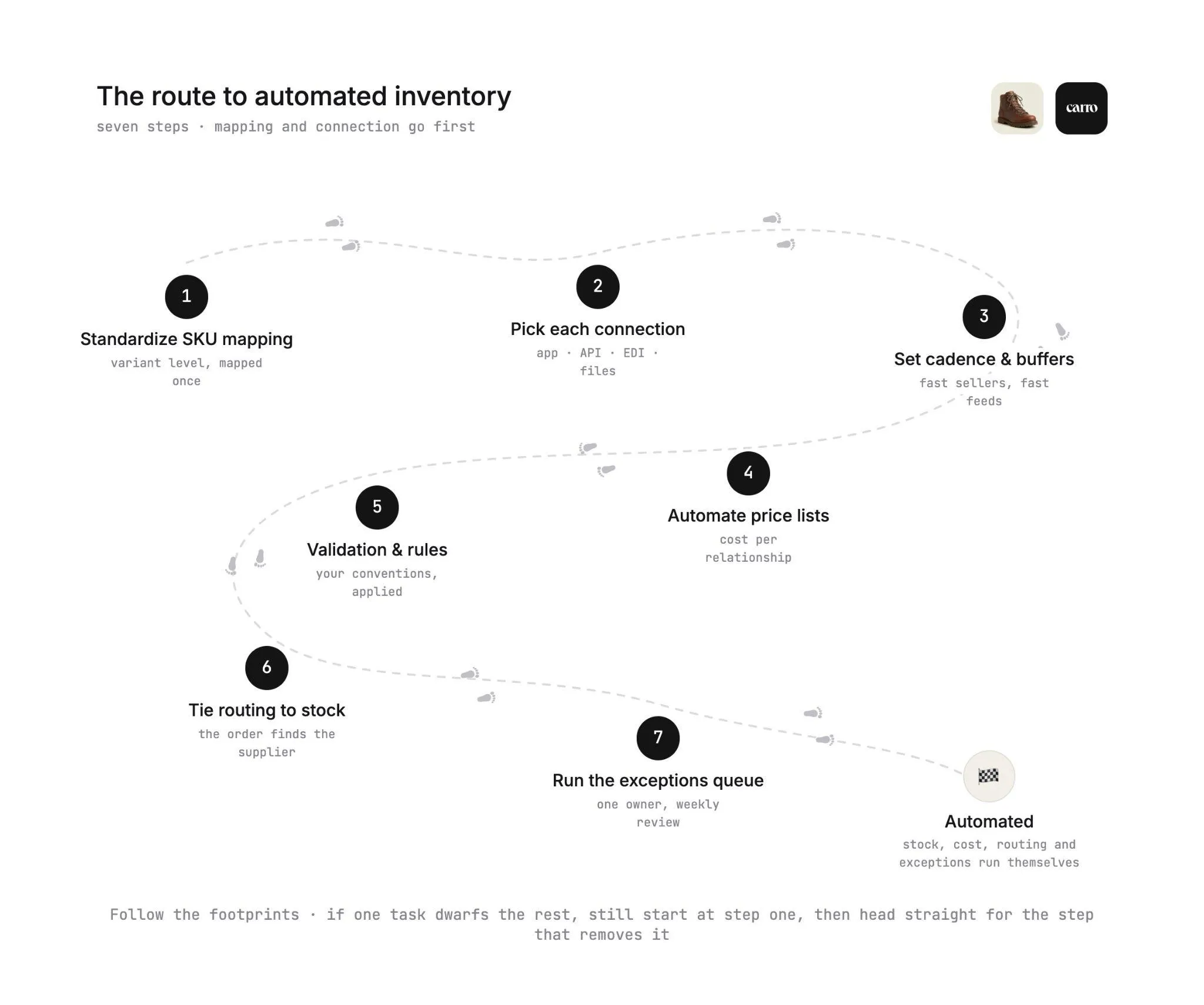
Here is the plan, ordered by dependency. Stock sync and order routing save the most recurring time, and both rely on a clean mapping and a working connection, so those two go first.
If your audit shows one task dwarfing the rest, still start at step one. Then push straight through to the step that removes that task before you polish anything else.
Step 1: Standardize SKU Mapping
Every later step looks up products through this mapping, so build it first. Your catalog and each supplier's system name the same product differently.
A trail shoe might be NP-TR2-BLK-10 at the supplier and TRAIL-RUNNER-2-BLACK-10 in your store. Every automation downstream needs to know those are one variant.
Map at the variant level. A boot in five sizes and two colors is ten mappings, and one missing mapping can oversell a size or leave an order line with no supplier to route to.
Use a stable key where the supplier provides one, such as a UPC or a GS1 GTIN, and keep one mapping per supplier relationship.
On Carro, partner products arrive with descriptions, images and variants mapped to the fields each connection supports. Onboarding shows progress in plain numbers, such as a supplier with its Shopify app installed and 128 of 212 products mapped.
Any SKU mapping error that slips through later lands in the exceptions view with the detail you need to fix it.
Manual work removed: looking up supplier codes against your SKUs, file by file.
Step 2: Pick the Connection per Supplier
Automation reads what a supplier can send, so choose the connection from the supplier's actual setup. Each supplier can use a different method while your team works from one catalog.
| What the supplier runs | Connection | What typically comes through it |
|---|---|---|
| A commerce platform such as Shopify | Platform app | Products, variants and stock from the supplier's store |
| An ERP or order system with developers | API | Stock, orders and tracking exchanged system to system |
| An established EDI program | EDI | Standard documents for inventory, purchase orders and ship notices |
| No technical team | CSV files, often over SFTP on a schedule | Stock and product data each time a file lands |
EDI documents follow the X12 standard. The 846 Inventory Inquiry/Advice carries stock levels, the 850 Purchase Order carries the order, and the 856 Ship Notice/Manifest describes what shipped.
Our guide to EDI for inventory management shows how those documents map to stock records.
Suppliers without technical teams can join too, and the Carro team works on the setup with them. The supplier onboarding sequence runs the same way for every supplier: account details, connection, product data, partner price list, test order, go live.
Manual work removed: downloading, cleaning and uploading supplier files.
Step 3: Set Sync Cadence and Buffers
Close the gap between the supplier's shelf and your storefront, and you cut oversells at the source. Stock moves from each supplier's system on the cadence its connection supports.
An app or API connection can pass a change along soon after it happens. A CSV that lands every morning describes the supplier's warehouse as it stood when the file was written.
The gap matters because the supplier sells the same units elsewhere, through its own site and through other retailers. On a fast seller, a morning file can be wrong by early afternoon.
Shoppers notice stale availability. In GreyOrange's 2026 Eye on Inventory Report, 57% of US shoppers surveyed had found items marked available online that were out of stock in stores.
Set a buffer for that gap. Ask suppliers on slower feeds to report quantities net of a small reserve on fast-moving items, or to report zero once a variant falls below an agreed threshold.
Review the agreement per supplier, since a reserve that protects a fast seller can hide real availability on a slow one.
Our explainer on how inventory management software works shows where sync lag enters the system and why it causes oversells.
Manual work removed: pasting quantities, and the cancellations that follow a stale file.
Step 4: Automate Partner Price Lists
A changed wholesale cost is the second number that goes stale. Partner price lists keep it current, one supplier relationship at a time.
On Carro, partner price lists set the cost for each relationship. When a supplier changes a price list, the new cost lands without anyone re-entering it.
Brands on the network set a price list per retail partner, so the cost you see belongs to your relationship. You set the retail price and the merchandising, and the sale stays under your brand.
Decide in advance what a cost change means for your retail price. One team holds the price and absorbs small changes, and another reviews every change above a set percentage. Write your rule down, and every price-list email becomes a routine check.
Manual work removed: copying changed costs into spreadsheets and then into the store.
Step 5: Add Validation and Merchandising Rules
Make products from 30 suppliers read like one store. Supplier product data arrives written to each supplier's conventions, with its own title format and its own tags.
Validation flags data problems before launch. Merchandising rules then apply your conventions to published content, so a title pattern or a tagging scheme holds across every brand. Edits change your copy of a product and leave the supplier's original as it is.
Selection stays manual by design. Teams filter by supplier or brand and select products one at a time or in bulk, and Carro's catalog and inventory module keeps stock and prices on those products current.
Manual work removed: hand-editing titles and tags for every new product.
Step 6: Tie Order Routing to Stock
With stock and cost current, your orders can route themselves. A single customer order splits into separate supplier orders, each routed into the system that partner already works in, with nothing re-keyed.
Routing reads the same mapping as stock sync. The trail shoe line goes to the supplier that holds the shoe, and the 28-liter pack line goes to the brand that makes the pack, all from one checkout.
Each supplier order then carries a documented state, from confirmed at the supplier through shipped with tracking.
Order execution covers that path in detail, and our dropshipping automation guide walks through every stage after checkout.
Manual work removed: splitting carts by hand and chasing suppliers for tracking.
Step 7: Run an Exceptions Queue
Some orders will still go wrong, and each one needs a person with enough detail to act on it. An exceptions queue puts those orders in one place, so your team sees them before a customer writes in.
On Carro, failed charges, SKU mapping errors and stalled orders appear in an exceptions view with that detail attached. A failed charge follows the configured process and is surfaced for someone on your team.
A stalled order shows its documented state, so you can see exactly where it stopped.
Review the queue on a fixed day each week and group it by supplier. When two suppliers produce most of the exceptions, the fix starts with a conversation with those two, and a partner that keeps underperforming can be removed.
Manual work removed: hunting for problems across inboxes and customer tickets.
How to Automate Inventory Management Processes Across Suppliers
Here is every recurring process in a multi-supplier program, by hand and automated, with the event that sets it off.
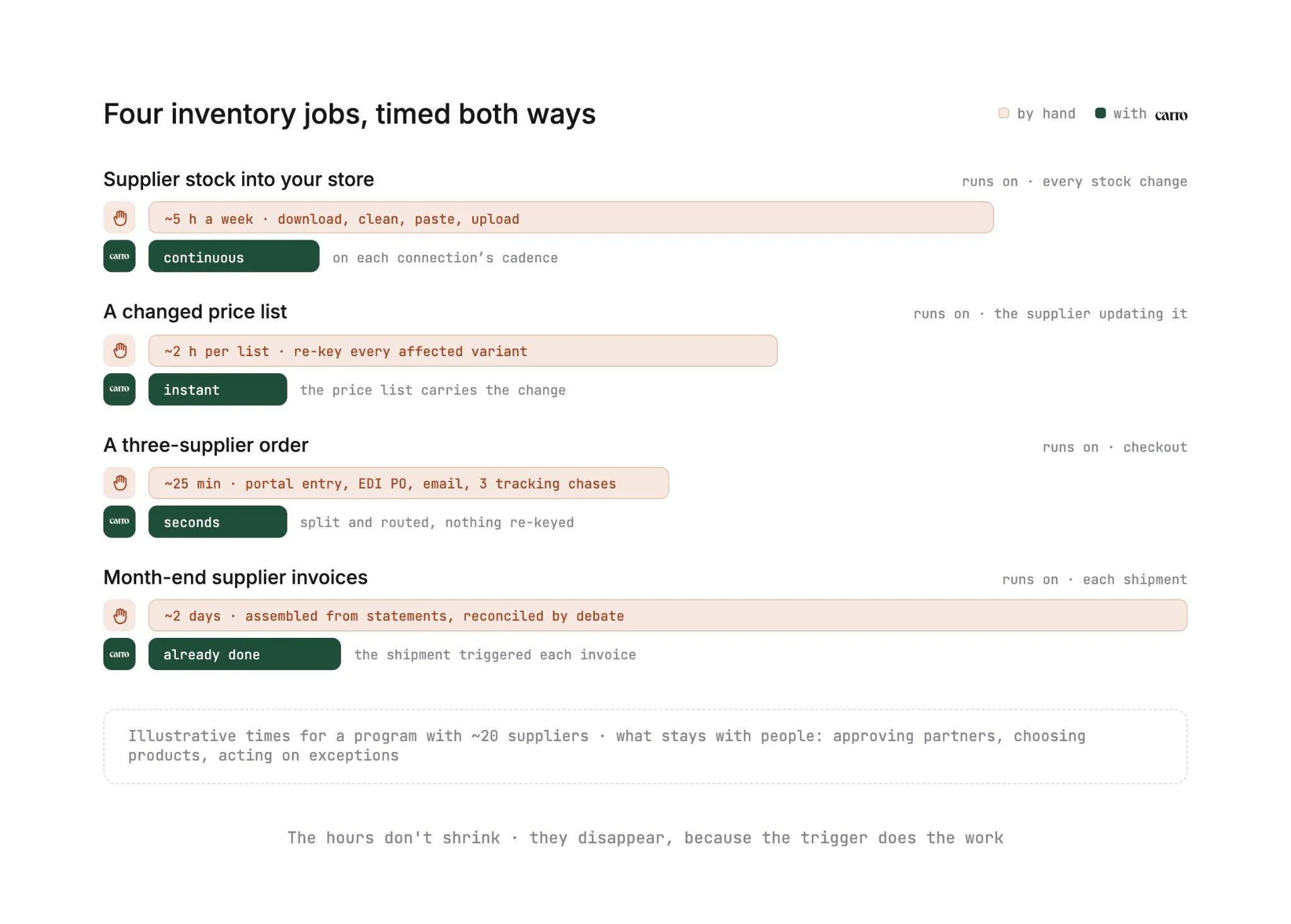
| Process | Manual version | Automated version | Trigger |
|---|---|---|---|
| Stock update | Download each supplier file and paste quantities | Quantities flow from the supplier's system into the catalog | Supplier stock change or scheduled file |
| Cost update | Re-key the new price list into a sheet and the store | Partner price list sets the cost for that relationship | Supplier updates its price list |
| New product listing | Copy descriptions, resize images, build variants | Products arrive mapped, validation flags gaps, rules apply your conventions | Your team selects products |
| Order split | Read the cart and email each supplier its lines | One order becomes supplier orders routed to each system | Customer checkout |
| Fulfillment status | Message suppliers for tracking | Documented state from confirmed to shipped with tracking | Supplier ships |
| Supplier invoice | Build invoices from statements at month end | Shipment triggers the invoice under agreed settings | Shipment |
| Payment | Manual transfers and remittance emails | Retailer charged, supplier credited through the connected payment account | Invoice |
| Return | Email thread with the supplier | Request the supplier accepts or rejects, credit lands on the order | Customer return request |
| Exceptions | Found when a customer complains | Exceptions view with the detail needed to act | Failed charge, mapping error or stalled order |
Read the trigger column first. Every automated row starts from an event, such as a checkout or a shipment, and runs without anyone opening a file.
The rows share records, which is where the time savings stack up. The shipment that updates tracking also triggers the supplier invoice.
A return credit lands against the same order that holds the commission and the shipping cost. Retailer and supplier read the same figures.
Product cost, partner fees and processing charges stay separate within each partner relationship. Invoice, batch invoice and payout records carry the fee and net detail your finance team needs to reconcile.
For marketplaces, this is how the work per seller stops growing with the number of sellers, the goal behind scaling a marketplace without adding headcount.
Our guide on how to manage inventory on a marketplace covers the operator's side of the same processes.
Some teams script parts of this themselves. Our piece on Claude Code for inventory management explores that route, and the table above doubles as a checklist of what any script must cover and who would own it.
Returns and Restocks in a Dropship Model
Returns get easier once the terms are set up front. A return in a dropship program involves a supplier you don't manage and stock you never held.
The flow depends on terms agreed before the first order, and onboarding is where you set them. On Carro, returns terms are part of the first onboarding stage, alongside contacts and commercial terms.
Each supplier relationship then carries its own terms and refund settings. Here is how one return moves:
- The customer asks to return one line of an order.
- The return reaches the supplier as a request, under the terms and refund settings agreed with that supplier.
- The supplier accepts or rejects it, and that decision stays with the supplier.
- The refund runs as a separate step from acceptance, under the refund settings agreed with that supplier.
- The return credit lands against the order it belongs to, next to the commission and the shipping cost.
In a mixed-supplier order, a return touches only the line and the supplier involved. The other suppliers' invoices and payouts stay as they were.
Restocking happens in the supplier's system, so nobody on your team enters it by hand. When a returned unit goes back on the supplier's shelf, or a new delivery reaches its warehouse, the quantity changes there first and reaches your catalog on the next sync.
The part you still watch is the mapping. If a supplier re-codes a variant while it is out of stock, the returning units have nothing to match, so check new or changed supplier SKUs in the weekly exceptions review.
| Event | Who acts | What runs on its own |
|---|---|---|
| Return requested | Customer, then your support team | The request reaching the supplier under agreed terms |
| Return accepted or rejected | Supplier | The agreed terms and refund settings applied to the request |
| Refund issued | Your team, under the agreed refund settings | The return credit landing on the original order |
| Returned unit restocked | Supplier, in its own system | The updated quantity reaching your catalog on the next sync |
| Supplier restock after a stockout | Supplier | Availability returning to your store through the same connection |
How to Tell It Worked
Four numbers prove the automation is paying off. Measure them before and after the change, per supplier, for at least a full month on each side.
| Metric | How to measure it | What improvement looks like |
|---|---|---|
| Oversell rate | Orders cancelled for lack of supplier stock, divided by total orders | Falls, with the remaining cases clustered on file-based suppliers you can buffer |
| Time to list a new supplier's products | Days from signed agreement to first product live | Days per supplier, on the same path every time |
| Hours per supplier per week | Audit hours divided by active suppliers | Flat or falling while the supplier count grows |
| Invoice disputes | Supplier invoices questioned by either side each month | Falls as both sides read the same order record |
Break every metric out by supplier. An average across 40 partners hides the two whose feeds cause most of the problems, and those two deserve your next hour of work.
Time to list is your growth number. On Carro, suppliers come onto the network in days, and a test order checks fulfillment, tracking and invoicing before any product goes live.
Put growth numbers in the same review. Retailers running programs on Carro report up to 3.5x revenue growth, up to 180% growth in average order value and up to 3x catalog size.
The four operating numbers above are what keep that larger catalog manageable, so you can keep adding suppliers with confidence!
Everything You Need to Know About How to Automate Inventory Management
The whole guide in one table, ready for anyone scoping the work before a vendor call.
| Topic | What you need to know |
|---|---|
| What it means for dropship and marketplaces | Automating the flow of stock, cost, product data, orders, tracking and invoices between your store and suppliers who hold the stock |
| Where to start | A one-week audit of supplier files, price re-entry, oversell corrections, order re-keying, tracking chases and invoice assembly |
| The first step | Standardize SKU mapping at the variant level, since sync, cost and routing all depend on it |
| Connections | Platform app, API, EDI or CSV over SFTP, chosen per supplier from what it already runs |
| Sync cadence | Set by each connection; daily files need a reserve or threshold on fast sellers |
| Partner price lists | Set the cost for each relationship, so changed costs land without re-entry; you set the retail price |
| Product data | Validation flags problems before launch, merchandising rules apply your conventions, edits change your copy only |
| Order routing | One customer order splits into supplier orders routed into each supplier's system |
| Exceptions | Failed charges, SKU mapping errors and stalled orders in one view, each for a person to act on |
| What stays a decision | Partner approval, product selection, retail price, return acceptance, refunds and failed charges |
| Returns and restocks | Returns run as requests the supplier accepts or rejects; restocks reach your catalog through sync |
| Metrics | Oversell rate, time to list a new supplier's products, hours per supplier per week, invoice disputes |
| Where Carro fits | One workflow from supplier onboarding to settlement, on Shopify, Magento 2, WooCommerce or BigCommerce |
If you're scoping the work in-house, start with the audit and SKU mapping rows, since sync, cost and routing all depend on them. On a vendor call, press on the connections, sync cadence and exceptions rows, which decide how much supplier work leaves your team's week.
Why Carro Is the Right Move
Three things set Carro apart when you automate stock you don't hold.
1. One workflow from supplier setup to settlement Supplier onboarding, catalog and inventory sync, order routing, tracking, invoicing and payouts run in a single workflow on Carro's dropship platform.
Every new supplier follows the same path as the last one, so the work per supplier stops growing with the supplier count.
2. Connections on each supplier's terms, with no replatform: Carro works with Shopify, Magento 2, WooCommerce and BigCommerce, plus EDI, API, SFTP, CSV and platform apps.
It runs beside your existing payments, shipping, ERP and accounting systems. Suppliers without technical teams get hands-on help from the Carro team.
3. A curated network behind one relationship: Account Managers hand-match you with brands from a network of 1,500,000 products, and Carro holds the authorization to represent those products in agreed selling channels.
One relationship with Carro replaces a separate agreement with every supplier, and you can also connect the partners you already work with.
Carro is built for dropship coordinators and marketplace operators at retailers and marketplaces whose supplier list is growing faster than the team that manages it.
It fits programs selling in the US, in USD, through a connected payment account in a Stripe-approved country. If every product you sell sits in your own warehouse, a warehouse-focused tool will serve you better.
Bring one representative supplier and product range to a demo. The Carro team will walk through selection, field mapping, stock updates and price list behavior on your own catalog, so you see your next supplier's setup running before you commit.
Frequently asked questions
How do you automate inventory management for a dropship program?
You automate inventory management for a dropship program by automating the data that moves between your store and each supplier, from stock quantities and partner costs to orders and invoices. Start with a one-week audit of six manual tasks, then standardize SKU mapping at the variant level. From there, pick a connection per supplier and tie order routing to stock.
How do you automate inventory management processes across multiple suppliers?
You automate inventory management processes across multiple suppliers by giving every supplier the same path into one catalog, whatever system it runs. Each process then starts from an event, so a supplier stock change updates quantities and a shipment triggers the supplier invoice. The test is whether hours per supplier per week stay flat as the supplier count grows.
Can you automate inventory management for stock you don't hold?
You can automate inventory management for stock you don't hold, because the work is keeping supplier data current in your catalog. Supplier stock arrives on the cadence each connection supports, and orders route to the supplier that holds the stock. Carro runs this across a network of 1,500,000 products from established brands, plus any partners you connect yourself.
How often should supplier inventory sync with my store?
Supplier inventory should sync with your store as often as the supplier's connection allows, with the shortest gap on fast-selling products. App and API connections pass stock changes along soon after they happen, while a daily CSV file reflects the supplier's warehouse at the time it was written. For daily files, ask suppliers to report quantities net of a small reserve on fast sellers.
What is the best inventory management software for dropship and marketplace programs in 2026?
The best inventory management software for dropship and marketplace programs in 2026 is Carro, because it keeps stock you don't hold current across many suppliers and runs orders and settlement on the same record. It works with Shopify, Magento 2, WooCommerce and BigCommerce stores. Retailers on Carro report up to 3.5x revenue growth and up to 3x catalog size.
How long does it take to automate inventory management with Carro?
You can automate inventory management with Carro in days per supplier, and a marketplace can open on an existing store in weeks. Each supplier follows the same onboarding sequence, from account details and connection through a partner price list and test order. The test order checks fulfillment, tracking and invoicing before products go live, with no custom development.
How do I get started with Carro?
You get started with Carro by booking a demo and bringing a representative supplier and product range, so the team can walk through field mapping and stock updates on your catalog. You then connect your Shopify, Magento 2, WooCommerce or BigCommerce store and choose brands from the network or connect your own suppliers. Many teams launch without internal developer resources.
Will automating inventory management take control away from my team?
Automating inventory management leaves control with your team, because every decision that shapes the catalog stays with you. You approve each partner and set the retail price on every product, and failed charges still reach a person. Automation takes over the retyping of stock files and supplier invoices.