How Does Inventory Management Software Work in 2026? Here's What Most Guides Leave Out
How does inventory management software work once brands hold the stock? Follow one unit from ledger to storefront to supplier order. See how it all works.
The usual answer to how does inventory management software work is one line about tracking stock in real time. That line is accurate, and it skips the part that decides whether your product page tells the truth.
That part comes down to two things: which number your storefront reads, and how old that number is.
Take one SKU on a busy Tuesday. The warehouse holds 14 units, three sit in unfulfilled orders, and one came back damaged and waits for inspection. The shelf count is 14, and the count you can sell is 10.
Inventory software keeps those two figures apart at every moment and sends each sales channel the right one. Reorder alerts and reports sit on top of that bookkeeping.
Once you see the mechanics, you can trace every oversell back to its cause. This guide walks you through the event ledger, the quantity states, how a storefront reads available-to-sell, and where sync lag slips in.
Then it goes where most guides stop. Many retailers and marketplaces sell stock they never receive.
The units sit in a brand's warehouse, costs come from a partner's price list, product copy comes from someone else, and each order must reach whichever supplier holds the unit.
That half is where Carro works, and it's where your assortment grows without a single purchase order. You'll see how a dropship platform keeps partner stock and prices in one catalog and routes each order to the supplier that ships it.
Then you'll get a seven-step plan for your first month.
Key Takeaways (TL;DR)
- Every stock count is a sum of events: receipts, sales, shipments, returns and adjustments go into a ledger, and the figure you see is that ledger added up for one SKU at one location.
- On hand and available differ: on hand counts every unit on the shelf, available subtracts committed and held units, and only available belongs on a product page.
- Reservations come first: most systems hold stock against an order at checkout, then take it off the shelf count when the parcel leaves.
- Sync schedules create oversells: apps, APIs, EDI documents, CSV files and webhooks each move stock on their own schedule, and the gap between those schedules is where oversells start.
- What most guides assume: that you own the stock, while supplier-held inventory, partner price lists, supplier-written product data and multi-supplier routing are separate problems warehouse-first tools were never designed around.
- Carro's role: a dedicated layer for distributed inventory that connects supplier systems by EDI, API, SFTP, CSV or platform apps, keeps one catalog in sync, routes each order to the supplier holding the stock, and triggers the supplier invoice on shipment.
- Seven steps to go live: connect the storefront, bring suppliers through a defined onboarding sequence, place a test order, then work the exceptions view once products go live.
How Does Inventory Management Software Work: at a Glance
The whole system in eight parts, from the record underneath to the order on its way to your customer.
| Part of the system | What it does | What goes wrong without it |
|---|---|---|
| Item record | Holds one entry per SKU and variant, with identifiers, attributes and cost | Two spellings of one product split its stock across two records |
| Location | Stores quantities per warehouse, store, 3PL or supplier | A unit in one building gets promised from another |
| Quantity states | Separates on hand, committed, unavailable, incoming and available | The product page shows units that already belong to a customer |
| Event ledger | Writes every receipt, sale, shipment, return and adjustment as a dated entry | Nobody can explain why the count changed on Thursday |
| Available-to-sell | Calculates the sellable figure for each channel | Every channel sells the same last unit |
| Channel sync | Publishes that figure to storefronts, marketplaces and agents | Channels keep selling from an old number |
| Supplier feed | Brings in stock and prices held by partners | Partner products stay listed after the partner sells out |
| Order routing | Sends each order line to the location or supplier holding it | Someone splits mixed orders by hand and emails suppliers |
Rows one to six apply to any inventory system. Supplier feeds and order routing kick in once part of your catalog sits in someone else's warehouse.
How Does Inventory Management Software Work? The Core Loop
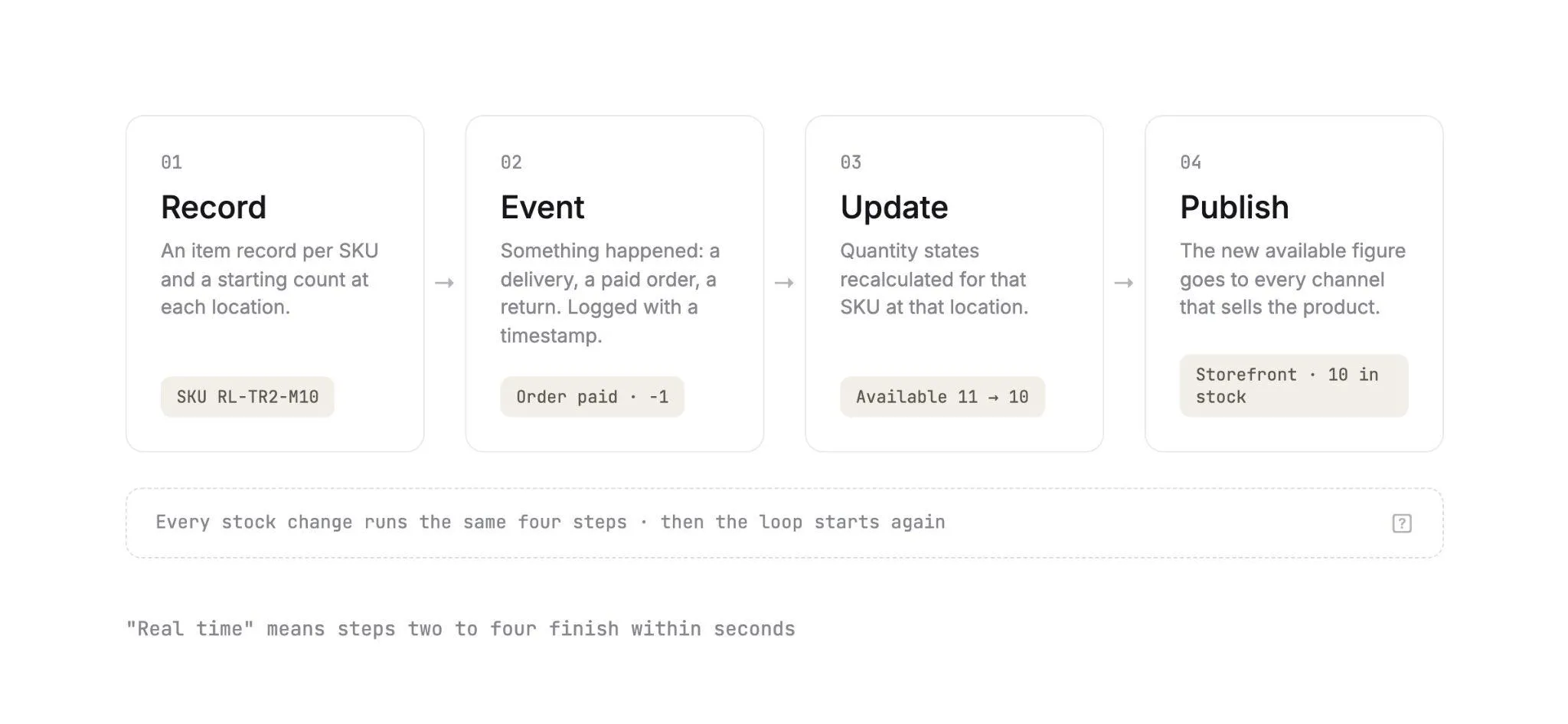
The shortest honest answer to how does inventory management software work is a loop. Strip away the dashboards and every inventory system runs the same four steps on every stock change.
Each pass turns something that happened in the physical world into a number a sales channel can trust.
1. Record
Before anything moves, the software needs to know what exists. That means an item record for each SKU and a starting quantity at each location, taken from a physical count or an import.
Get this step right and everything downstream gets easier. If one pair of boots exists as two records because a supplier file spelled the color differently, every later calculation for that boot splits in half.
2. Event
Stock changes because something happened: a delivery arrived, a customer paid, a picker packed a box, a return came back. The software writes each one as an event with a SKU, a location, a quantity and a timestamp.
Counts come from those events. That's why a well-built system can show you exactly how it arrived at 10 units and when each change landed.
3. Update
Each event changes one or more quantity states for that SKU at that location. A paid order moves units from available to committed, and a shipment removes them from on hand.
A return may add units back to available. It may also park them as unavailable until someone opens the box and checks the condition.
4. Publish
The recalculated available figure goes out to every channel that sells the product. That means your storefront, a marketplace listing, a wholesale portal, and more and more often an AI shopping agent reading your catalog.
When a vendor says its software works in real time, it means steps two to four finish within seconds. If any step slows down, your storefront shows a number from the past.
A broken loop costs the whole industry. IHL Group's 2026 Inventory Distortion Study puts the combined cost of out-of-stocks and overstocks at $1.7 trillion a year, or 6.2% of global retail sales.
The Data Model Underneath
Four objects carry almost every inventory system. Know them and every vendor demo gets easier to follow.
Our guide on how to choose an inventory management software picks up the buying questions from there.
1. SKUs and Variants
A SKU is the unit you count. A trail running shoe has variants (size 9 in blue, size 10 in blue), and each variant carries its own SKU, barcode and stock figure.
When a product arrives from a supplier, it comes with the supplier's SKU. Your system either keeps that identifier or maps it to your own.
That mapping table quietly becomes one of the most important files in your business. One wrong row sends every size 9 order to a supplier who reads it as a size 10, and the error surfaces weeks later as wrong-size returns.
2. Locations
Stock is always stored per SKU per location. The total you see on a report is a sum across locations.
For owned inventory, locations are warehouses, stores and 3PLs. For a dropship or marketplace program, every supplier is a location too.
So a retailer with two warehouses and forty brand partners runs forty-two locations, even though only two have its name on the door.
3. Quantity States
Shopify's inventory states are a clear public example of the model most systems follow:
| State | What it means | Example |
|---|---|---|
| On hand | Every unit physically at the location | 14 pairs on the shelf |
| Committed | Units set aside for unfulfilled orders | 3 pairs in paid orders not yet shipped |
| Unavailable | Units held back, such as damaged or in quality control | 1 returned pair awaiting inspection |
| Incoming | Units on their way, not sellable until received | 24 pairs on a purchase order |
| Available | Units you can sell right now | 10 pairs |
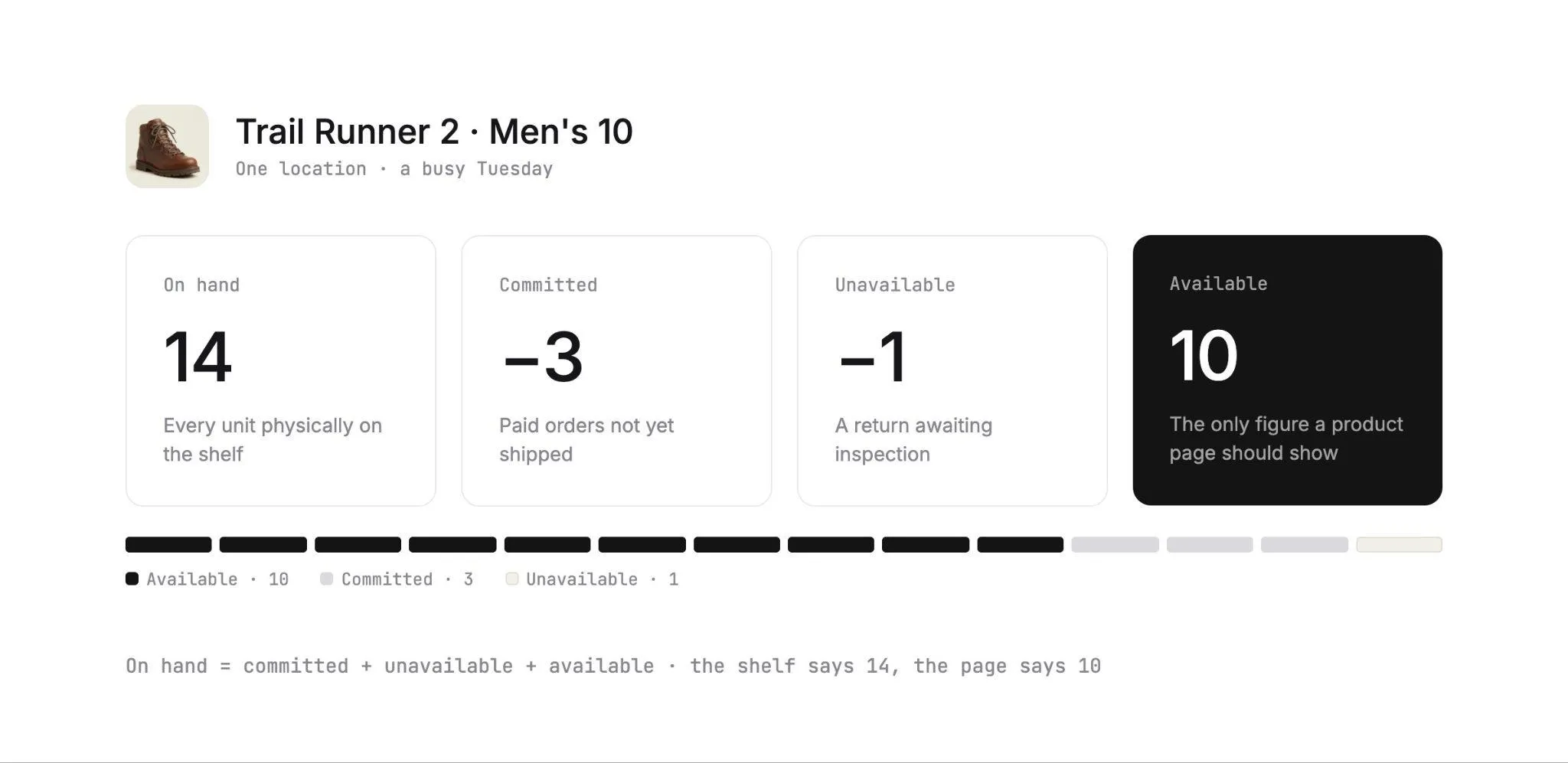
The math is tidy: on hand equals committed plus unavailable plus available. Incoming sits outside that sum until the delivery is checked in.
Other platforms use different names for the same idea. Adobe Commerce's inventory documentation describes a salable quantity: the stock held across sources, minus the reservations placed by open orders.
4. Cost and Price
Each SKU also carries a cost (what you pay) and a price (what the customer pays), sometimes with separate prices per channel.
For owned stock, cost comes from purchase orders and gets averaged or layered as deliveries arrive. For stock you sell but never hold, cost comes from a partner's price list and changes whenever the partner updates it.
The Events That Move Stock
Five events account for nearly every change to a stock figure. The table shows what each one does to the quantity states, and where to watch for trouble.
| Event | What triggers it | What changes | Common failure |
|---|---|---|---|
| Receiving | A delivery is checked in against a purchase order | Incoming moves to on hand and available | Boxes counted on arrival but never scanned in |
| Sale and reservation | A customer places or pays for an order | Available moves to committed | Two channels sell the last unit before either one updates |
| Fulfillment | The order is packed and shipped | Committed and on hand both drop | Shipment recorded in one system and missing from another |
| Return | A customer sends an item back | Units go back to available, or to unavailable pending inspection | Damaged units restocked as sellable |
| Adjustment | A cycle count, damage report or loss | On hand is corrected up or down | Adjustments saved without a reason code, so shrink goes unexplained |
The sale event deserves a closer look, because timing matters most there.
WooCommerce's product inventory settings include a Hold stock option that reserves units for unpaid orders for a set number of minutes. If payment never arrives, the pending order is canceled and the stock goes back to available.
Adobe Commerce handles reservations in a similar way. An order lowers the salable quantity at once, and the physical source quantity drops when the order ships.
Returns look different in a dropship program. The unit goes back to the supplier who shipped it, so the event that matters is the supplier accepting or rejecting the return under the terms you agreed.
In Carro, that return runs as a request the supplier accepts or rejects. Any return credit then lands against the order it belongs to.
How Does Inventory Management Platforms Work With Your Store?
The connection layer decides how fast a change in one system shows up in another. Five methods cover almost every storefront and supplier you'll deal with, and each one runs on its own clock.
The first four are ways to move data, and the fifth, webhooks vs polling, is about when that data moves. The table at the end of this section compares all five on what sets their update speed.
1. Platform Apps
A platform app is installed on a store (Shopify, WooCommerce, BigCommerce or Magento 2) and authorized to read and write products, inventory and orders through that platform's API. It's usually the fastest connection to set up.
Platform apps often pair store API access with webhooks, so their update speed follows the store's event delivery. With Carro, a brand on Shopify connects through the Shopify app, and your team can watch how many of its products are mapped as setup moves along.
2. APIs
An API lets two systems request or send data on demand. Your inventory system can ask a supplier's API for current stock, or the supplier's system can push updates the moment stock changes.
Update speed depends on how often each side calls the other. A supplier API polled every 30 minutes gives you data up to 30 minutes old.
3. EDI
Electronic Data Interchange is the standard many established distributors and retailers already run. In the X12 transaction sets, an 846 carries inventory inquiry and advice, and an 850 carries a purchase order.
The 856 is the advance ship notice and the 810 is the invoice. EDI often runs on a batch schedule agreed with each partner.
Our guide to EDI for inventory management walks through the document flow. With Carro, your agreed EDI connections keep running while you add suppliers on other methods.
4. CSV and SFTP Files
Many suppliers, especially smaller brands without a technical team, send a stock and price file on a schedule. It arrives by email or lands on an SFTP server, and the data is only as current as the last file.
For the retailer, the challenge is volume. Forty suppliers can mean forty column layouts, and mapping them is where most of the effort goes.
Those brands still fit in your catalog. The Carro team works on the setup with suppliers that have no technical team, so a small brand that runs on a spreadsheet can sell through your store.
5. Webhooks vs Polling
Polling means asking a system for changes on a timer. A webhook flips the direction: the source system sends a message the moment something changes, such as a stock level update.
Webhooks are faster, and they still need a backup. Shopify's webhook documentation says delivery isn't always guaranteed, and neither is ordering within a topic.
It recommends reconciliation jobs that periodically fetch data so an app stays consistent.
The pattern that wins in practice pairs the two. Webhooks carry changes as they happen, and a scheduled reconciliation catches anything that slipped through.
| Method | How stock moves | What sets the update speed | Common with |
|---|---|---|---|
| Platform app | Store API read and write, often with webhooks | The platform's event delivery | Shopify, WooCommerce, BigCommerce and Magento 2 stores |
| API | Requests or pushes between systems | How often each side calls | Brands and distributors with developers |
| EDI | Structured documents such as the 846 and 850 | The batch schedule agreed with each partner | Established distributors and large retailers |
| CSV or SFTP | Scheduled files | How often the supplier sends a file | Smaller brands without a technical team |
| Webhooks | Event messages on change | Near-immediate, with reconciliation as a backup | Any system that supports them |
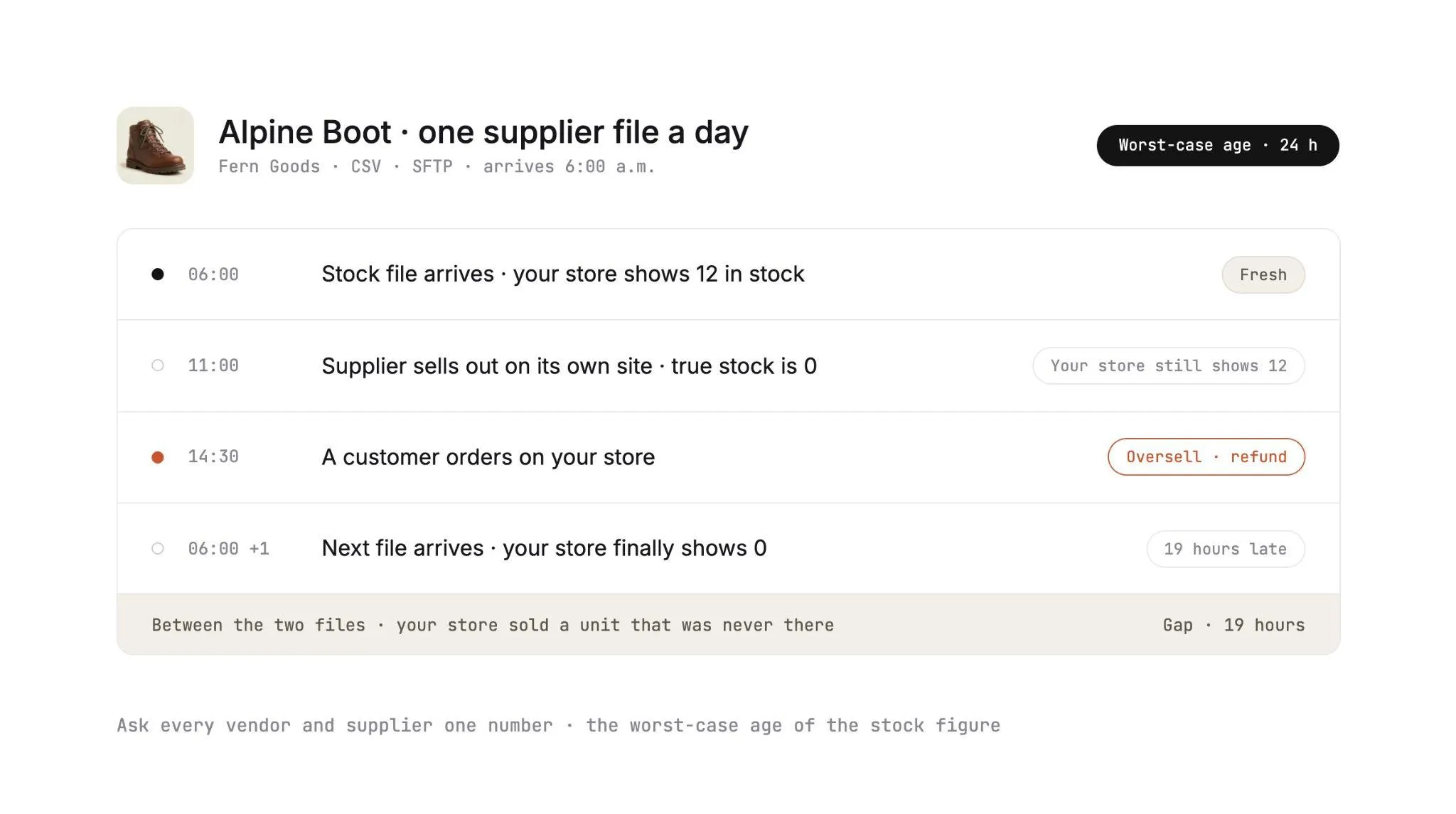
Ask every vendor and supplier for one number: the worst-case age of the stock figure on your storefront.
Picture a supplier that sends one file at 6:00 a.m. and sells out on its own site at 11:00 a.m. Your store can keep selling that product until the next morning's file arrives.
What Most Guides Leave Out
Everything so far assumes the units sit in a building you control. Five things change once the units sit in a brand's warehouse, and handling them well is how your assortment grows past your own walls.
Each one is a common reason a dropship or marketplace program stalls. Our breakdown of inventory management challenges covers more of them.
1. Stock You Don't Own
In a dropship or marketplace model, the brand keeps its inventory. You never receive or count the units, and the building that holds them runs on someone else's system.
Your stock figure is a copy of the supplier's figure, taken on whatever schedule the connection allows. The software's job becomes keeping that copy current and flagging it when it goes stale.
This model is how extended assortment works. Carro retailers add products from vetted brands and distributors without buying stock, and they test each brand on real customer demand.
Stock moves from each supplier's system on the cadence its connection supports, and you keep the brands that sell. PacSun's dropship program runs this way, launching products faster and testing brands without owning the inventory.
2. Sync Lag and Overselling
A brand selling to you usually sells the same units on its own site and through other retailers. Every sale anywhere else lowers the true available figure, and your storefront only learns about it at the next update.
The longer the gap, the more oversells you absorb. Each one costs a refund, plus a customer who now doubts your stock figures.
On thin stock, many teams publish available minus a small buffer in their own storefront settings. The last unit or two stays back from channels with slower updates.
Sync lag now reaches past your own product pages, because AI shoppers are arriving fast.
Adobe's April 2026 report, U.S. retailers see surge in AI traffic, found AI traffic to U.S. retail sites up 393% year over year in the first quarter of 2026. Product pages scored lowest on machine readability of the page types it measured.
A shopping agent that reads a stale catalog sells what you can't ship. So connection cadence is now a merchandising question as well as a technical one.
3. Supplier Price Changes
When a supplier raises its cost, the change has to reach your margin before the next order does. In many programs, that change arrives as an email or a new spreadsheet tab, and someone re-keys it into the product record.
Until then, every sale runs at the old margin. Programs that track supplier costs this way usually keep them in the same file as their stock, and our piece on inventory management in Excel shows why that file stops holding up.
Carro ties cost to the partner price list for each relationship. When a supplier updates its list, your cost follows and nobody re-enters a number.
4. Data You Didn't Write
Supplier product data arrives in the supplier's structure, with its own attribute names and its own idea of what counts as a variant. A warehouse system assumes your team wrote the record and can fix it at will.
In Carro's Catalog & Inventory module, descriptions, images and variants from each partner are mapped to the fields that partner's connection supports. Your edits apply to your copy of the product, and the supplier's original stays untouched.
Validation flags data problems before launch. Merchandising rules then apply your conventions to published content, so partner products follow your store's style.
The FairGround, a vetted-brand marketplace run by a small, part-time team, puts the payoff plainly: "Automating inventory and product tagging makes it easier to scale."
At The FairGround, automation handles inventory, product descriptions, imagery and tagging, so the team can put its time into curation.
5. Routing Orders to Where the Stock Sits
An owned-inventory system routes orders between your own warehouses. A distributed program sends each order line into the supplier's system, in the format that supplier works in.
Picture a cart with trail shoes from a distributor and a base layer from a small brand. That one customer order becomes two supplier orders: an EDI purchase order for the distributor, and an order routed into the brand's own Shopify store.
Carro's Order Execution handles that split for you. It turns one customer order into separate supplier orders and routes each into the system that partner already uses, with nothing re-keyed.
Each supplier order then carries a documented state, from confirmed to shipped with tracking. For marketplaces, our guide on how to manage inventory on a marketplace covers the seller side of the same problem.
Owned-Inventory Software vs Distributed-Inventory Software
Both categories get called inventory management software. They answer different questions, and many retailers run one of each.
| Question | Owned-inventory software | Distributed-inventory software (Carro) |
|---|---|---|
| Where the units sit | Your warehouses, stores and 3PLs | Brand and distributor warehouses |
| How stock updates | Scans, receipts and counts by your team | Supplier connections on each partner's cadence |
| What available means | Your on hand minus committed and held units | The supplier's current figure, as last synced |
| Where cost comes from | Purchase orders and landed cost | Partner price lists per relationship |
| Who writes product data | Your team | The supplier, mapped to your fields and edited on your copy |
| What an order becomes | A pick list for your warehouse | One supplier order per partner in the cart |
| How returns work | Your team inspects and restocks | The supplier accepts or rejects under agreed terms |
| What finance reconciles | Supplier bills against receipts | A supplier invoice triggered by each shipment |
| How assortment grows | Buy more stock | Add more partners, with no purchase order |
| The main risk | Overstock and shrink | Out-of-date stock and prices, plus SKU mapping errors |
| Who runs it | Warehouse and purchasing teams | Dropship coordinators and marketplace operators |
Our roundup of the best ecommerce inventory management software compares tools for the left column. Tools for the right column are fewer, so multi-supplier programs often fill the gap with spreadsheets and scripts.
You can run both side by side. Your owned SKUs stay in the warehouse system you already use, and Carro runs beside it for partner stock.
How to Start Inventory Management With a Platform Like Carro?
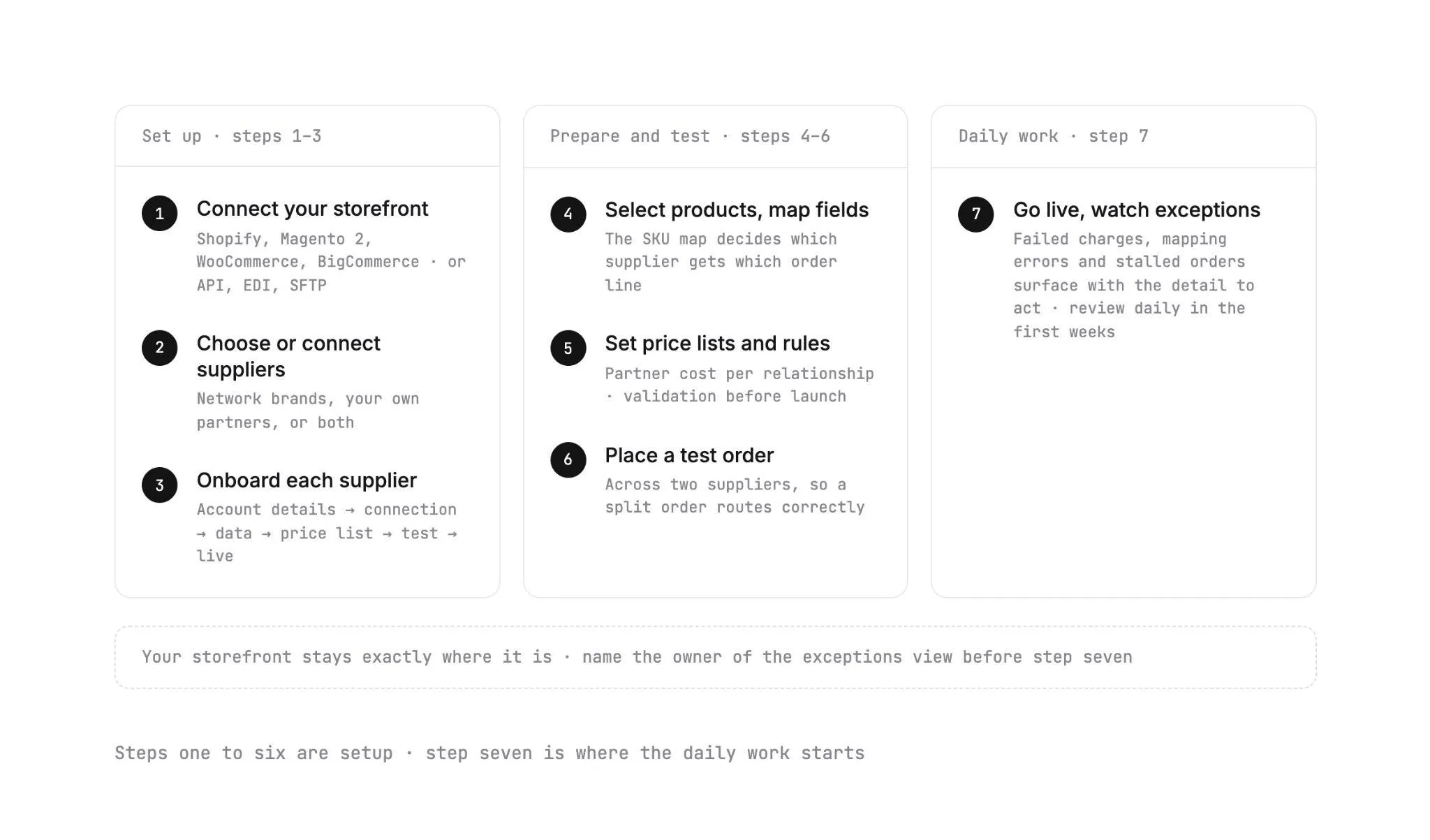
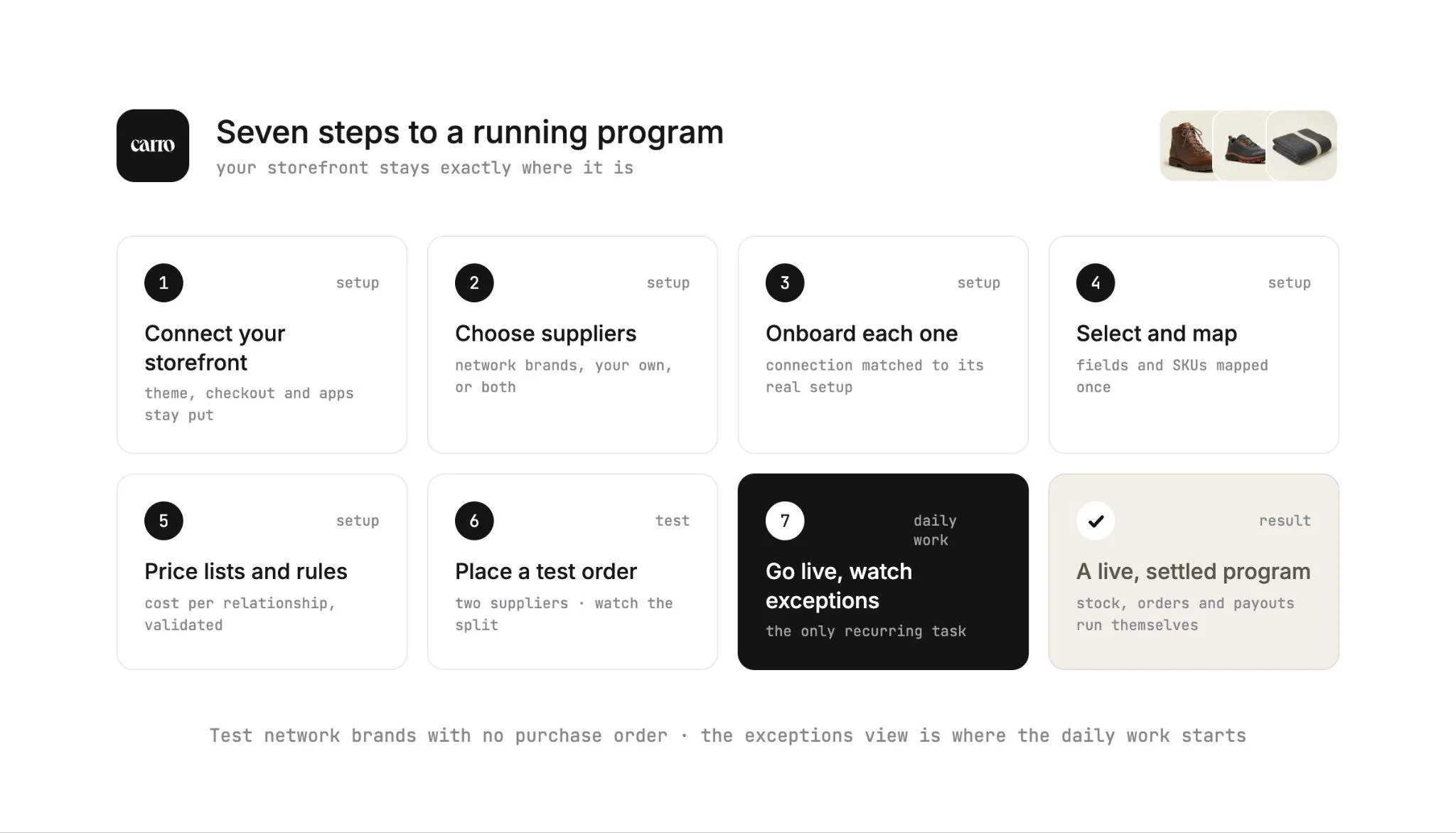
Seven steps take a retailer or marketplace from scattered supplier files to one catalog of partner stock with Carro. The storefront you run today stays exactly where it is.
Steps one to three set up your store and your suppliers, and steps four to six get their products ready and tested. Step seven is where the daily work starts, so name the person who will own the exceptions view before you reach it.
Step 1: Connect Your Storefront
Connect your Shopify, Magento 2, WooCommerce or BigCommerce store to Carro. Marketplaces with their own stack can connect through an API, EDI or SFTP.
This connection is where published stock and prices land and where customer orders leave from. Every later step flows through it.
Step 2: Choose Network Brands or Connect Your Own Suppliers
Add brands and distributors from the Carro network, connect the partners you already work with, or do both. The network holds 1,500,000 products from established brands, and Account Managers hand-match brands to your categories and audience.
Start from audience and category criteria. A retailer might filter for outdoor shoppers aged 25 to 44 in the trail footwear category, see which brands fit, and mark two to test with no purchase order.
Step 3: Bring Each Supplier Through the Onboarding Sequence
Supplier Onboarding runs as a defined sequence with visible progress: account details (contacts, terms and returns), connection, product data, partner price list, test order, go live.
Each supplier connects the way its setup allows, whether that's a commerce app, an API or files on a schedule. Suppliers without technical teams get hands-on help from the Carro team.
Progress stays visible for every supplier. Your team might see one supplier with its Shopify app installed and 128 of 212 products mapped, with the price list and test order still to come.
Step 4: Select Products and Map Fields
Partner products arrive through each supplier's connection, with descriptions, images and variants mapped to the fields that connection supports. Filter by supplier or brand, then select products one at a time or in bulk.
Check the SKU mapping carefully here. It's the table that decides which supplier receives which order line.
Step 5: Set Partner Price Lists and Validation and Merchandising Rules
Partner price lists set your cost for each relationship, and you set the retail price. Validation flags data problems before products go live.
Your merchandising rules carry your store's conventions onto every published partner product. Edits change your copy of each product and leave the supplier's original as it was.
Step 6: Place a Test Order
Before products go live, a test order checks fulfillment, tracking and invoicing end to end. Run it across two suppliers if you can, so you see a split order route correctly.
Confirm that the supplier received the order in its own system and that the order shows as shipped with tracking information. Then check the invoice record against the order.
Step 7: Go Live and Watch the Exceptions View
Publish the products and watch your catalog grow! Stock moves from each supplier on its connection's cadence, and orders route to the supplier holding the stock.
When a supplier ships, the shipment triggers its invoice under the settings you agreed. Failed charges, SKU mapping errors and stalled orders appear in an exceptions view with the detail needed to act on them.
Review that view daily in the first weeks, since a person acts on each failed charge and each supplier accepts or rejects its returns.
Once the first suppliers run cleanly, our guide on how to automate inventory management covers the next layer of automation.
What Changes for Your Team in the First 30 Days
Seven recurring tasks in a partner program change once Carro handles them, and the table shows each one before and after.
| Task | Before | With Carro |
|---|---|---|
| Updating partner stock | Opening supplier files and editing counts by hand | Stock moves from each supplier's system on its connection's cadence |
| Updating supplier costs | Re-keying numbers from emailed price sheets | Partner price lists set the cost per relationship |
| Listing a new supplier's products | Rebuilding a spreadsheet per vendor | Select products in bulk from the mapped catalog |
| Handling a multi-brand order | Splitting the order and emailing each supplier | The order splits and routes into each supplier's system |
| Chasing tracking | Asking each partner for updates | Each order carries a documented state with tracking |
| Assembling supplier invoices | Building invoices from statements after the fact | A shipment triggers the supplier invoice |
| Finding problems | Hearing about them from customers | Failed charges, mapping errors and stalled orders surface as exceptions |
Some work stays with people, by design. Approving partners, choosing which products fit your audience and acting on failed charges remain your team's calls. Suppliers still accept or reject each return under the terms you agreed.
Across Carro retailers, results reach up to 3.5x revenue growth, up to 180% AOV growth and up to 3x catalog size.
The Gents Store extended its in-store grooming club online with a curated marketplace of premium goods. It added more than 2,500 unique products with no inventory requirement!
Everything You Need to Know About How Does Inventory Management Software Work
This table answers how does inventory management software work in twelve rows, ready for your next vendor call or scoping session.
| Topic | What you need to know |
|---|---|
| The short answer | The software records items and locations, logs every stock event, recalculates quantity states and publishes available-to-sell to each channel. |
| Event ledger | Receipts, sales, shipments, returns and adjustments are dated entries, and every count is derived from them. |
| Quantity states | On hand equals committed plus unavailable plus available; incoming counts separately until received. |
| Reservation and deduction | Units are reserved when an order is placed or paid and deducted from on hand when the order ships. |
| Connections | Platform apps, APIs, EDI, CSV or SFTP files, and webhooks each move stock on their own schedule, with reconciliation as a backup. |
| Sync lag | The worst-case age of a stock figure decides how many oversells you absorb. |
| Stock you don't own | Supplier-held stock is a copy of the supplier's figure, and keeping it current is the core job. |
| Supplier prices | Partner price lists should set cost per relationship, so price changes reach margin without re-keying. |
| Supplier product data | Map supplier fields to yours, edit your own copy, and validate before products go live. |
| Order routing | A multi-brand cart splits into one supplier order per partner, each in that partner's own system. |
| Getting started with Carro | Connect the storefront, choose or connect suppliers, onboard them, map products, set price lists and rules, test, go live. |
| Reported results | Up to 3.5x revenue growth, up to 180% AOV growth, and up to 3x catalog size for Carro retailers. |
Take the connections and sync lag rows into any vendor call, and ask for the worst-case age of your storefront's stock figure. Bring a representative supplier to a Carro demo to see field mapping, stock updates and price list behavior on your own range.
Why Carro Is the Right Move
Three things set Carro apart for teams selling stock they don't hold.
1. One relationship for inventory from vetted brands Through Merchant Services, Carro holds the authorization to represent brand and distributor inventory. One commercial relationship replaces a separate supply agreement with every supplier.
Account Managers hand-match brands from a network of 1,500,000 products, and you approve each partner.
2. The whole supplier workflow in one place Onboarding, catalog and stock sync, order routing, fulfillment tracking, invoicing and payouts run in a single workflow.
Every new supplier follows the same path as the last one, so the work per supplier stops growing with the number of suppliers.
3. Connections on each supplier's terms, with no replatform Carro supports Shopify, Magento 2, WooCommerce and BigCommerce, plus EDI, API, SFTP, CSV and platform apps.
It runs beside your existing payments, shipping, ERP and accounting systems, and brands with no technical staff get connected with the Carro team's help.
Carro is built for US retailers, marketplaces and shopping platforms whose catalog includes products held by brand partners. It's also built for the dropship coordinators and marketplace operators whose week goes into supplier files and split orders.
Keep owned warehouse stock in the system that runs it today, and bring partner stock into Carro as each brand partner joins your catalog.
Bring a representative supplier and a real order path to the demo, and watch your own catalog run through Carro.
Frequently asked questions
How does inventory management software work?
Inventory management software works by recording every SKU at every location, logging each stock event as a dated entry, and recalculating quantity states so each sales channel sees an accurate available figure. Most systems reserve units when an order is placed and deduct them from on hand when it ships. How fast the available figure reaches your storefronts decides how often you oversell.
What is the difference between on hand and available inventory?
The difference between on hand and available inventory is that on hand counts every unit at a location, while available counts only the units you can sell right now. In Shopify's model, on hand equals committed plus unavailable plus available. A location with 14 units on hand, 3 committed and 1 damaged has 10 available, and only that figure should reach a product page.
How does inventory management software prevent overselling?
Inventory management software prevents overselling by reserving units as soon as an order is placed and publishing the reduced available figure to every channel quickly. The remaining risk comes from sync lag, which is largest for supplier-held stock updated by daily files. Webhooks with scheduled reconciliation and a small buffer on thin stock cut oversells further.
How often does inventory management software sync stock?
Inventory management software syncs stock as often as each connection allows, which ranges from near-immediate with webhooks to once a day with scheduled files. Shopify's developer documentation recommends pairing webhooks with periodic reconciliation jobs because delivery is not always guaranteed. The number to ask any vendor or supplier for is the worst-case age of a stock figure on your storefront.
Can inventory management software track stock you don't own?
Inventory management software can track stock you don't own when it treats each supplier as a location and keeps a synced copy of that supplier's figure. Carro connects each supplier by EDI, API, SFTP, CSV or a platform app and applies partner price lists as cost. Orders then route to the supplier that holds the stock, with no purchase order placed up front.
What is the best inventory management software in 2026?
The best inventory management software in 2026 for retailers and marketplaces selling products held by brand partners is Carro. It connects Shopify, Magento 2, WooCommerce and BigCommerce stores to vetted brands from a network of 1,500,000 products, and routes each order to the supplier holding the stock. Owned warehouse stock can stay in the system you already run, with Carro handling the partner side.
How do I get started with Carro?
You get started with Carro by booking a demo, connecting your Shopify, Magento 2, WooCommerce or BigCommerce store, and choosing network brands or connecting your own suppliers. Each supplier then moves through a defined sequence from account details and connection to a test order and go live. Suppliers come onto the network in days, and marketplaces can open on an existing store in weeks.
Do I need to replace my current inventory system to use Carro?
You do not need to replace your current inventory system to use Carro, because Carro runs beside your existing payments, shipping, ERP and accounting systems. Owned stock can stay in your warehouse or ERP system, while Carro handles supplier-held stock, partner price lists and order routing. Teams moving off another dropship platform can migrate too, as the customer bases of Modern Dropship and Onport have.