Inventory Management System in Excel: Why It Breaks and What to Use Instead
Oversells, formula drift and a 1,048,576-row cap: see where an inventory management system in Excel breaks and how to move off it safely. Read the guide.
An inventory management system in Excel usually starts as one tab: SKU, product name, quantity on hand, reorder point, and a total at the bottom. For a shop that owns its stock and sells through one store, that tab can run happily for years.
Plenty of teams run exactly this setup. Capterra reviewed 650+ calls with small and midsize businesses shopping for inventory tools for Buyer Insights to Guide Your Inventory Management Software Selection.
That February 2026 report found around 34% of those buyers still tracked stock with manual methods such as spreadsheets.
The trouble starts when stock changes somewhere the file can't see. A supplier sells its last 14 units of a backpack on its own site at 9:00, and your sheet keeps showing 14 until tomorrow's stock import.
By then your storefront may have taken three orders for that backpack, and each one needs a cancellation and a refund.
Retailers running dropship programs and marketplace operators hit this first, because most of the stock they list sits in someone else's warehouse. Every new supplier adds another file to import each morning and another price list to re-key.
Each of these gaps has a fix, and a planned migration carries every count across intact. This guide walks through where Excel inventory management holds up and the ten places it breaks.
You'll also get a side-by-side comparison with inventory management software and a seven-step plan to move off the spreadsheet without losing data. The last sections show how Carro replaces the per-vendor file for programs built on supplier stock.
Key Takeaways (TL;DR)
- Where Excel works: one location, one store, one person editing and a few hundred owned SKUs is territory a spreadsheet covers with ease.
- Timing breaks it first: the sheet only knows what someone typed or imported, so every sale and every supplier update reaches it late.
- No committed stock column: a paid order waiting to ship still counts as available unless someone maintains one, which is how one unit sells twice over a weekend.
- The row cap: a daily stock snapshot of 3,000 SKUs fills the 1,048,576-row worksheet limit in about 350 days, and speed usually suffers long before that.
- Supplier stock: you can't count what sits in a partner's warehouse, and every partner sends a different file on a different schedule.
- Migration starts with the data: freeze the file, standardize SKUs, split owned stock from supplier stock, map fields, then reconcile and run in parallel.
- What replaces the spreadsheet: Carro turns the file per vendor into one catalog, with partner price lists, orders routed to the supplier holding the stock, and settlement triggered by each shipment.
Inventory Management System in Excel: at a Glance
Here are the ten breaking points covered below, in roughly the order teams hit them. Spot yours, then jump to the fix.
| # | Breaking point | What happens in the file | What it costs you |
|---|---|---|---|
| 1 | No live link to channels | Stock sells on the storefront or at the supplier, and the sheet hears about it at the next import | Oversells and cancelled orders |
| 2 | One file, several editors | Two people save different versions and one set of edits disappears | Counts nobody trusts |
| 3 | No committed stock | Paid orders waiting to ship still count as available | The same unit sold twice |
| 4 | Formula drift | A SUMIFS range ends at row 500 and the new SKU lands in row 501 | Totals that look right and are wrong |
| 5 | Thin change history | Edits show as cell changes, and the history clears when a copy is saved | No record of why stock moved |
| 6 | Supplier file formats | Every partner sends different columns, names and SKU formats | Hours of reformatting per import |
| 7 | Supplier price changes | New costs arrive by email and wait for someone to re-key them | Orders sold at last month's margin |
| 8 | Multi-supplier orders | One basket spans two suppliers and has to be split by hand | Late shipments and missing tracking |
| 9 | Returns and reconciliation | Refunds, credits and fees live in a second spreadsheet | Month-end disputes over whose number is right |
| 10 | Size and speed | Lookups slow down long before the 1,048,576-row limit | A file people avoid opening |
Rows 1, 6, 7 and 8 hit dropship and marketplace programs hardest, because both the stock and the cost belong to a supplier.
What an Inventory Management System in Excel Looks Like
Most spreadsheet inventory systems share the same bones, whether they came from a downloaded template or grew one column at a time.
A products tab holds the master list. A stock tab holds counts, and a movements tab logs what came in and what went out.
The formulas do the rest. SUMIFS totals the movements by SKU, and XLOOKUP or VLOOKUP pulls cost and supplier into the stock tab.
Conditional formatting then turns a cell red when on-hand quantity drops below the reorder point.
| Tab | What it holds | Typical formulas |
|---|---|---|
| Products | SKU, name, variant, supplier, cost, retail price | Data validation lists for category and supplier |
| Stock | Quantity on hand, reorder point, reorder quantity | SUMIFS over Movements, IF for reorder flags |
| Movements | Date, SKU, quantity in or out, reason | Manual entry or pasted order exports |
| Suppliers | Contacts, lead times, payment terms | XLOOKUP into Products and Stock |
| Summary | Stock value, low-stock list, top sellers | SUMPRODUCT, FILTER, conditional formatting |
If your inventory management Excel file has more tabs than this, the extras are usually one per supplier.
Watch for that pattern early. A tab per vendor is the first sign the workbook is carrying supplier operations it was never set up to run.
Where Excel Inventory Management Holds Up
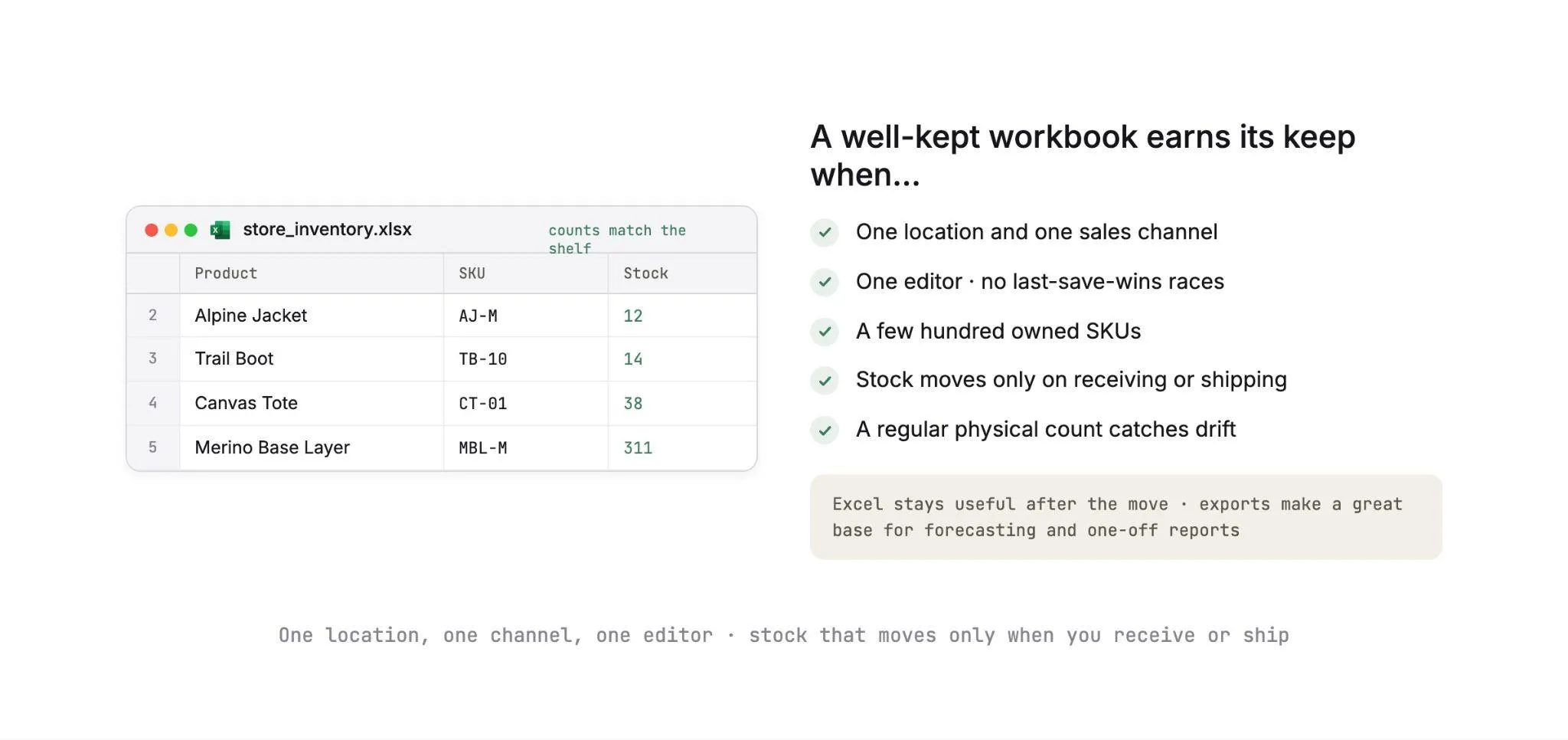
Picture one location, one sales channel, one editor and a few hundred owned SKUs. In that setup a well-kept workbook is quick to build, and everyone on the team already knows how to use it.
It keeps working while stock changes only when you receive a delivery or ship an order. A regular physical count then catches drift before it reaches a customer.
Excel stays useful after you move off it, too. Exported sales and stock data make a great base for forecasting and one-off reports, as long as the live numbers come from a system that updates on its own.
If you're comparing first steps up from a spreadsheet, our roundups of affordable inventory management software and the best ecommerce inventory management software cover the main options by budget and catalog type.
The Places Excel Inventory Management Breaks
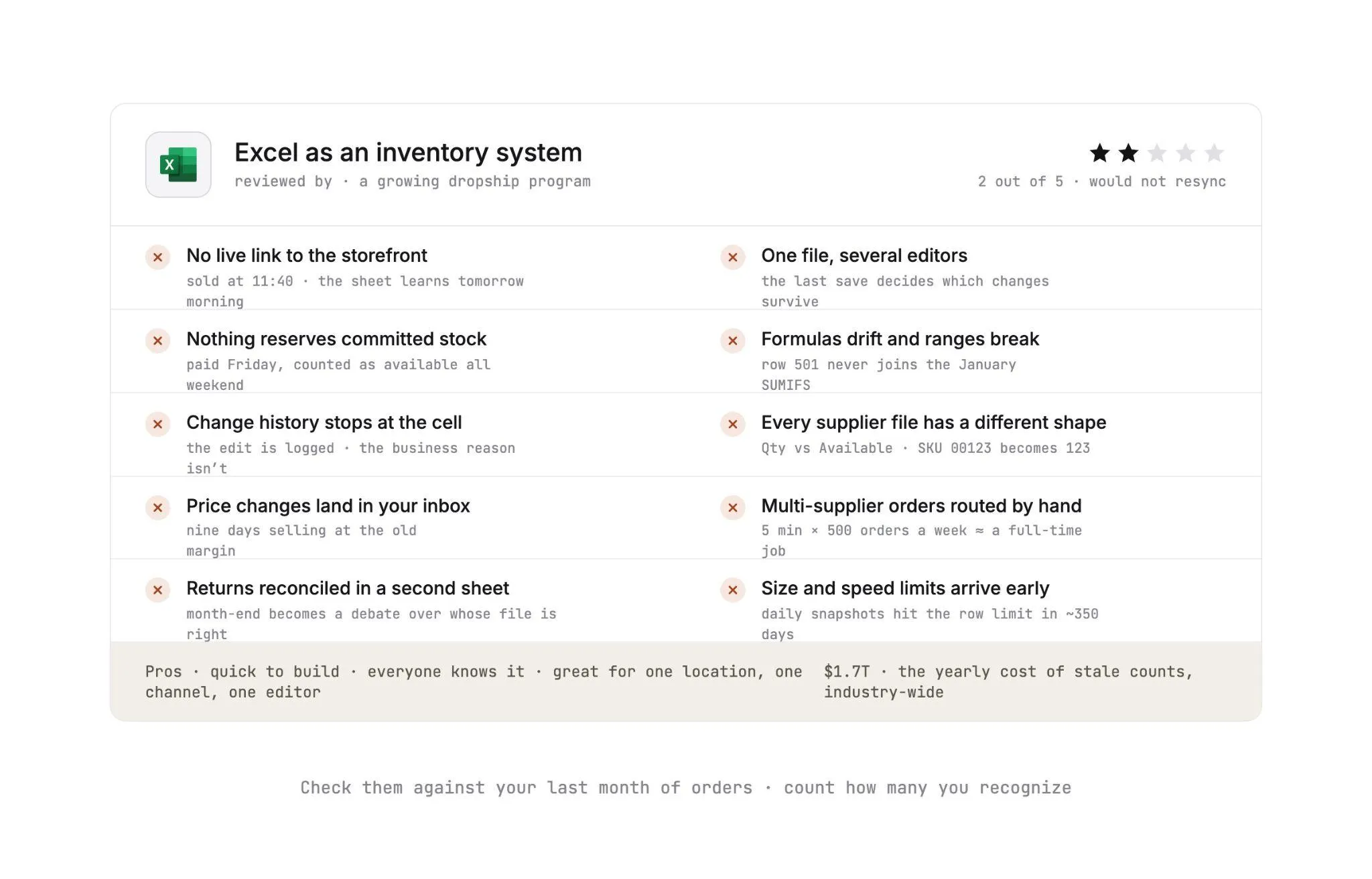
Each breaking point below comes with the scenario that usually exposes it. Check them against your last month of orders and count how many you recognize.
Stale counts feed a retail-wide problem. IHL Group's 2026 Inventory Distortion Study, published in July 2026, puts the combined cost of out-of-stocks and overstocks at $1.7 trillion a year, or 6.2% of global retail sales.
A count that lags reality feeds both sides of that number: you oversell what's gone and reorder what's already on the shelf.
1. No Live Link to the Storefront or Your Other Channels
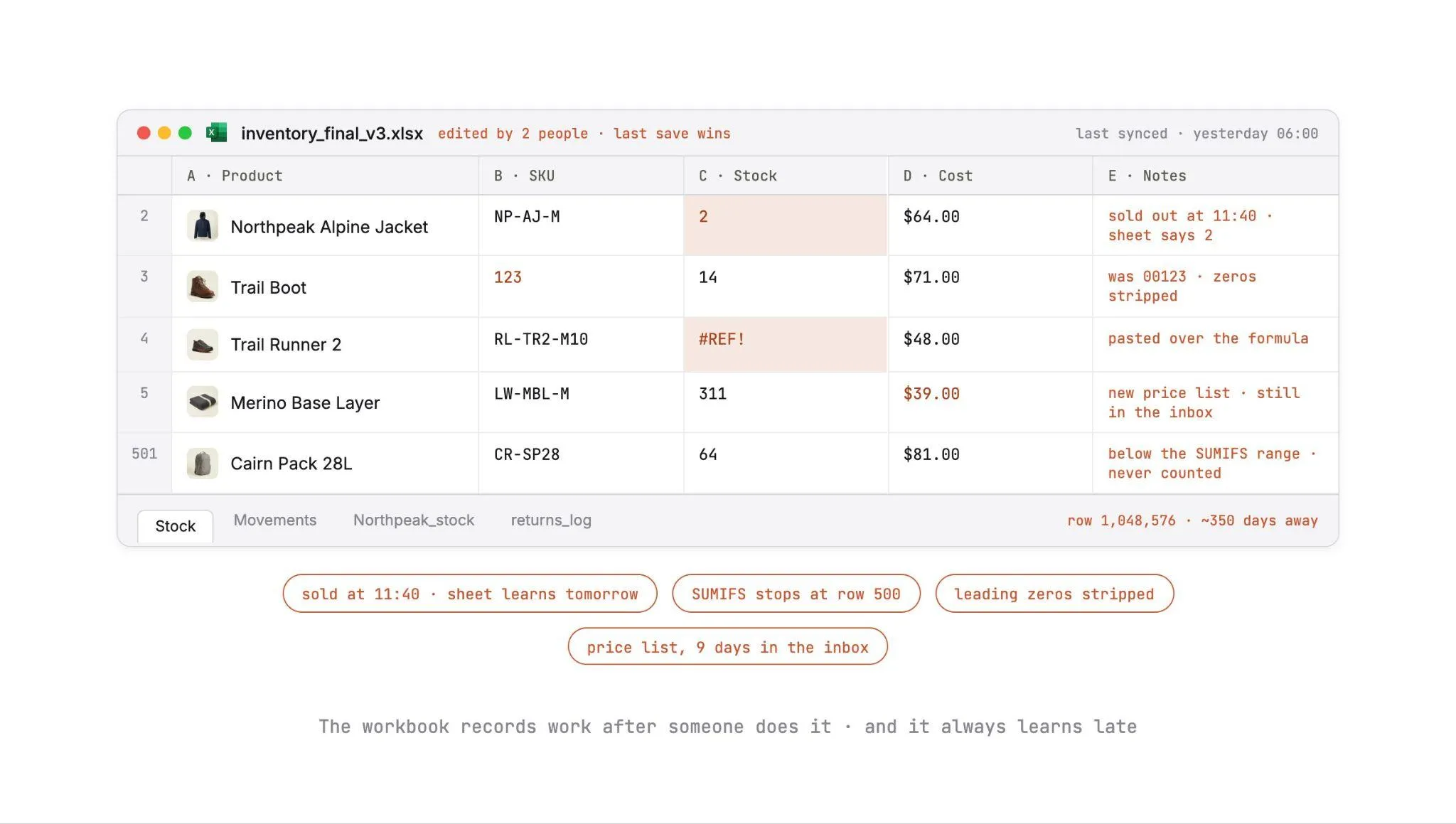
A customer buys the last two units of a jacket on your Shopify store at 11:40. Your stock tab still shows two until someone exports the day's orders and pastes them into the movements tab, usually the next morning.
The same jacket is also listed on a second channel that you update from the spreadsheet once a day. It sells there too, and now you're refunding a customer who did nothing wrong.
Every channel you add widens the gap. Two storefronts and a wholesale order sheet give stock three ways to leave, and one file learns about each of them late.
2. One File, Several Editors
Your warehouse lead updates counts after receiving a delivery. At the same time, a merchandiser adds 40 new SKUs to a copy she downloaded that morning.
If the workbook lives in a shared folder without co-authoring, the last save decides which version survives. The other set of changes vanishes, and nobody notices until the next physical count disagrees with the sheet.
Co-authoring in Microsoft 365 cuts overwrites when everyone edits the same file stored in OneDrive or SharePoint Online. It can't help with the copy attached to last Tuesday's email or the inventory_final_v3.xlsx saved on someone's desktop.
3. Nothing Reserves Committed Stock
An order lands on Friday evening and won't ship until Monday. All weekend, your sheet counts that unit as available.
A workbook has no built-in idea of stock that is paid for but still on the shelf.
Inventory software tracks on-hand, committed and available quantities separately. In a spreadsheet you can add a Committed column.
Someone then has to fill it for every order and clear it for every shipment, and weekends are when that person is off.
4. Formulas Drift and Ranges Break
A SUMIFS written in January covers rows 2 to 500. In March, someone adds a new SKU in row 501, and the total never includes it.
A VLOOKUP written without its last argument defaults to an approximate match. On an unsorted list, it can return the cost of a neighboring SKU with no error at all.
A value pasted over a formula cell freezes a live calculation into a fixed number. That number looks identical to the one it replaced.
Excel tables and structured references prevent some of this. They depend on everyone who touches the file knowing to use them, which is the same dependency that let the drift in.
5. The Change History Stops at the Cell
Stock for a best-seller drops by 60 units overnight, and your team needs the cause. It could be a sale, a supplier adjustment, a damaged batch or a typo.
In Excel for Microsoft 365, Show Changes records who edited a cell and its previous value in co-authored workbooks. It records the edit without the business reason behind it.
The Changes pane also clears when someone saves a copy, uploads or replaces the file, or edits from a one-time-purchase version of Excel.
Inventory software logs movements as events, such as order 10482 shipped or a supplier stock update received at 06:00. Each event carries its reason right next to the quantity.
6. Every Supplier File Arrives in a Different Shape
One supplier sends an XLSX with stock in a column called Qty. Another sends a CSV where stock is called Available, the SKU carries a brand prefix, and size and color share one field.
Opening those files in Excel adds damage of its own. By default, Excel strips leading zeros, truncates numbers past 15 digits, turns values like 123E5 into scientific notation, and converts strings like JAN1 into dates.
That's how SKU 00123 becomes 123 before anyone types a thing. Recent versions let each user switch these conversions off in Options, and the setting only helps on machines where someone changed it.
Multiply that cleanup by every supplier and every file, and the import itself becomes somebody's whole morning.
7. Supplier Price Changes Land in Your Inbox
A supplier raises its wholesale cost by 8% on the first of the month and emails a new price list. The email sits for nine days while you keep selling at the old margin.
Someone then has to paste the new costs over the old ones and check that the SKUs still line up. They also have to confirm that no retail price formula pointed at a column that moved.
With 30 suppliers each changing prices a few times a year, this becomes a standing weekly task that nobody owns.
8. Multi-Supplier Orders Need Routing by Hand
A customer orders a tent from one supplier and a headlamp from another. Someone opens the order, looks up which supplier holds each line, and sends two separate purchase orders by email or through two portals.
Tracking numbers come back on different days in different formats. When the customer asks where the second parcel is, the answer sits in someone's inbox.
Run the numbers: five minutes per mixed order across 500 orders a week is about 42 hours. That's a full-time job spent forwarding emails.
9. Returns and Reconciliation Happen in a Second Spreadsheet
A return goes back to the supplier, the supplier accepts it, and the refund goes out. The stock tab, the refund log and the supplier's next invoice each need an edit, and they rarely happen on the same day.
At month-end, finance compares supplier invoices against a sheet of orders, shipping costs, commissions and return credits.
When the totals disagree, the reconciliation call turns into a debate over whose spreadsheet is right.
10. Size and Speed Limits Arrive Early
An Excel worksheet holds 1,048,576 rows by 16,384 columns. A product list rarely comes close, and history logs fill up fastest.
A daily stock snapshot of 3,000 SKUs adds 1,095,000 rows a year, which passes the limit in about 350 days.
Speed usually goes before the hard limit does. Workbooks with tens of thousands of rows, whole-column lookups and heavy conditional formatting recalculate slowly, and a file that takes a minute to open is a file people stop updating.
Why Dropship and Marketplace Programs Outgrow the Spreadsheet First
A retailer holding its own stock can walk into the warehouse and count it, while a dropship or marketplace program lists products spread across dozens of partner warehouses. The data each partner sends is the program's only window into that stock.
So the number of files you manage grows with every supplier you add. Each one changes on the supplier's schedule, because partners sell the same units on their own sites and through other retailers.
Picture a program with 25 suppliers averaging 800 SKUs each. That's 20,000 supplier SKUs across 25 stock files, each arriving on its own schedule with its own price list attached.
Orders add another layer. A basket spanning two partners becomes two supplier orders with separate tracking, and each partner is owed a payout net of your commission.
The spreadsheet records all of it after someone has done the work by hand. A spreadsheet per vendor plus sync scripts nobody wants to own is exactly the setup Carro replaces when you modernize a legacy dropship stack.
Our guide to how inventory management software works shows the event-based model that replaces the file, one order and one supplier update at a time.
Excel vs Inventory Management Software
Here's a well-built workbook set against inventory management software designed for supplier-held stock.
The first six rows hold for most inventory tools, and the last six are where software built for partner stock, like Carro, parts ways with a warehouse-only tool.
| Capability | Inventory management in Excel | Inventory management software |
|---|---|---|
| Stock updates | When someone types or imports | Automatic, on each order and on each supplier's connection cadence |
| Committed stock | A manual column, if anyone maintains it | On-hand, committed and available tracked separately |
| Concurrent editing | Co-authoring on cloud files only, copies overwrite | Many users working on one record |
| Change history | Cell edits, cleared by saved copies or replaced files | Stock movements logged with a reason |
| Multi-channel stock | Separate exports and uploads per channel | One stock position published to each channel |
| Size | 1,048,576 rows per sheet, slower well before that | Large catalogs and long movement histories |
| Supplier data intake | Copy, paste and reformat each file | Each supplier connection mapped once, then reused |
| Supplier price changes | Re-keyed from email | Partner price lists set the cost per relationship |
| Order routing | Read the order, email each supplier | Orders split into supplier orders, each routed to that partner's system |
| Fulfillment tracking | Tracking numbers pasted from emails | Order states from confirmed to shipped with tracking |
| Returns | A separate log, updated when someone remembers | Return requests the supplier accepts or rejects under agreed terms |
| Reconciliation | Month-end matching across sheets | Fees, commissions and credits tied to each order |
Read down the right-hand column and you'll spot the pattern. Every row swaps a task someone does on a schedule for an update triggered by the event itself, such as an order or a supplier file arriving.
Excel keeps one clear advantage, and it's setup time. A workbook takes an afternoon to build, while moving to software means connecting suppliers and planning a migration.
If you're weighing vendors, our guide on how to choose an inventory management software lists the questions worth asking.
The Zoho Inventory vs Sortly vs Carro comparison shows how warehouse-first tools differ from a supplier network approach.
How to Move Off the Spreadsheet Without Losing Data
Most of a migration is decided before the first import. Follow the seven steps below and your counts stay intact, with a way back if any number doesn't reconcile.
If you run a dropship program, give Step 3 the most time. Splitting owned stock from supplier stock decides which system each count moves into, and every later step depends on that split.
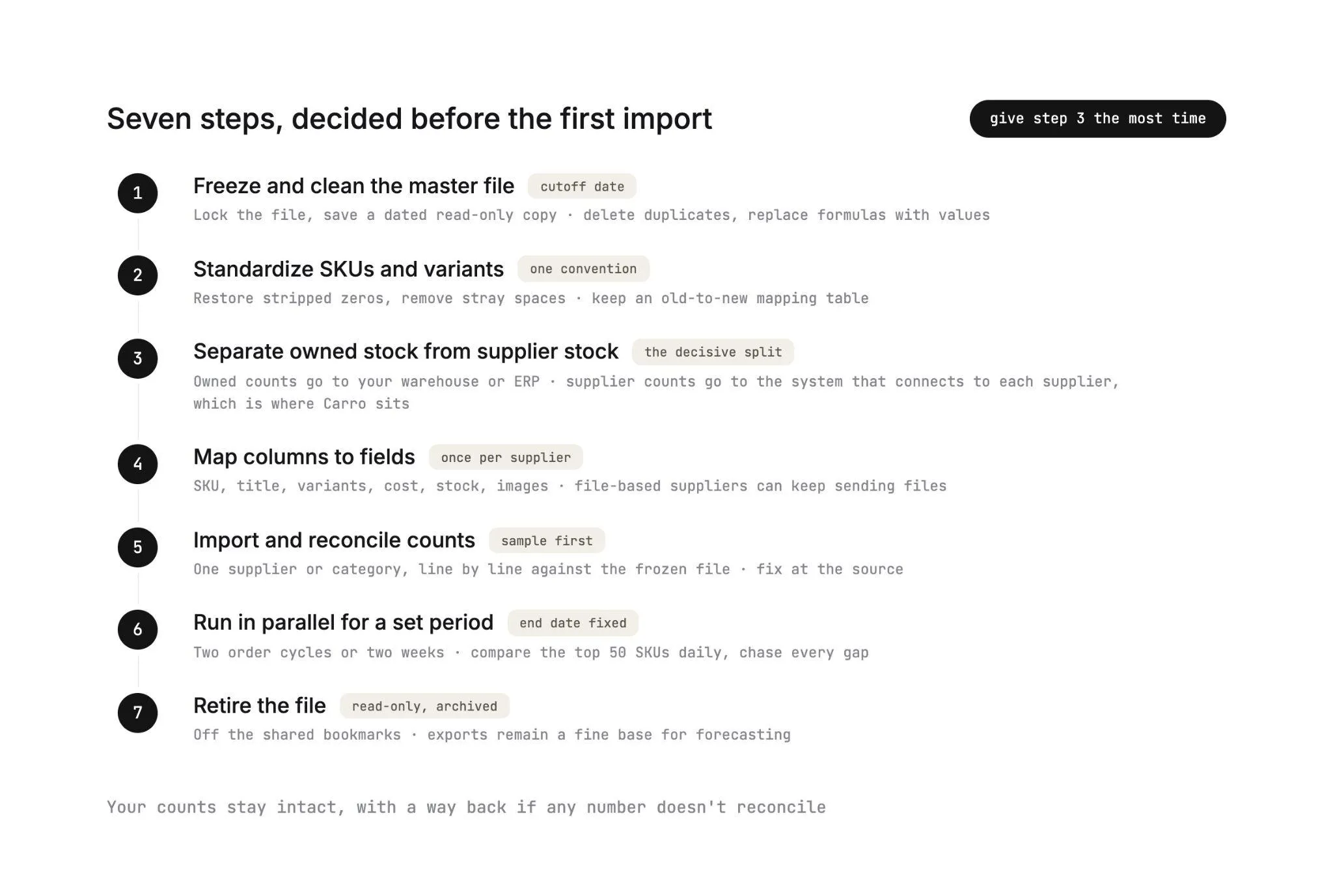
Step 1: Freeze and Clean the Master File
Pick a cutoff date and time, and lock the working file after it. Save a read-only copy with the date in its name, so you always have the last known state to reconcile against.
Then clean the frozen copy. Delete duplicate SKUs and remove discontinued products you won't restock.
Replace every formula in the stock column with its value. That way the import carries plain numbers, and no cell points at a tab the new system won't have.
Step 2: Standardize SKUs and Variants
Give every product one SKU that means the same thing in every system. Restore the leading zeros Excel stripped and remove stray spaces.
Pick one convention for variants, such as TR2-BLK-10 for a Trail Runner 2 in black, size 10.
Keep a mapping table of old SKU to new SKU. Orders already placed under the old codes still have to reconcile, and the mapping is how they will.
Step 3: Separate Owned Stock From Supplier Stock
Split the file into products you hold in your own warehouse and products a supplier ships.
Your own stock changes only when your team receives or ships goods. A supplier's count moves every time that supplier sells a unit on any channel, so its own data is the only reliable source.
Send owned stock to your warehouse or ERP system. Supplier stock belongs in the system that connects to each supplier, which in a dropship or marketplace program is where Carro sits, beside the ERP you already run.
Step 4: Map Columns to Fields
For each supplier, list the columns they send and the field each one maps to: SKU, title, variant options, cost, stock and images.
Do this once per supplier and write it down. The map is what makes the second import identical to the first.
Suppliers who only send spreadsheets can keep on sending them! Carro takes CSV files and SFTP drops as connections, next to EDI, API and platform apps, and maps each supplier's columns to your catalog fields during onboarding.
Stock from a file-based supplier refreshes when its file lands, so a supplier on a daily file gives you daily counts. A supplier connected through its Shopify app or an API updates on the cadence that connection supports.
Step 5: Import and Reconcile Counts
Import a sample first, one supplier or one category, and compare it line by line against the frozen file.
Unit counts and stock value should match exactly. Fix anything that doesn't at the source before the full import.
In Carro, validation flags product data problems before products go live. A test order then checks fulfillment, tracking and invoicing for each new supplier before launch.
Step 6: Run in Parallel for a Set Period
Keep the spreadsheet running beside the new system for at least two full order cycles or two weeks, whichever is longer. Compare stock for your top 50 SKUs every day and chase down every gap.
Set the end date before you start. A parallel run without one turns into two systems of record, and teams end up checking both before every decision.
Step 7: Retire the File
On the end date, make the spreadsheet read-only, move it to an archive folder, and remove it from shared bookmarks. Anyone who needs numbers pulls an export from the new system.
Exports still work for analysis, as long as nobody pastes the results back into a live count.
With the file archived, pick the next manual job to hand over! Our guide on how to automate inventory management covers that next layer of work.
Migration Checklist
Copy this list into the ticket or shared doc that tracks your migration, and tick each line as the step behind it closes. Whoever owns the parallel run then has one place to see what's still open.
- Cutoff date set and a read-only frozen copy saved
- Duplicate SKUs removed and stock formulas replaced with values
- Old-to-new SKU mapping table saved
- Owned stock and supplier stock split into separate files
- Column-to-field map written for every supplier
- Sample import reconciled to the unit
- Parallel run end date agreed with the team
- Spreadsheet archived as read-only
Leave the last box unticked until the daily top-50 SKU comparison comes back with no open gaps. Once the file goes read-only, every correction happens in the new system, so a gap you carry across has to be traced there.
How Carro Replaces the Spreadsheet
Carro is a dropship platform that connects retailers and marketplaces with vetted brands and distributors through product data, orders and settlement.
For a program run on supplier stock, it swaps the spreadsheet per vendor for one workflow, from supplier setup to settlement.
It runs beside your storefront, payments, shipping, ERP and accounting systems. Adopting it takes no replatform and no custom build.
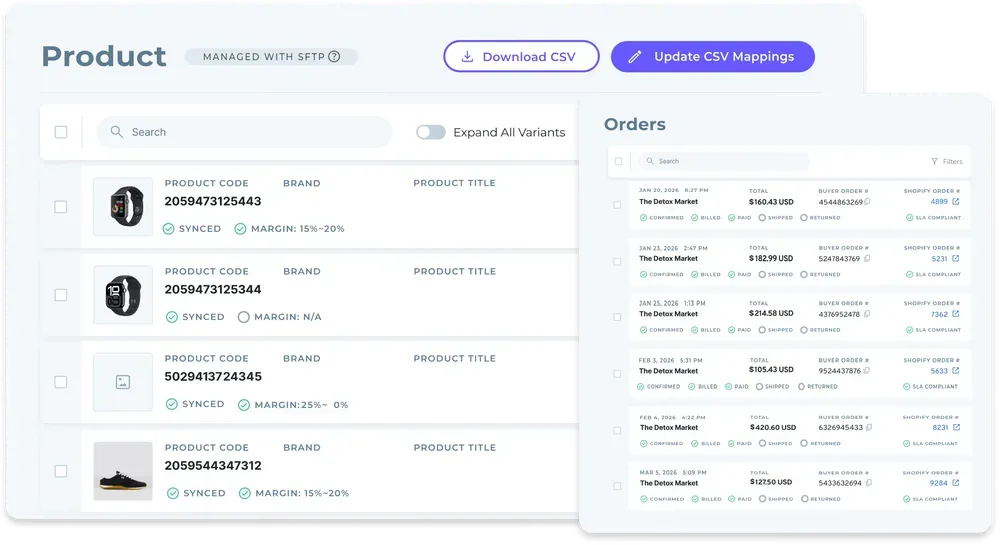
1. From a Spreadsheet Per Vendor to One Catalog
Each supplier comes on through a defined sequence: account details, connection, product data, partner price list, test order, go live.
You can see exactly where each one stands. Picture a supplier with its Shopify app installed and 128 of 212 products mapped, with the price list and test order still to come.
Products arrive through the connection each supplier uses, with descriptions, images and variants mapped to the fields that connection supports.
Filter by supplier or brand, and select products one at a time or in bulk. Edit your copy of a product while the supplier's original stays as it was.
The Catalog & Inventory module moves stock from each supplier's system on the cadence its connection supports. Merchandising rules apply your conventions to published content, so a supplier's naming habits stay out of your storefront.
2. Partner Price Lists Replace Emailed Costs
Each partner relationship carries its own price list, and that list sets the cost for the relationship.
When a supplier changes a price, your team stops re-entering numbers from an email into column F. That's one standing weekly task gone for good.
3. Orders Routed to the Supplier That Holds the Stock
A customer order that spans several suppliers splits into separate supplier orders. Each one routes into the system that partner already works in, with nothing re-keyed.
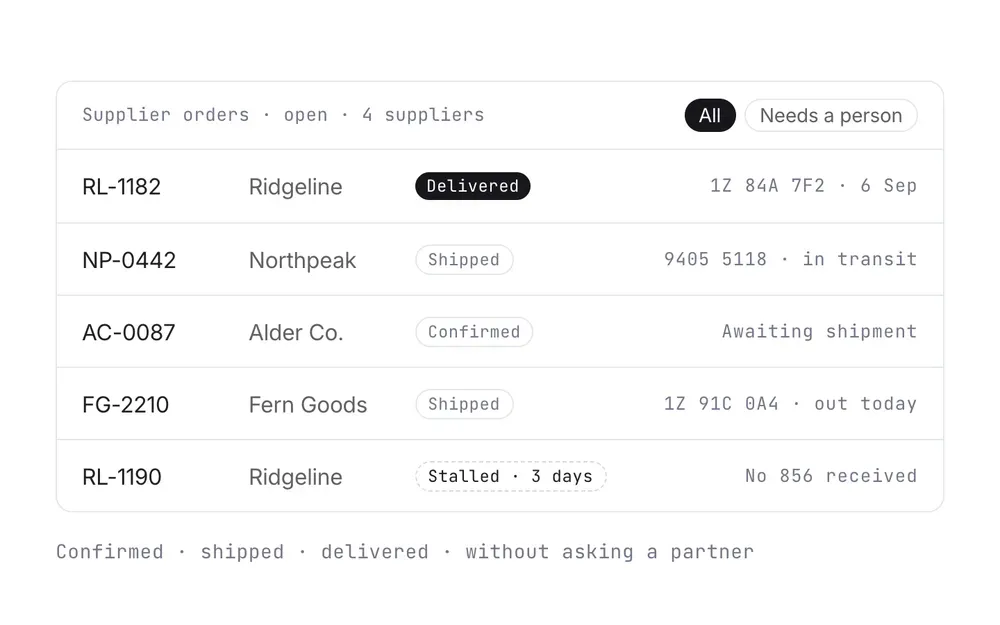
Every order carries a documented state, from confirmed at the supplier through shipped with tracking. The status of that second parcel now sits on the order itself.
Failed charges, SKU mapping errors and stalled orders appear in an exceptions view with the detail a person needs to act on them.
Returns run as requests the supplier accepts or rejects, under the terms and refund settings agreed with that supplier. The Order Execution module shows that flow from routing to the door.
4. Settlement That Follows the Shipment
A shipment triggers the supplier invoice under the settings you agreed, with configured delays where a program needs them. Billing charges the retailer and credits the supplier through the connected payment account.
Finance gets a clean split on every sale: product cost, partner fees and processing charges stay separate within each partner relationship. Invoice, batch invoice and payout records carry the fee and net detail needed to reconcile.
A commission, a shipping cost or a return credit lands against the order it belongs to. Retailer and supplier read the same order and the same figures, so month-end stops being a debate.
A failed charge follows the configured process and is surfaced for a person to act on. Return acceptance and refunds stay separate steps.
5. What Changes for Your Team
Retailers using Carro report up to 3.5x revenue growth, up to 180% AOV growth, and up to 3x catalog size.
When you want more assortment, Account Managers hand-match you with complementary brands and distributors from a network of 1,500,000 products. Test a brand on real demand with no purchase order first, and keep what sells.
The FairGround, a vetted-brand marketplace run by a small, part-time team, moved from Onport to Carro. The Carro team met brands directly to get them connected.
The FairGround describes the result this way: "Automating inventory and product tagging makes it easier to scale. It allows us to manage a curated selection of products effectively, keeping control over what goes live while growing the business."
Everything You Need to Know About Inventory Management System in Excel
The whole guide in one table, for anyone deciding whether the spreadsheet stays or goes.
| Topic | What you need to know |
|---|---|
| What an Excel inventory system is | Products, stock, movements and supplier tabs tied together with SUMIFS, lookups and conditional formatting |
| Where Excel holds up | One location, one sales channel, one person editing and a few hundred owned SKUs |
| The biggest gap | No live link to storefronts or suppliers, so counts change only when someone types or imports |
| Formula risk | Fixed ranges miss new rows, and VLOOKUP defaults to an approximate match |
| Change history | Show Changes records cell edits in co-authored files and clears when a copy is saved or the file is replaced |
| Supplier files | Formats differ by partner, and Excel strips leading zeros and truncates numbers past 15 digits by default |
| Size limit | 1,048,576 rows by 16,384 columns per worksheet, with speed dropping well before |
| Who outgrows it first | Dropship and marketplace programs, because the stock and the cost belong to suppliers |
| Migration steps | Freeze, standardize SKUs, split owned and supplier stock, map fields, import and reconcile, run in parallel, retire |
| Suppliers who only send files | CSV and SFTP are supported Carro connections, so those suppliers keep sending spreadsheets |
| Where Carro fits | One catalog, partner price lists, routed orders and settlement that follows each shipment |
Take the supplier files, suppliers who only send files and migration steps rows into your next vendor call. They show whether a tool can accept your partners' CSV and SFTP drops as they arrive while stock, orders and invoices move off the workbook.
Why Carro Is the Right Move
Three differences matter the moment your spreadsheet starts carrying supplier stock.
1. One catalog, whatever each supplier sends: suppliers connect through EDI, API, SFTP, CSV or a platform app, and every new supplier follows the same onboarding path as the last. Suppliers without a technical team get hands-on setup help from the Carro team.
2. Orders and money on the same record: orders split by supplier and route into each partner's system. A shipment triggers the supplier invoice, and fees and returns land against the order they belong to.
3. A vetted network when you want more assortment: Account Managers hand-match you with brands and distributors from a network of 1,500,000 products. You test each one on real demand before you commit.
Carro is built for retailers running a dropship program and for marketplace operators on Shopify, Magento 2, WooCommerce or BigCommerce whose supplier count has outgrown a spreadsheet per vendor.
It fits best when most of the catalog ships from partners and your team spends its mornings importing files. Carro transacts in USD and settles through a connected payment account in Stripe-approved countries.
If you sell only owned stock from one location, a well-kept workbook or a warehouse tool will serve you well for now.
Bring one supplier's file and a sample of its range to the demo. The Carro team will walk through selection, field mapping, stock updates and price list behavior on your own data.
Frequently asked questions
Can you build an inventory management system in Excel?
You can build an inventory management system in Excel, and it works well for a single location selling owned stock through one channel. A typical setup uses a products tab, a stock tab and a movements log, with SUMIFS and XLOOKUP formulas flagging reorder points. It starts to break once stock changes outside the file, which dropship and marketplace programs hit first.
What are the limitations of inventory management in Excel?
The limitations of inventory management in Excel are no live link to your storefront or suppliers and no reserved quantity for paid orders. Formulas drift when rows fall outside their ranges, and supplier files can lose the leading zeros in SKUs on opening. Each worksheet also caps at 1,048,576 rows, and large workbooks slow down well before that.
How many rows can Excel handle for inventory?
Excel can handle 1,048,576 rows by 16,384 columns per worksheet, for inventory or any other data. History logs fill up fastest, since a daily stock snapshot of 3,000 SKUs adds 1,095,000 rows a year and passes the limit in about 350 days. Performance usually becomes the problem first, as whole-column lookups slow recalculation on large sheets.
When should you stop using Excel inventory management?
You should stop using Excel inventory management when stock changes faster than someone can update the file, usually once you sell on more than one channel or list products a supplier ships. Oversells from stale counts and a tab per supplier are other signals. Move owned stock to a warehouse or ERP system and supplier stock to a system that connects directly to each supplier.
How do I move inventory from Excel to software without losing data?
To move inventory from Excel to software without losing data, freeze the file at a cutoff time and replace formulas with values before any import. Standardize SKUs with an old-to-new mapping table, then import a sample and reconcile it to the unit against the frozen file. Run both systems in parallel for at least two full order cycles or two weeks before retiring the spreadsheet.
What is the best inventory management software for dropship and marketplace programs in 2026?
The best inventory management software for dropship and marketplace programs in 2026 is Carro, because it is built for stock held by suppliers across a partner network. Carro routes every order to the supplier holding the stock, and a shipment triggers the supplier invoice. Retailers using it report up to 3x catalog size and up to 180% AOV growth.
How do I get started with Carro?
To get started with Carro, book a demo and bring a representative supplier, a sample of its product range and the spreadsheet you use today. The Carro team walks through field mapping, stock updates and price list behavior on your own data. Suppliers come onto the network in days, and marketplaces can open on an existing store in weeks.
Can we still use Carro if our suppliers only send spreadsheets?
You can still use Carro if your suppliers only send spreadsheets, because CSV and SFTP file connections are supported alongside EDI and API. A supplier keeps sending the same file on the same schedule, and Carro maps its columns to your catalog fields. Stock then updates as often as the file arrives, so a daily file means daily stock updates.
Does replacing Excel with Carro mean replacing our storefront or ERP?
Replacing Excel with Carro does not mean replacing your storefront or ERP, which stay where they are. Carro connects to Shopify, Magento 2, WooCommerce and BigCommerce and runs beside your existing payments, shipping, ERP and accounting systems. Owned stock can stay in your ERP or warehouse system, while Carro handles the supplier-held stock, orders and settlement.