Shopify Agentic Commerce in 2026: The Reason AI Agents Skip Your Products
Shopify agentic commerce puts eligible products in ChatGPT, Copilot, and Gemini. See what agents check first and how partner SKUs stay in play. Read the guide.
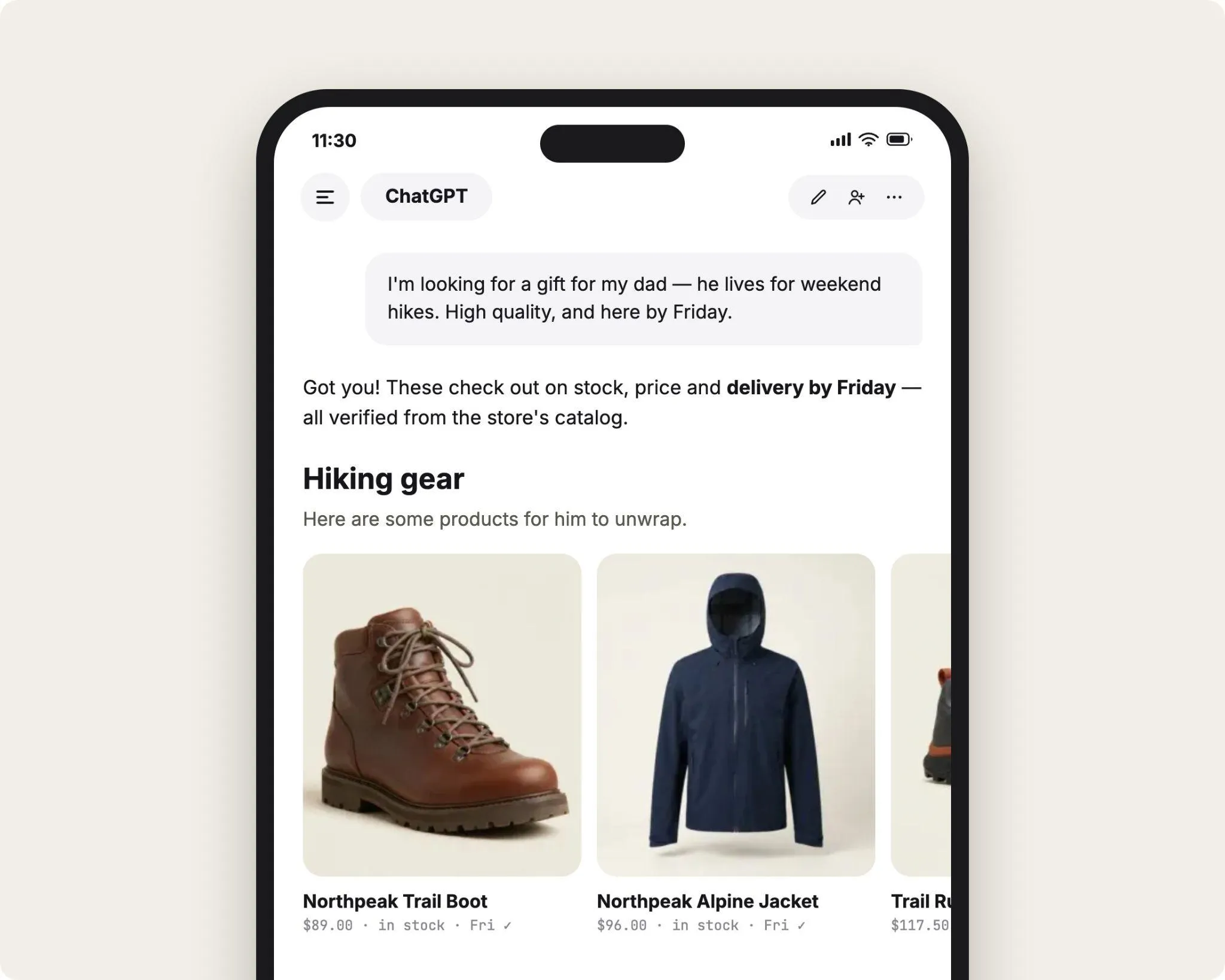
Shopify agentic commerce went from announcement to default setting in under a year. As of September 2026, eligible products in your Shopify store are listed in Shopify Catalog automatically, with no app to install.
From there, your products can surface inside ChatGPT, Microsoft Copilot, Google AI Mode and the Gemini app, and Meta's AI surfaces. That puts your catalog in front of buyers who ask an assistant what to buy.
With the agentic commerce Shopify integration handling the listing, the pick goes to the product record that holds up when a buyer asks for "waterproof trail runners under $150, size 10, in stock."
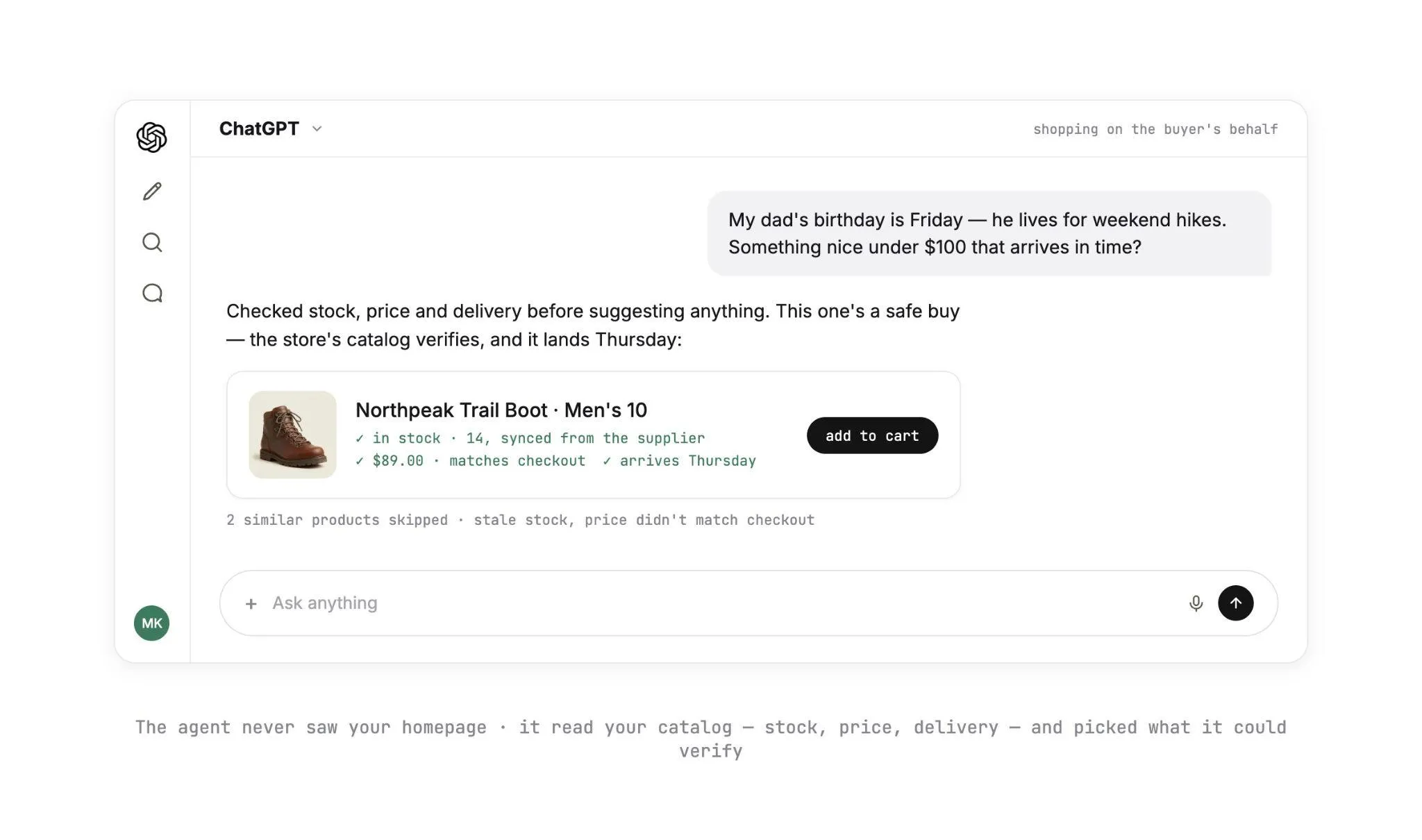
Products lose the recommendation for mundane reasons. A stock count went stale, or a price changed between the answer and the checkout page. Sometimes a variant called "US 10" never matched the buyer's "size 10."
On stores that carry products from partner brands, those problems pile up in one place: the SKUs you sell but do not stock.
Their current stock and price live in the supplier's system. The agent reads a copy in your Shopify admin that is only as fresh as the last update.
Below, you'll see how Shopify's agent channels work in 2026 and why agents skip products. Then you'll get a nine-step plan to make your whole catalog agent-ready, partner assortment included.
Key Takeaways (TL;DR)
- Listing is automatic: Shopify Catalog syndicates products that meet its requirements to ChatGPT, Microsoft Copilot, Google AI Mode and Gemini, and Meta, as of September 2026.
- Two open protocols: the Universal Commerce Protocol (co-developed by Shopify and Google) covers discovery to post-purchase, and the Agentic Commerce Protocol (OpenAI and Stripe) ran behind ChatGPT's original Instant Checkout.
- Checkout on your storefront: since March 2026, a buyer who picks a Shopify product in ChatGPT completes checkout on the merchant's own store, in an in-app browser or a new tab.
- Five ranking factors: Shopify names data quality, relevance, availability, pricing, and engagement signals, and four of them come straight from the product record you maintain.
- Six reasons products get skipped: wrong stock, prices that shift at checkout, thin attributes, unmapped variants, weak shipping signals, and partner products out of sync.
- Partner SKUs drift first: their stock, cost, and product data originate in a supplier's system and reach your admin on whatever schedule the connection runs.
- Carro's role: the inventory layer for that assortment, keeping partner catalogs current in your Shopify store, routing each order to the supplier holding the stock, and settling every order against the shipment.
Shopify Agentic Commerce: at a Glance
The six reasons an AI agent passes over a Shopify product, what it reads in each case, and the fix that wins it back.
| # | Why the agent skips it | What the agent reads | The fix |
|---|---|---|---|
| 1 | Stock that's wrong | Availability syndicated from your admin | Update stock from the system that holds it, every time it changes |
| 2 | Prices that don't match checkout | The quoted price, then the price on your checkout page | One price source, with partner cost changes flowing from the price list |
| 3 | Thin attributes | Title, description, category, metafields | A product category plus complete category metafields for every product type |
| 4 | Unmapped variants | Options, option values, variant SKUs | Consistent option names, one SKU and one stock count per variant |
| 5 | Weak shipping signals | Shipping settings, policies, delivery promises | Published policies and a realistic delivery window per supplier |
| 6 | Partner products out of sync | All of the above, for SKUs you do not stock | A supplier connection that updates stock and prices, with orders routed and settled per supplier |
Rows one to five apply to every Shopify store. Row six applies to stores with an extended assortment, where partner SKUs are the products most likely to drift.
What Shopify Agentic Commerce Looks Like in 2026
Four pieces sit behind the channel as of September 2026. Two are Shopify products you manage from the admin, and two are open protocols that define how agents transact with merchants.
The prize is big enough to plan around. McKinsey's October 2025 report, The agentic commerce opportunity, estimates up to $1 trillion in agent-orchestrated US B2C retail revenue by 2030.
1. Shopify Catalog
Shopify Catalog is the structured data layer that makes your products readable to AI agents. It syndicates titles, descriptions, images, pricing, options, and availability to connected AI platforms.
Eligible products are included by default. Catalog also does interpretive work for you: Shopify's launch post, Introducing Shopify Agentic Storefronts, says it structures product data automatically, including categories, attributes, and variants.
Shopify's engineering post Clustering billions of products for agentic commerce with Catalog API (June 2026) explains how Catalog groups listings of the same item under one Universal Product Identifier.
In practice, the same trail shoe sold by three stores can surface as one product with three offers. Your job is to make yours the strongest of the three.
Shopify's Catalog requirements ask for a title, at least one image, a price above zero, an identifiable product URL, and publication to the online store, Hydrogen, or a headless channel.
Unlisted products and products hidden from search engines are excluded. Your store also has to be on the Starter plan or higher and out of private mode.
2. Agentic Storefronts
Agentic Storefronts is the sales channel in your Shopify admin that connects Catalog to AI shopping platforms. Shopify introduced it in the Winter '26 Edition on December 10, 2025.
You'll find it under Sales channels > Agentic, where you switch individual AI channels on or off. It's active by default for eligible stores.
Here's where each channel stands as of September 2026, based on Shopify's channel pages for ChatGPT, Microsoft Copilot, Google AI Mode and Gemini, and Meta:
| AI channel | Who it's live for | Where the buyer pays |
|---|---|---|
| ChatGPT | Stores selling to US buyers, wherever the store is based | Your online store checkout, in a ChatGPT in-app browser or a new tab on the web |
| Microsoft Copilot | Stores selling to US buyers, with products in Shopify Catalog | Direct checkout inside Copilot, where activated |
| Google AI Mode and Gemini app | US-based stores selling to US buyers, rolling out to eligible stores | Shopify-powered direct checkout inside the chat, where activated |
| Meta (surfaces such as Muse) | Stores selling to buyers in the US, Canada, or Mexico | Direct checkout on Meta surfaces, where active |
In every channel, you stay the merchant of record. The order lands in your Shopify admin, and fulfillment, returns, and the customer relationship stay yours.
3. The Universal Commerce Protocol
The Universal Commerce Protocol (UCP) is an open standard for how AI agents transact with merchants. It covers product discovery, cart creation, checkout, payment, and post-purchase, and Shopify and Google co-developed it.
Google announced it on January 11, 2026, around the NRF retail show, in Under the Hood: Universal Commerce Protocol (UCP). Etsy, Wayfair, Target, and Walmart helped build it, and more than 20 partners endorsed it, including Visa, Mastercard, and Stripe.
In practice, an agent built on UCP can build a cart, move to checkout, and complete payment with any merchant that supports the standard.
Shopify's developer documentation states that its tools implement UCP at every step of the buyer journey. That reaches all the way to order webhooks for fulfillment events, refunds, and returns.
A protocol that takes a buyer from question to payment without a product page visit also removes a safety net. No shopper sees the wrong size chart or the sold-out variant first, so your data has to be right before the agent reads it.
4. The Agentic Commerce Protocol Shopify Merchants Heard About, and the March 2026 Change
The Agentic Commerce Protocol (ACP) is an open standard co-developed by OpenAI and Stripe. OpenAI announced it on September 29, 2025, in Buy it in ChatGPT: Instant Checkout and the Agentic Commerce Protocol.
ACP ran behind Instant Checkout, which let US ChatGPT users buy single items from US Etsy sellers inside the chat. Shopify merchants such as Glossier, SKIMS, Spanx, and Vuori were announced as coming next.
The plan changed in March 2026. In Powering Product Discovery in ChatGPT (March 24, 2026), OpenAI said it would let merchants use their own checkout while it focuses on product discovery.
Shopify's ChatGPT integration moved purchases to the merchant's own store, as Digital Commerce 360 covered in Shopify changes its integration approach with ChatGPT (March 17, 2026). The buyer discovers the product in ChatGPT, then pays on your storefront.
For your operations, this is a win: ChatGPT orders run through the checkout you already know. On mobile it opens in an in-app browser, and on the web in a separate tab.
Those clicks add up. Adobe's 2025 holiday season results (January 2026) found that traffic to US retail sites from generative AI tools rose 693.4% year over year between November 1 and December 31, 2025.
The same change means the price and availability ChatGPT quoted meet your live store the moment the page loads. Any gap between the two shows up right in front of the buyer.
What an AI Agent Reads Before It Recommends a Product
Most of what an agent weighs sits in your own admin. Shopify names five ranking factors: data quality, relevance, availability, pricing, and engagement signals.
Four of those five are properties of the product record you maintain. You can start improving them this week.
Shopify Catalog syndicates your titles, descriptions, images, pricing, options, and availability. Stores with custom data structures can use Catalog Mapping to map metafields, metaobjects, and prefixed product tags to how products appear in AI channels.
| Field in your Shopify admin | What the agent does with it |
|---|---|
| Title and description | Matches the product to the words in the buyer's request |
| Product category | Places the product in the right comparison set |
| Options and variants | Resolves "size 10, black" to one purchasable variant |
| Metafields and category metafields | Answers attribute questions such as material, fit, or waterproof rating |
| Price | Compares offers and checks the budget the buyer stated |
| Availability | Removes products the buyer cannot buy right now |
| Images | Meets the Catalog minimum and presents the product in the answer |
| Shipping and return policies | Answers delivery and returns questions, and gates direct checkout on some channels |
Read the list against a real prompt. A request for "merino base layer, women's medium, under $90, arrives before Saturday" touches a category, a variant, a price, a stock count, and a delivery promise in one line.
Each one works as a filter. A product that fails any of them drops out before engagement signals get a chance to help it.
Shopify's Catalog and product discovery page says Catalog continuously updates product data so inventory and pricing stay accurate across every AI channel. It updates from your admin, so every agent answer is as current as the system that feeds your admin.
Why AI Agents Skip Your Products
You can check each of these six causes in your own admin today, starting with the one agents filter on hardest.
Causes 3 to 5 sit in product data your merchandising team edits directly, so they make the quickest wins. Cause 6 belongs to whoever runs your partner assortment, since it starts in supplier systems and makes the other five harder to fix.
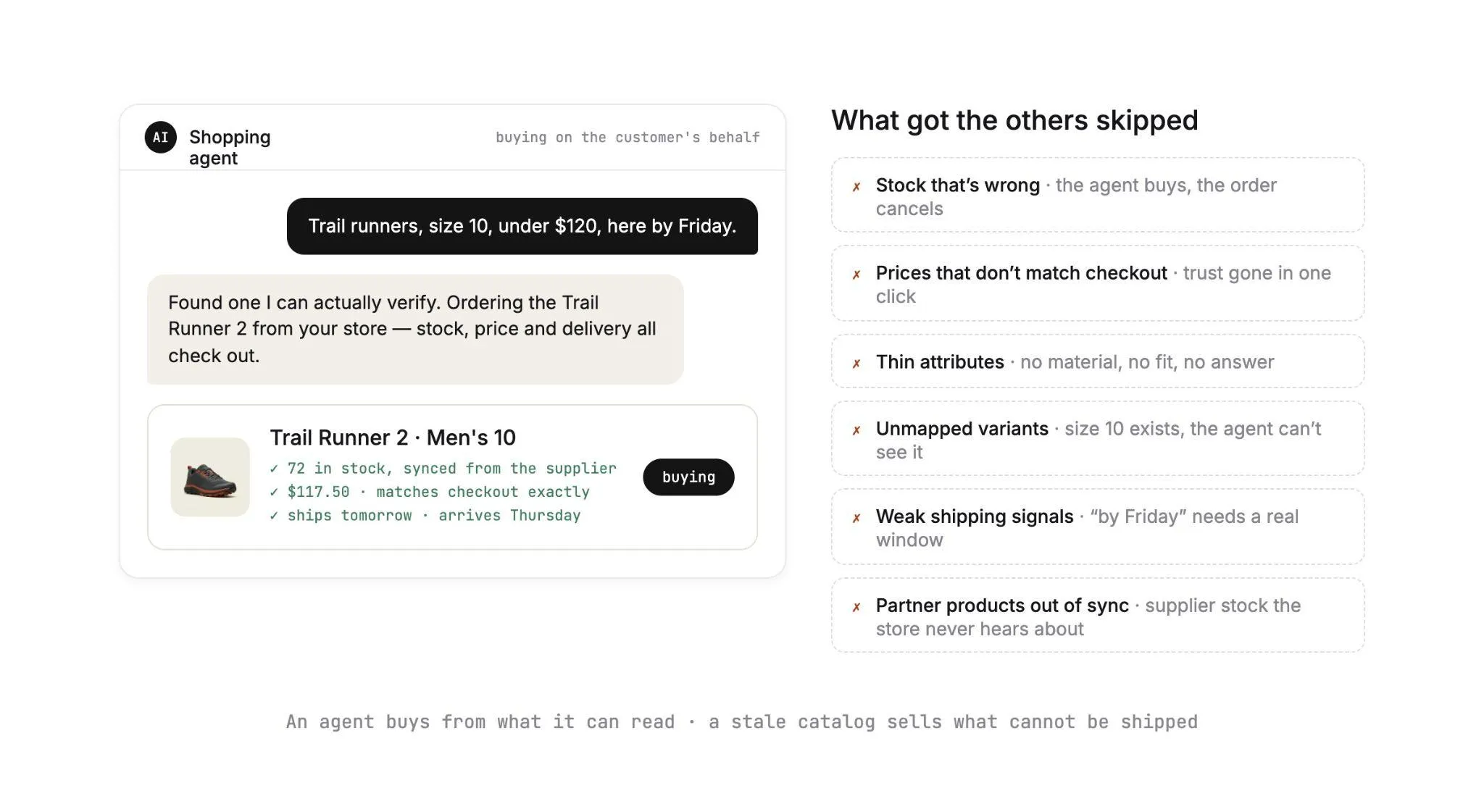
1. Stock That's Wrong
Availability is one of Shopify's five ranking factors. A buyer who asks for something in stock turns it into a hard filter.
Picture a product showing 14 units that the supplier sold out this morning. It gets recommended, then fails at checkout or ships late.
The opposite error is quieter. A product showing zero because a stock file failed overnight drops out of every answer until someone notices, and nobody gets an alert for a sale that never happened.
Stock you hold is counted in Shopify or your ERP. For partner products, the count lives in the supplier's system, and your admin shows whatever the last update carried.
2. Prices That Don't Match Checkout
On ChatGPT, the buyer lands on your store to pay. If the checkout page shows $92 after the agent quoted $84, the buyer is reading two numbers for one product and has a reason to close the tab.
Price drift has two common sources. The first is a sale price set in one system and missed in another.
The second is a supplier cost change that should have moved your retail price and did not. That leaves you either off-price with the agent or selling below margin.
3. Thin Attributes
A title and one image meet the Shopify Catalog minimum. A competing offer that states fit, material, care, and a waterproof rating gives the agent far more to match against the buyer's request.
Shopify's category metafields exist for this. Assign each product to its category in the Standard Product Taxonomy, and the attributes that category expects become structured fields Catalog can read directly.
Partner products arrive thin more often than owned ones, because the supplier's source data sets your starting point.
A brand that sends a title, one paragraph, and three images gives you a record that clears the eligibility bar. It carries few of the attributes a comparison runs on, and that gap is your opening to add them.
4. Unmapped Variants
An agent has to resolve "size 10, black" to one variant with one SKU, one price, and one stock count.
Say the supplier's catalog calls the option "US Size" and yours calls it "Size", or lists "10.0" where you list "10". The agent now has no single variant to resolve the request to.
Catalog consolidates variants on its side, and it works from what you publish. A product imported as twelve separate listings, one per size, hands it twelve thin records to cluster.
Import it as one product with twelve size variants, and Catalog gets a single complete record to work from.
The same fault shows up again at order time. A SKU mapping error between your variant and the supplier's turns an agent-placed order into an exception, so the mapping belongs in the supplier connection, where every order uses it.
5. Weak Shipping Signals
Buyers write delivery terms straight into prompts, such as "by Friday" or "ships from the US." A product with a stated delivery window hands the agent an answer and gains the edge over an offer with a generic shipping page.
Policies count for checkout eligibility too. Shopify's Microsoft Copilot channel page requires a published terms of service, privacy policy, and return and refund policy before direct checkout works.
The Shopify Knowledge Base app lets you review and customize the answers AI agents give to shopper questions. Make it the home for current shipping and returns answers.
Drop-shipped products carry a specific risk here. A store-wide two-day shipping promise sits on top of partner products that leave the brand's warehouse on the brand's schedule, so an agent that repeats it books a late delivery before the supplier sees the order.
6. Partner Products Out of Sync
Every cause above gets worse when the product comes from a supplier. Stock, cost, attributes, variants, and delivery windows all start in the partner's system.
Your Shopify record is a copy, updated on whatever schedule the connection runs. A CSV emailed on Mondays gives you a catalog that is accurate for a few hours a week. An agent reading it on Thursday recommends from Monday's numbers.
This cause scales with your assortment. Each partner brand you add brings its own update schedule, and each schedule is another point where a record can drift before an agent reads it.
The Extended Assortment Problem: Products You Sell but Don't Stock
Extended assortment is the part of your catalog fulfilled by brands and distributors. You list the product and set the price, and the sale runs under your brand while the supplier ships from its own warehouse.
Retailers use it to fill category gaps and test brands without a purchase order.
Super73, the electric bike maker, added helmets, lights, and other accessories from the Carro network. It became a one-stop shop for its riders!
The agent sees one Shopify record for each of those products. Behind it sit a supplier's inventory system, a partner price list, and a warehouse that ships on its own timeline.
Clustering raises the stakes. When Shopify Catalog groups identical items across stores, a brand's product listed by you, by the brand's own store, and by two other retailers becomes one product with several offers.
The agent then compares those offers on signals such as availability and price. Keep your record the freshest, and your offer gets a real shot at the pick.
| What drifts | Where the change starts | What the agent ends up reading |
|---|---|---|
| Stock | The supplier sells through its own site and other retailers | "In stock" on a product that is gone |
| Cost and retail price | A new partner price list | A price that fails at checkout, or a margin that disappeared |
| Attributes and images | The supplier's source data | A thin record that loses comparisons |
| Variants | The supplier's option names and SKUs | A size or color it cannot resolve |
| Delivery window | The supplier's warehouse and carrier | A promise your store makes and the supplier cannot keep |
| Discontinued items | The supplier drops a SKU | A live listing for a product nobody makes |
Stores usually find this drift through a cancellation or a refund request. In agent channels, the same drift also removes products from answers with no ticket at all.
A buyer who never saw the product has nothing to complain about, so the lost sale stays invisible.
The fix sits upstream of Shopify. For each partner, the test is whether stock, price, and product data reach your admin when the supplier changes them, or when someone on your team gets around to an upload.
Our guide to Shopify dropshipping automation covers the order and fulfillment side of that same setup.
In composable commerce terms, this is a separate component of the stack. Shopify covers the storefront, the checkout, and syndication to AI channels through Catalog, while partner stock, prices, and product data need their own layer underneath.
How to Make a Shopify Catalog Agent-Ready
Work through the nine steps below in order: steps 1 to 5 get the catalog you control in shape, and steps 6 to 9 bring the partner assortment you do not stock up to the same standard.
Steps 1, 3 and 4 run inside your Shopify admin, so the person who manages it can start today. Steps 6 to 9 belong with whoever runs your partner relationships, since each one depends on what a supplier sends and when it arrives.
Step 1: Confirm Eligibility and Channel Settings
Open Sales channels > Agentic and check which AI channels are on. Then pull a list of products that fail Catalog's minimum: no image, a zero price, unlisted status, or hidden from search engines.
Next, decide what should stay out. Shopify's Catalog and product discovery page explains that unlisted products, B2B-only products, and products behind customer authentication stay out of AI channels.
Shopify's data sharing and privacy page adds a caveat: if you block Catalog access, AI channels can still crawl your product information, with data that may be less complete and less current.
Step 2: Split the Catalog by Where Stock Lives
Tag every product by source: stock you hold, and stock a partner holds. The two groups fail for different reasons, and different teams fix them.
Owned SKUs take their counts from your inventory management software or ERP. Partner SKUs take theirs from a supplier connection.
Write down that connection's update schedule for every partner. It tells you exactly how stale each partner's records can get.
Step 3: Assign Categories and Fill Category Metafields
Assign every product to its category in Shopify's Standard Product Taxonomy. Then list the attributes a buyer would state in a prompt for each of your top categories, and fill them as category metafields.
Settle field ownership first if it's spread across several systems. Our PIM for Shopify guide shows how to decide which system owns each field, so a nightly sync never overwrites the attributes you added.
Step 4: Normalize Options and Variants
Pick one name for each option and one format for each value, then apply them across owned and partner products. A store that uses "Size" with values like "10" should never show "US Size" or "10.0" on one supplier's products.
Give each variant its own SKU, price, and stock count. Merge products imported as one listing per size into a single product with variants, so Catalog gets one complete record to work from.
Step 5: Keep Owned Stock Current at the Source
For stock you hold, the count should update in Shopify when a unit sells anywhere: your store, a marketplace, a retail location.
If your ERP or warehouse system writes to Shopify on a timer, check how long that timer is and what sells in the gap. If customers are finding your oversells, fix this step before anything else on the list.
Step 6: Connect Partner Products Through Carro
Partner SKUs stay in agent answers when their records update from the supplier. Carro is a dropship platform that connects your Shopify store to vetted brands and distributors, and to the partners you already work with.
Account Managers hand-match brands to your category and audience from a network of 1,500,000 products. You choose which partners join before a single product reaches your store.
Every supplier comes on through the same sequence: account details (contacts, terms, returns), connection, product data, partner price list, test order, and go live.
Suppliers connect the way they already work: a commerce app, an API, EDI, SFTP, or CSV. The Carro team works on the setup with suppliers that have no technical staff, and supplier onboarding brings a supplier onto the network in days.
Once a supplier is connected, catalog and inventory sync moves partner stock and prices into your Shopify store on the cadence each connection supports. Descriptions, images, and variants map to the fields that connection carries.
Validation flags data problems before launch, and merchandising rules apply your conventions to published content. Your edits change your copy of the product, and the supplier's original stays untouched.
"Carro has improved the way we manage suppliers, orders, and catalog operations, allowing us to set new products live much faster than before," says Eric Flores, Drop Ship Coordinator.
Step 7: Tie Retail Prices to Partner Costs
Each partner relationship in Carro carries its own price list, which sets your cost for that supplier's products. When a supplier changes its prices, the new cost comes through that price list, so your team sets the retail price from it without re-entering numbers.
Aim for one price source per product. Catalog syndicates the price in your admin, the buyer pays the price on your checkout page, and both have to come from the same number.
Step 8: Publish Delivery Windows and Return Terms Per Supplier
Agree a dispatch window and return terms with each partner during onboarding. Then publish delivery estimates that reflect the slowest supplier in each product group.
Keep your terms of service, privacy policy, and return and refund policy published, since Copilot's direct checkout requires all three.
Load the answers buyers ask for into the Shopify Knowledge Base app. A line such as "ships from the brand's US warehouse within two business days" gives an agent a specific answer to repeat.
Step 9: Place a Test Agent Order for a Partner SKU
Time to see it work! Search for one of your partner products in ChatGPT, follow it to your checkout, and buy it.
Then trace the order through three checks: the supplier received it, tracking came back, and the invoice matched the price list.
Carro's onboarding sequence includes a test order for every new supplier, which checks fulfillment, tracking, and invoicing before products go live. Repeat your agent test whenever you add a partner or change a connection, since that's where the next drift will start.
After the Agent Clicks Buy: Routing and Settlement
A channel that sells while nobody is watching still has to pay everyone correctly. Agent-placed orders arrive at any hour, often for products nobody on your team touched that day.
The work after checkout decides whether the channel makes money or creates refund work. For partner products, three things have to happen without anyone forwarding an email.
1. Routing Each Order to the Supplier Holding the Stock
A buyer asks Copilot for a trail runner and a merino base layer, and each comes from a different partner brand. Carro's order execution splits that one customer order into two supplier orders.
Each supplier order routes into the system that partner already works in, with nothing re-keyed. It carries a documented state, from confirmed at the supplier through shipped with tracking.
Failed charges, SKU mapping errors, and stalled orders appear in an exceptions view, with the detail your team needs to act.
2. Tracking the Shipment Back to the Buyer
Agents now follow orders past checkout. Shopify's order webhooks documentation shows agents receiving each committed change on an order, including fulfillment progress, refunds, returns, and cancellations.
A buyer who asks the agent "where is my order?" gets an answer built from your fulfillment data.
That answer is only as good as the tracking each supplier sends back. With Carro, each supplier order is tracked from confirmed at the supplier through shipped with tracking information, so a two-brand order carries two tracked shipments.
3. Settling Each Order Against the Shipment
Agent-placed orders settle like any other partner order. With payment settlement, a shipment triggers the supplier invoice under the settings you agreed with that partner.
Billing charges the retailer and credits the supplier through the connected payment account. Configured delays apply where a program needs them.
Product cost, partner fees, and processing charges stay separate within each partner relationship. A commission, a shipping cost, and a return credit each land against the order they belong to.
You and the supplier read the same figures, so reconciliation starts from one shared record.
Some steps still need a person, and Carro treats them that way. A failed charge follows the configured process and is surfaced for someone to act on.
A return runs as a request the supplier accepts or rejects under the agreed terms, with the refund as a separate step.
If this is the channel you're building toward, Carro's agentic checkout page shows how the catalog, routing, and settlement pieces fit together for agent-placed orders.
Everything You Need to Know About Shopify Agentic Commerce
The whole guide in one table, ready for your next scoping call or catalog audit.
| Topic | What you need to know |
|---|---|
| What it is | Shopify syndicates eligible products to AI shopping channels through Shopify Catalog and the Agentic Storefronts sales channel. |
| Channels (September 2026) | ChatGPT and Microsoft Copilot for stores selling to US buyers, Google AI Mode and Gemini for eligible US-based stores, and Meta for US, Canadian, and Mexican buyers. |
| Where buyers pay | ChatGPT sends buyers to your store in an in-app browser or new tab. Copilot, Google, and Meta use direct checkout where activated. |
| Catalog eligibility | Title, at least one image, price above zero, identifiable URL, published to the online store, Hydrogen, or headless, and a Starter plan or higher. |
| Universal Commerce Protocol | Open standard co-developed by Shopify and Google, announced January 2026, covering discovery, cart, checkout, payment, and post-purchase. |
| Agentic Commerce Protocol | Open standard from OpenAI and Stripe, announced September 2025, behind ChatGPT Instant Checkout until the March 2026 change. |
| What agents weigh | Data quality, relevance, availability, pricing, and engagement signals. |
| Six reasons for skipped products | Wrong stock, checkout price mismatches, thin attributes, unmapped variants, weak shipping signals, and partner products out of sync. |
| Where drift starts | Extended assortment, because partner stock, cost, and product data live in the supplier's system. |
| Fastest fixes | Category metafields, one option vocabulary, one SKU and stock count per variant, and published policies. |
| Partner products | Connect each supplier so stock and costs update from the source on the cadence each connection supports, with a price list per partner. |
| After checkout | Route each order to the supplier holding the stock, track every shipment, and settle each order against the shipment. |
| Where Carro fits | The inventory layer for agentic commerce on Shopify: curated supplier network, catalog sync, order routing, and settlement. |
| Reported results | Carro retailers report up to 3.5x revenue growth, up to 180% AOV growth, and up to 3x catalog size. |
Hand the fastest fixes row to your merchandising team this week, since every item on it lives in your Shopify admin. Take the partner products and after checkout rows into a demo, where you can follow one partner SKU from sync to settlement.
Why Carro Is the Right Move
An agent buys from what it can read. Here's what makes Carro the inventory layer behind a Shopify store that sells in AI channels.
1. One catalog, current across every supplier: partner stock, costs, and product data come from each supplier's own system on the cadence its connection supports, and you set the retail price. Shopify Catalog then syndicates a record built on the supplier's latest numbers.
2. An order an agent places is an order that can be filled: each order splits by supplier, routes to the partner holding the stock, and is tracked to the door, with exceptions surfaced for your team to act on.
3. Settlement that follows the shipment: the shipment triggers the invoice, the retailer is charged, the supplier is credited, and fees and returns land against the order they belong to.
Carro is built for Shopify retailers and marketplaces that sell products from partner brands and want that assortment ready for ChatGPT, Copilot, Gemini, and Meta.
It connects through the Shopify store you already run, beside your existing payments, shipping, ERP, and accounting systems, with no replatform.
Bring one partner brand, its product data, and a real order path, and the Carro team walks that assortment from supplier setup to settlement.
Frequently asked questions
What is Shopify agentic commerce?
Shopify agentic commerce is Shopify's system for selling products through AI shopping agents, built on Shopify Catalog and the Agentic Storefronts sales channel. Eligible products are listed in Catalog by default and syndicated to AI channels such as ChatGPT, Microsoft Copilot and Gemini. Merchants manage channels under Sales channels > Agentic and stay the merchant of record for every order.
Which AI channels does Shopify agentic commerce reach in 2026?
Shopify agentic commerce reaches ChatGPT, Microsoft Copilot, Google AI Mode and the Gemini app, and Meta as of September 2026. ChatGPT and Copilot are live for stores selling to US buyers, while Meta covers buyers in the US, Canada and Mexico. Buyers on ChatGPT check out on the merchant's own store, and Copilot, Google and Meta use direct checkout inside the channel.
Does the Agentic Commerce Protocol Shopify merchants heard about still apply?
The Agentic Commerce Protocol Shopify merchants heard about in 2025 still exists as an open standard, but ChatGPT purchases for Shopify merchants no longer complete inside the chat. OpenAI and Stripe announced ACP on September 29, 2025, and it ran behind Instant Checkout. In March 2026, Shopify moved ChatGPT purchases to the merchant's own store.
Why do AI agents skip my Shopify products?
AI agents skip your Shopify products when the product record fails one of the checks a buyer's request implies, such as stock, price, variants or delivery. Shopify lists the ranking factors as data quality, relevance, availability, pricing and engagement signals. On stores with partner brands, products whose stock and prices sync from a supplier on a slow schedule are the most exposed.
How do I make dropship products agent-ready on Shopify?
To make dropship products agent-ready on Shopify, connect each supplier so stock, cost and product data update in your admin when the supplier changes them. Fill category metafields and map supplier variants to one option vocabulary with one SKU per variant. Carro keeps partner stock and prices current in your Shopify admin, and a test order checks fulfillment, tracking and invoicing before products go live.
What is the best dropship platform for Shopify agentic commerce in 2026?
The best dropship platform for Shopify agentic commerce in 2026 is Carro, because it keeps partner catalogs current in your Shopify store and routes and settles every order an agent places. Account Managers hand-match brands from a network of 1,500,000 products. Carro retailers report up to 3.5x revenue growth and up to 3x catalog size.
How do I get started with Carro?
To get started with Carro, book a demo and bring one partner brand, its product data and a real order path from your Shopify store. The Carro team reviews which brands fit your audience and which connection each supplier needs. Suppliers come onto the network in days, and marketplaces can open on an existing store in weeks.
Do I need to rebuild my Shopify store to use Carro for agentic commerce?
You do not need to rebuild your Shopify store to use Carro for agentic commerce, because Carro connects to the store you already run. Partner products arrive as products in your Shopify admin, where Shopify Catalog treats them like any other product that meets its requirements. Carro has already moved the customer bases of Modern Dropship and Onport without changing their storefronts.